07. Custom Domain & SSL
Map a custom domain to your Java App Service app and secure it with a managed TLS certificate.
Infrastructure Context
Service: App Service (Linux, Standard S1) | Network: VNet integrated | VNet: ✅
This tutorial assumes a production-ready App Service deployment with VNet integration, private endpoints for backend services, and managed identity for authentication.
flowchart TD
    INET[Internet] -->|HTTPS| WA["Web App\nApp Service S1\nLinux Java 17"]

    subgraph VNET["VNet 10.0.0.0/16"]
        subgraph INT_SUB["Integration Subnet 10.0.1.0/24\nDelegation: Microsoft.Web/serverFarms"]
            WA
        end
        subgraph PE_SUB["Private Endpoint Subnet 10.0.2.0/24"]
            PE_KV[PE: Key Vault]
            PE_SQL[PE: Azure SQL]
            PE_ST[PE: Storage]
        end
    end

    PE_KV --> KV[Key Vault]
    PE_SQL --> SQL[Azure SQL]
    PE_ST --> ST[Storage Account]

    subgraph DNS[Private DNS Zones]
        DNS_KV[privatelink.vaultcore.azure.net]
        DNS_SQL[privatelink.database.windows.net]
        DNS_ST[privatelink.blob.core.windows.net]
    end

    PE_KV -.-> DNS_KV
    PE_SQL -.-> DNS_SQL
    PE_ST -.-> DNS_ST

    WA -.->|System-Assigned MI| ENTRA[Microsoft Entra ID]
    WA --> AI[Application Insights]

    style WA fill:#0078d4,color:#fff
    style VNET fill:#E8F5E9,stroke:#4CAF50
style DNS fill:#E3F2FDPrerequisites
- Running App Service app (
$APP_NAME) in Azure - Access to your DNS provider zone
- Standard tier or above if your specific domain/cert scenario requires it
What you'll learn
- How to map
wwwor root domains to App Service - How Azure verifies domain ownership
- How to issue and bind an App Service Managed Certificate
- How to enforce HTTPS and validate final routing
Main Content
Domain and certificate flow
flowchart TD
    A[Create DNS record] --> B[Add hostname to App Service]
    B --> C[Ownership verification]
    C --> D[Create managed certificate]
    D --> E[Bind cert to hostname]
    E --> F[Enable HTTPS only]
Step 1: choose hostname strategy
Common options:
www.example.com(CNAME toapp-name.azurewebsites.net)app.example.com(CNAME)example.comapex/root (A record + TXT verification)
For easiest operation, start with a subdomain (www or app).
Step 2: create DNS records
At your DNS provider:
- Create
CNAMEforwwwpointing to$APP_NAME.azurewebsites.net - Create TXT verification record (
asuid.www) with value from Azure portal or CLI flow
Propagation delay
DNS propagation may take minutes to hours depending on TTL and provider behavior.
Step 3: add hostname to App Service
export CUSTOM_HOSTNAME="www.example.com"

az webapp config hostname add \
  --resource-group "$RG" \
  --webapp-name "$APP_NAME" \
  --hostname "$CUSTOM_HOSTNAME" \
  --output json
| Command/Code | Purpose |
|---|---|
export CUSTOM_HOSTNAME="www.example.com" | Stores the custom hostname so later commands can reuse it. |
az webapp config hostname add | Adds the custom domain binding to the App Service app. |
--resource-group "$RG" | Targets the resource group that contains the app. |
--webapp-name "$APP_NAME" | Selects the App Service app that will receive the hostname. |
--hostname "$CUSTOM_HOSTNAME" | Specifies the DNS hostname to map to the app. |
--output json | Returns hostname binding details in JSON format. |
List current hostnames:
az webapp config hostname list \
  --resource-group "$RG" \
  --webapp-name "$APP_NAME" \
  --output table
| Command/Code | Purpose |
|---|---|
az webapp config hostname list | Lists the hostnames currently bound to the web app. |
--resource-group "$RG" | Targets the app's resource group. |
--webapp-name "$APP_NAME" | Selects the App Service app to inspect. |
--output table | Displays the hostname list in a readable table format. |
Step 4: create App Service Managed Certificate
az webapp config ssl create \
  --resource-group "$RG" \
  --name "$APP_NAME" \
  --hostname "$CUSTOM_HOSTNAME" \
  --output json
Preview Command
az webapp config ssl create is currently in Preview. Not all hostname configurations are eligible for managed certificates. See App Service TLS overview for eligibility requirements. The Azure Portal provides an alternative path for managed certificate creation.
| Command/Code | Purpose |
|---|---|
az webapp config ssl create | Requests an App Service Managed Certificate for the custom hostname. |
--resource-group "$RG" | Targets the resource group that contains the app. |
--name "$APP_NAME" | Selects the web app that will own the certificate. |
--hostname "$CUSTOM_HOSTNAME" | Specifies the validated hostname for certificate issuance. |
--output json | Returns certificate creation details in JSON format. |
Then list available certs:
| Command/Code | Purpose |
|---|---|
az webapp config ssl list | Lists available certificates in the resource group. |
--resource-group "$RG" | Restricts the certificate list to the target resource group. |
--output table | Shows certificate details in a compact table view. |
Capture certificate thumbprint (masked example below):
Step 5: bind certificate to hostname
az webapp config ssl bind \
  --resource-group "$RG" \
  --name "$APP_NAME" \
  --certificate-thumbprint "$THUMBPRINT" \
  --ssl-type SNI \
  --output json
| Command/Code | Purpose |
|---|---|
az webapp config ssl bind | Binds the issued certificate to the app's custom hostname. |
--certificate-thumbprint "$THUMBPRINT" | Selects the certificate to bind by thumbprint. |
--ssl-type SNI | Uses Server Name Indication for hostname-based TLS binding. |
--output json | Returns binding details in JSON format. |
Step 6: enforce HTTPS only
| Command/Code | Purpose |
|---|---|
az webapp update | Updates general web app settings after certificate binding. |
--https-only true | Forces the app to accept only HTTPS traffic. |
--output json | Returns the updated web app configuration in JSON format. |
Verify endpoint behavior on custom domain
| Command/Code | Purpose |
|---|---|
curl "https://$CUSTOM_HOSTNAME/health" | Confirms the custom domain resolves and the health endpoint returns successfully over TLS. |
curl "https://$CUSTOM_HOSTNAME/info" | Verifies the app serves runtime metadata on the custom domain over HTTPS. |
You should get HTTP 200 and a valid certificate chain.
Managed certificate scope
App Service Managed Certificates have platform-specific limitations (for example wildcard coverage). Validate your domain pattern before committing to this approach.
Platform architecture
For platform architecture details, see Platform: How App Service Works.
Verification
az webapp config hostname listincludes your custom host- TLS certificate is issued and bound to hostname
- HTTPS requests to custom domain succeed
- HTTP requests redirect or are blocked as intended
Troubleshooting
Hostname add fails verification
Check DNS records and TXT ownership record name/value exactly; wait for propagation and retry.
Certificate creation fails
Confirm hostname is validated and publicly resolvable. Managed certificate issuance requires successful domain mapping.
Browser shows old certificate
Clear DNS/TLS cache or test with another network; propagation can lag at edge resolvers.
Run It in the Portal
Portal view: Custom domains blade (post-binding verification)
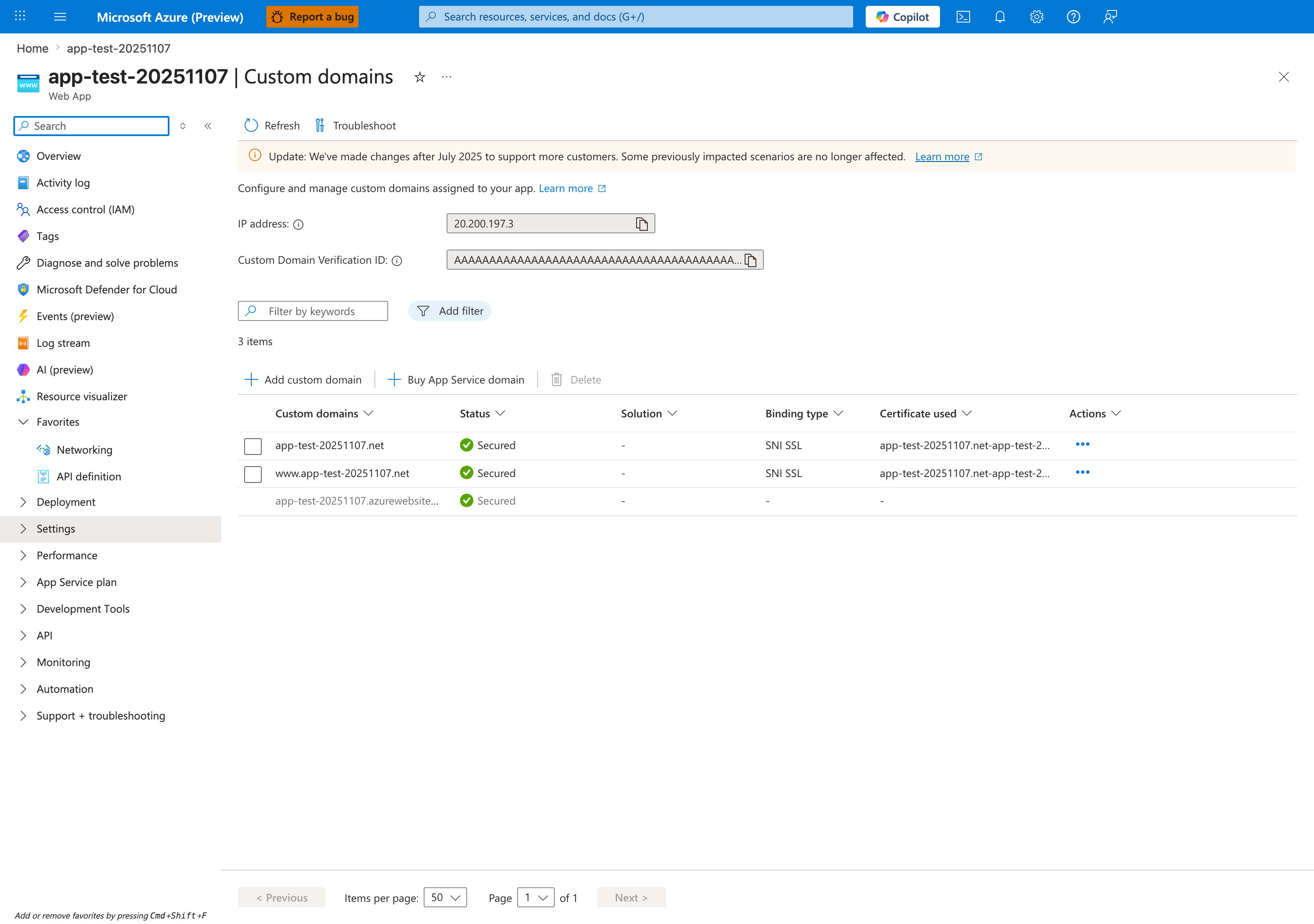
The Custom domains blade is the Portal verification surface for the az webapp config hostname add and az webapp config ssl bind steps in this tutorial. After DNS validation and certificate binding, the custom-hostname rows should show Status: Secured, Binding type: SNI SSL, and a populated Certificate used value, which is the end state visible for app-test-20251107.net and www.app-test-20251107.net in this screenshot. The IP address field at the top is the value you compare against the apex-domain A record during setup, and Add custom domain is the visible Portal entry point for the same hostname-binding flow. Use this blade after the CLI steps to confirm that the hostname rows, binding type, and certificate columns all reflect the expected custom-domain state for your Spring Boot app.