06. CI/CD
Implement GitHub Actions CI/CD for repeatable Java builds and controlled deployments to Azure App Service.
Infrastructure Context
Service: App Service (Linux, Standard S1) | Network: VNet integrated | VNet: ✅
This tutorial assumes a production-ready App Service deployment with VNet integration, private endpoints for backend services, and managed identity for authentication.
flowchart TD
    INET[Internet] -->|HTTPS| WA["Web App\nApp Service S1\nLinux Java 17"]

    subgraph VNET["VNet 10.0.0.0/16"]
        subgraph INT_SUB["Integration Subnet 10.0.1.0/24\nDelegation: Microsoft.Web/serverFarms"]
            WA
        end
        subgraph PE_SUB["Private Endpoint Subnet 10.0.2.0/24"]
            PE_KV[PE: Key Vault]
            PE_SQL[PE: Azure SQL]
            PE_ST[PE: Storage]
        end
    end

    PE_KV --> KV[Key Vault]
    PE_SQL --> SQL[Azure SQL]
    PE_ST --> ST[Storage Account]

    subgraph DNS[Private DNS Zones]
        DNS_KV[privatelink.vaultcore.azure.net]
        DNS_SQL[privatelink.database.windows.net]
        DNS_ST[privatelink.blob.core.windows.net]
    end

    PE_KV -.-> DNS_KV
    PE_SQL -.-> DNS_SQL
    PE_ST -.-> DNS_ST

    WA -.->|System-Assigned MI| ENTRA[Microsoft Entra ID]
    WA --> AI[Application Insights]

    style WA fill:#0078d4,color:#fff
    style VNET fill:#E8F5E9,stroke:#4CAF50
style DNS fill:#E3F2FDPrerequisites
- GitHub repository with this project
- Azure resources already provisioned
- Service principal or OIDC-based federated credential configured
- Repository secrets/variables prepared
What you'll learn
- How to build and validate the Spring Boot app in CI
- How to deploy with
azure-webapp-maven-pluginfrom GitHub Actions - How to gate deployment on branch/environment policies
- How to preserve reproducibility with explicit tool versions
Main Content
Pipeline design
flowchart TD
    A[Push / PR] --> B[Build + Unit Tests]
    B --> C[Package JAR]
    C --> D[Azure Login]
    D --> E[Maven Deploy to App Service]
    E --> F[Smoke Test /health]
Required GitHub secrets and variables
Set these in repository settings:
- Secret:
AZURE_CREDENTIALS(service principal JSON) or OIDC setup - Variable:
RESOURCE_GROUP_NAME - Variable:
APP_NAME - Variable:
LOCATION
Masked credential JSON example:
{
  "clientId": "xxxxxxxx-xxxx-xxxx-xxxx-xxxxxxxxxxxx",
  "clientSecret": "<redacted>",
  "subscriptionId": "<subscription-id>",
  "tenantId": "<tenant-id>"
}
Complete workflow example
Create .github/workflows/java-appservice-cicd.yml:
name: java-appservice-cicd

on:
  push:
    branches: [ "main" ]
  pull_request:
    branches: [ "main" ]
  workflow_dispatch:

jobs:
  build:
    runs-on: ubuntu-latest
    steps:
      - name: Checkout
        uses: actions/checkout@v4

      - name: Set up JDK 17
        uses: actions/setup-java@v4
        with:
          distribution: temurin
          java-version: '17'
          cache: maven

      - name: Build and test
        working-directory: apps/java-springboot
        run: ./mvnw --batch-mode clean verify

  deploy:
    if: github.ref == 'refs/heads/main'
    needs: build
    runs-on: ubuntu-latest
    environment: production
    steps:
      - name: Checkout
        uses: actions/checkout@v4

      - name: Set up JDK 17
        uses: actions/setup-java@v4
        with:
          distribution: temurin
          java-version: '17'
          cache: maven

      - name: Azure login
        uses: azure/login@v2
        with:
          creds: ${{ secrets.AZURE_CREDENTIALS }}

      - name: Package app
        working-directory: apps/java-springboot
        run: ./mvnw --batch-mode clean package -DskipTests

      - name: Deploy with Maven plugin
        working-directory: apps/java-springboot
        env:
          RESOURCE_GROUP_NAME: ${{ vars.RESOURCE_GROUP_NAME }}
          APP_NAME: ${{ vars.APP_NAME }}
          LOCATION: ${{ vars.LOCATION }}
        run: ./mvnw --batch-mode azure-webapp:deploy

      - name: Smoke test
        run: |
          curl --fail "https://${{ vars.APP_NAME }}.azurewebsites.net/health"
          curl --fail "https://${{ vars.APP_NAME }}.azurewebsites.net/info"
| Command/Code | Purpose |
|---|---|
on.push.branches: [ "main" ] | Triggers the workflow automatically for pushes to main. |
on.pull_request.branches: [ "main" ] | Runs CI validation for pull requests targeting main. |
actions/checkout@v4 | Checks out the repository so the workflow can build and deploy it. |
actions/setup-java@v4 | Installs JDK 17 and configures Maven caching for the workflow. |
run: ./mvnw --batch-mode clean verify | Builds the app and runs tests in CI using Maven Wrapper. |
clean | Removes previous Maven build artifacts before verification. |
verify | Executes the Maven lifecycle up to verification, including tests. |
azure/login@v2 | Authenticates the workflow to Azure before deployment. |
run: ./mvnw --batch-mode clean package -DskipTests | Packages the deployable JAR in the deployment job. |
package | Creates the Spring Boot JAR artifact for deployment. |
-DskipTests | Skips tests in the deploy stage because validation already ran in the build stage. |
run: ./mvnw --batch-mode azure-webapp:deploy | Deploys the app to Azure App Service using the Maven plugin configuration. |
curl --fail "https://${{ vars.APP_NAME }}.azurewebsites.net/health" | Fails the workflow if the deployed app health endpoint is unavailable. |
curl --fail "https://${{ vars.APP_NAME }}.azurewebsites.net/info" | Validates that the deployed app serves runtime metadata after deployment. |
Why deploy with Maven plugin in CI
- Reuses the same deployment contract defined in
pom.xml - Avoids duplicating runtime assumptions across scripts
- Keeps deployment behavior consistent between local and pipeline runs
Recommended branch controls
- Protect
mainbranch - Require PR checks (
buildjob) - Require manual approval on
productionenvironment - Restrict who can edit environment secrets
Prefer OIDC in production
Use GitHub OIDC federation instead of long-lived secrets where possible for stronger credential hygiene.
Optional: deploy only changed app code
For monorepos, use path filters so docs-only changes do not trigger deployments.
Optional: add infrastructure stage
Run az deployment group what-if for infra/main.bicep in PRs, then deploy infra on approved merges.
Platform architecture
For platform architecture details, see Platform: How App Service Works.
Verification
- PR run executes
clean verifysuccessfully mainrun deploys and passes smoke test calls- App Service deployment history shows latest artifact rollout
/infoendpoint reflects expected runtime metadata
Troubleshooting
azure/login fails
Re-check secret JSON keys and tenant/subscription alignment.
Maven deploy succeeds but app unhealthy
Inspect App Service logs and confirm startup command still includes --server.port=$PORT.
Pipeline is slow
Ensure Maven cache is enabled in actions/setup-java, and avoid redundant clean package steps.
Run It in the Portal
Portal view: Deployment Center blade (GitHub Actions source configuration)
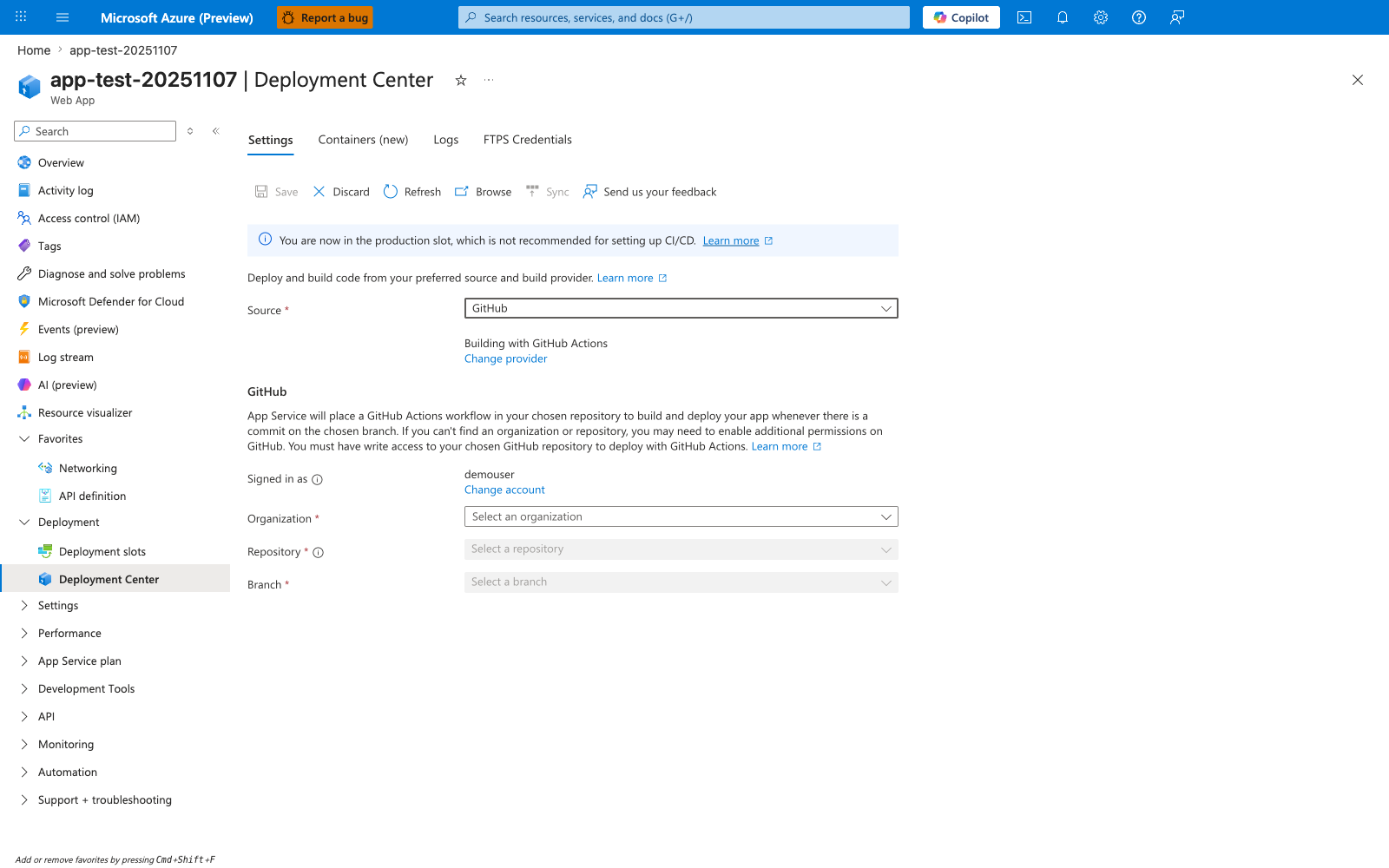
The Deployment Center blade is the Portal entry point for wiring an App Service app to GitHub. With Source: GitHub selected and Building with GitHub Actions, filling in Organization, Repository, and Branch and clicking Save causes App Service to generate a starter workflow in the selected repository. This tutorial takes the version-controlled path instead by keeping a hand-authored workflow under .github/workflows/ and using explicit actions/setup-java, azure/login@v2, and azure/webapps-deploy@v3 steps with clean verify for the Maven build. The banner You are now in the production slot, which is not recommended for setting up CI/CD is still useful context when you later harden this flow with staging-slot promotion.