05. Infrastructure as Code
Use Bicep to deploy repeatable, reviewable Azure infrastructure for your Java App Service workload.
Infrastructure Context
Service: App Service (Linux, Standard S1) | Network: VNet integrated | VNet: ✅
This tutorial assumes a production-ready App Service deployment with VNet integration, private endpoints for backend services, and managed identity for authentication.
flowchart TD
    INET[Internet] -->|HTTPS| WA["Web App\nApp Service S1\nLinux Java 17"]

    subgraph VNET["VNet 10.0.0.0/16"]
        subgraph INT_SUB["Integration Subnet 10.0.1.0/24\nDelegation: Microsoft.Web/serverFarms"]
            WA
        end
        subgraph PE_SUB["Private Endpoint Subnet 10.0.2.0/24"]
            PE_KV[PE: Key Vault]
            PE_SQL[PE: Azure SQL]
            PE_ST[PE: Storage]
        end
    end

    PE_KV --> KV[Key Vault]
    PE_SQL --> SQL[Azure SQL]
    PE_ST --> ST[Storage Account]

    subgraph DNS[Private DNS Zones]
        DNS_KV[privatelink.vaultcore.azure.net]
        DNS_SQL[privatelink.database.windows.net]
        DNS_ST[privatelink.blob.core.windows.net]
    end

    PE_KV -.-> DNS_KV
    PE_SQL -.-> DNS_SQL
    PE_ST -.-> DNS_ST

    WA -.->|System-Assigned MI| ENTRA[Microsoft Entra ID]
    WA --> AI[Application Insights]

    style WA fill:#0078d4,color:#fff
    style VNET fill:#E8F5E9,stroke:#4CAF50
style DNS fill:#E3F2FDPrerequisites
- Completed 02. First Deploy
- Azure CLI with Bicep support (
az bicep version) - Familiarity with resource groups and ARM deployments
What you'll learn
- How
infra/main.bicepcomposes reusable modules - How naming, parameters, and outputs are structured
- How to customize SKU, retention, and sampling safely
- How to validate deployments before production rollout
Main Content
Bicep architecture in this repository
flowchart TD
    M[main.bicep] --> LA[modules/log-analytics.bicep]
    M --> AI[modules/application-insights.bicep]
    M --> ASP[modules/appservice-plan.bicep]
    M --> WA[modules/webapp.bicep]
    AI --> LA
    WA --> ASP
    WA --> AI
main.bicep structure and intent
main.bicep defines:
- Parameters:
baseName,location,appServicePlanSku,logAnalyticsRetentionDays,appInsightsSamplingPercentage - Deterministic names using
uniqueString(resourceGroup().id, baseName) - Module composition for each major Azure resource
- Outputs consumed by
deploy.sh(webAppName,webAppUrl, etc.)
Key parameter example
@description('App Service plan SKU (e.g., B1, S1).')
param appServicePlanSku string = 'B1'

@description('Log Analytics retention in days.')
@minValue(30)
@maxValue(730)
param logAnalyticsRetentionDays int = 30
| Command/Code | Purpose |
|---|---|
@description('App Service plan SKU (e.g., B1, S1).') | Documents what the appServicePlanSku parameter controls. |
param appServicePlanSku string = 'B1' | Declares the App Service plan SKU parameter with a default of B1. |
@description('Log Analytics retention in days.') | Documents the retention parameter used by the deployment. |
@minValue(30) | Prevents retention values below 30 days. |
@maxValue(730) | Prevents retention values above 730 days. |
param logAnalyticsRetentionDays int = 30 | Declares the Log Analytics retention parameter with a 30-day default. |
These constraints prevent invalid retention values at deployment time.
Web app module highlights
modules/webapp.bicep sets critical platform-safe defaults:
- Linux runtime:
JAVA|17-java17 - Health check path:
/health - Startup command:
java -jar /home/site/wwwroot/*.jar --server.port=$PORT - System-assigned managed identity enabled
- App Settings for profile and JVM tuning (
SPRING_PROFILES_ACTIVE,JAVA_OPTS)
Deploy Bicep with explicit parameters
export RG="rg-appservice-java-guide"
export LOCATION="eastus"
export BASE_NAME="java-guide-iac"

az deployment group create \
  --resource-group "$RG" \
  --template-file "infra/main.bicep" \
  --parameters \
    baseName="$BASE_NAME" \
    location="$LOCATION" \
    appServicePlanSku="B1" \
    logAnalyticsRetentionDays=30 \
    appInsightsSamplingPercentage="100" \
  --output json
| Command/Code | Purpose |
|---|---|
export RG="rg-appservice-java-guide" | Sets the target resource group for the deployment. |
export LOCATION="eastus" | Sets the Azure region parameter value. |
export BASE_NAME="java-guide-iac" | Sets the naming prefix used by the Bicep template. |
az deployment group create | Runs a resource group-scoped Bicep deployment. |
--template-file "infra/main.bicep" | Points Azure CLI to the main Bicep template in the repository. |
baseName="$BASE_NAME" | Supplies the base name consumed by deterministic resource naming. |
location="$LOCATION" | Supplies the deployment region. |
appServicePlanSku="B1" | Chooses the B1 App Service plan tier for this example. |
logAnalyticsRetentionDays=30 | Sets the Log Analytics data retention period. |
appInsightsSamplingPercentage="100" | Keeps full Application Insights sampling in this example. |
--output json | Returns full deployment results in JSON format. |
Customize for production
Common production deltas:
appServicePlanSku:S1or higherlogAnalyticsRetentionDays: 90-365 (compliance dependent)appInsightsSamplingPercentage: reduce for high-volume apps (for example25)
Example:
az deployment group create \
  --resource-group "$RG" \
  --template-file "infra/main.bicep" \
  --parameters \
    baseName="$BASE_NAME" \
    location="$LOCATION" \
    appServicePlanSku="S1" \
    logAnalyticsRetentionDays=120 \
    appInsightsSamplingPercentage="50" \
  --output table
| Command/Code | Purpose |
|---|---|
az deployment group create | Deploys the same Bicep template with production-oriented settings. |
appServicePlanSku="S1" | Upgrades the plan tier to S1 for production workloads. |
logAnalyticsRetentionDays=120 | Increases log retention for longer operational history. |
appInsightsSamplingPercentage="50" | Reduces telemetry volume by sampling half of Application Insights events. |
--output table | Displays a concise table view of the deployment result. |
Validate and preview changes
Run template validation before actual deployment:
az deployment group validate \
  --resource-group "$RG" \
  --template-file "infra/main.bicep" \
  --parameters baseName="$BASE_NAME" location="$LOCATION" \
  --output json
| Command/Code | Purpose |
|---|---|
az deployment group validate | Validates the template and parameter values without creating resources. |
--template-file "infra/main.bicep" | Uses the repository's main Bicep template for validation. |
--parameters baseName="$BASE_NAME" location="$LOCATION" | Supplies the minimum required parameters for validation. |
--output json | Returns validation results in JSON format. |
Use what-if for drift-safe planning:
az deployment group what-if \
  --resource-group "$RG" \
  --template-file "infra/main.bicep" \
  --parameters baseName="$BASE_NAME" location="$LOCATION" \
  --output json
| Command/Code | Purpose |
|---|---|
az deployment group what-if | Previews the resource changes that the Bicep deployment would make. |
--template-file "infra/main.bicep" | Runs the preview against the main infrastructure template. |
--parameters baseName="$BASE_NAME" location="$LOCATION" | Supplies the parameter values used for the comparison. |
--output json | Returns the change preview in JSON format. |
Avoid portal-only drift
If you change App Service settings directly in the portal and never reflect them in Bicep, subsequent deployments may overwrite or conflict with manual edits.
Platform architecture
For platform architecture details, see Platform: How App Service Works.
Verification
- Deployment finishes with
provisioningState: Succeeded - Output includes a valid
webAppUrl https://<web-app-host>/healthreturns HTTP 200- App Service configuration reflects expected Bicep defaults
Troubleshooting
Bicep module path errors
Run deployment from repository root or ensure relative module paths in main.bicep remain unchanged.
Runtime mismatch after deploy
Check App Service runtime in portal or CLI; confirm linuxFxVersion is JAVA|17-java17.
Health check keeps failing
Confirm /health endpoint exists and startup command still forwards --server.port=$PORT.
CLI Alternative (No Bicep)
Use these commands when you need an imperative deployment path without changing the existing Bicep workflow.
Step 1: Set variables
RG="rg-springboot-tutorial"
LOCATION="koreacentral"
PLAN_NAME="plan-springboot-tutorial-s1"
APP_NAME="app-springboot-tutorial-abc123"
VNET_NAME="vnet-springboot-tutorial"
INTEGRATION_SUBNET_NAME="snet-appsvc-integration"
| Command/Code | Purpose |
|---|---|
RG="rg-springboot-tutorial" | Sets the resource group name for the CLI deployment path. |
LOCATION="koreacentral" | Sets the Azure region for the CLI deployment path. |
PLAN_NAME="plan-springboot-tutorial-s1" | Names the App Service plan to create. |
APP_NAME="app-springboot-tutorial-abc123" | Sets the globally unique web app name. |
VNET_NAME="vnet-springboot-tutorial" | Names the virtual network to create. |
INTEGRATION_SUBNET_NAME="snet-appsvc-integration" | Names the subnet used for App Service VNet integration. |
Step 2: Create RG, plan, app
az group create --name $RG --location $LOCATION
az appservice plan create --resource-group $RG --name $PLAN_NAME --is-linux --sku S1
az webapp create --resource-group $RG --plan $PLAN_NAME --name $APP_NAME --runtime "JAVA|17-java17"
| Command/Code | Purpose |
|---|---|
az group create --name $RG --location $LOCATION | Creates the resource group for the imperative deployment path. |
az appservice plan create --resource-group $RG --name $PLAN_NAME --is-linux --sku S1 | Creates a Linux App Service plan on the S1 tier. |
az webapp create --resource-group $RG --plan $PLAN_NAME --name $APP_NAME --runtime "JAVA|17-java17" | Creates the Java 17 App Service app. |
Expected output
Step 3: Configure app settings and startup command
az webapp config appsettings set --resource-group $RG --name $APP_NAME --settings SCM_DO_BUILD_DURING_DEPLOYMENT=true SPRING_PROFILES_ACTIVE=production
az webapp config set --resource-group $RG --name $APP_NAME --startup-file "java -jar /home/site/wwwroot/app.jar --server.port=$PORT"
| Command/Code | Purpose |
|---|---|
az webapp config appsettings set --resource-group $RG --name $APP_NAME --settings SCM_DO_BUILD_DURING_DEPLOYMENT=true SPRING_PROFILES_ACTIVE=production | Sets build and Spring profile app settings for the web app. |
SCM_DO_BUILD_DURING_DEPLOYMENT=true | Enables build automation during deployment in the SCM site. |
SPRING_PROFILES_ACTIVE=production | Ensures the app runs with the production Spring profile. |
az webapp config set --resource-group $RG --name $APP_NAME --startup-file "java -jar /home/site/wwwroot/app.jar --server.port=$PORT" | Configures the startup command used by App Service to launch the JAR. |
Expected output
Step 4 (Optional): Add VNet integration
az network vnet create --resource-group $RG --name $VNET_NAME --location $LOCATION --address-prefixes 10.10.0.0/16
az network vnet subnet create --resource-group $RG --vnet-name $VNET_NAME --name $INTEGRATION_SUBNET_NAME --address-prefixes 10.10.1.0/24 --delegations Microsoft.Web/serverFarms
az webapp vnet-integration add --resource-group $RG --name $APP_NAME --vnet $VNET_NAME --subnet $INTEGRATION_SUBNET_NAME
| Command/Code | Purpose |
|---|---|
az network vnet create --resource-group $RG --name $VNET_NAME --location $LOCATION --address-prefixes 10.10.0.0/16 | Creates the VNet used for app integration. |
az network vnet subnet create --resource-group $RG --vnet-name $VNET_NAME --name $INTEGRATION_SUBNET_NAME --address-prefixes 10.10.1.0/24 --delegations Microsoft.Web/serverFarms | Creates a delegated subnet that App Service can join. |
az webapp vnet-integration add --resource-group $RG --name $APP_NAME --vnet $VNET_NAME --subnet $INTEGRATION_SUBNET_NAME | Connects the app to the VNet integration subnet. |
Expected output
Step 5: Validate effective configuration
az webapp config show --resource-group $RG --name $APP_NAME --query "{linuxFxVersion:linuxFxVersion, appCommandLine:appCommandLine}" --output json
az webapp config appsettings list --resource-group $RG --name $APP_NAME --query "[?name=='SCM_DO_BUILD_DURING_DEPLOYMENT' || name=='SPRING_PROFILES_ACTIVE']" --output json
| Command/Code | Purpose |
|---|---|
az webapp config show --resource-group $RG --name $APP_NAME --query "{linuxFxVersion:linuxFxVersion, appCommandLine:appCommandLine}" --output json | Verifies the effective runtime and startup command applied to the app. |
az webapp config appsettings list --resource-group $RG --name $APP_NAME --query "[?name=='SCM_DO_BUILD_DURING_DEPLOYMENT' || name=='SPRING_PROFILES_ACTIVE']" --output json | Confirms the key app settings were stored correctly. |
Expected output
Run It in the Portal
Portal view: Resource group overview (verifying Bicep deployment outputs)
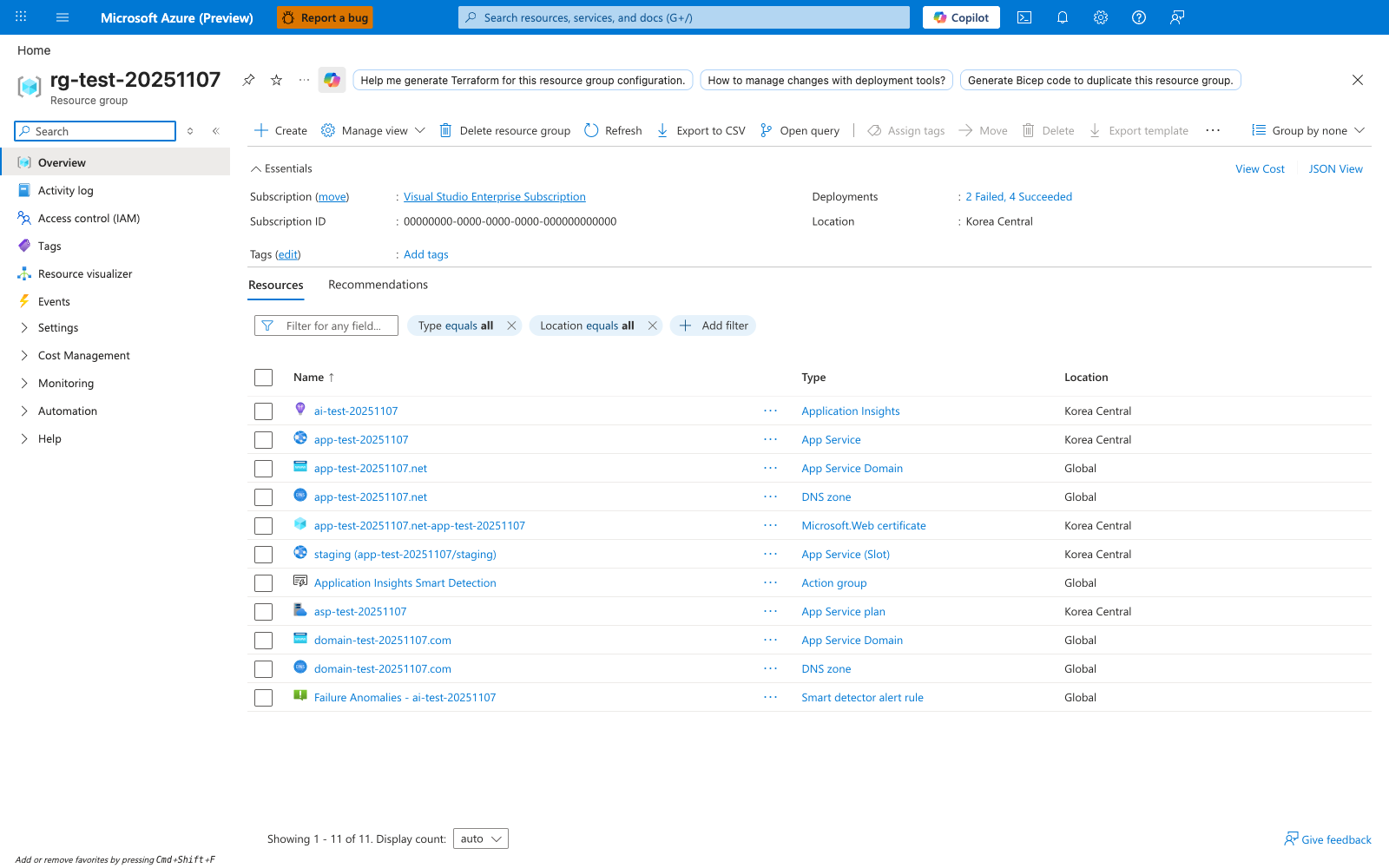
After running az deployment group create --template-file ./infra/main.bicep, the resource group overview is the Portal surface for checking what the deployment produced. The visible Resources tab shows how Azure inventories related resources as separate rows in one resource group, including App Service, App Service Plan, Application Insights, and other related rows the modular Bicep template provisions (for example a Log Analytics workspace). For this tutorial, use the same blade to confirm that the Spring Boot web app and plan created by your Bicep deployment exist, then open the Deployments entry in Essentials if you need to inspect deployment history after a partial failure. The Export template button is also useful when you want to compare deployed ARM state with the Bicep source in your repository.