03. Configuration
Configure runtime behavior, secrets, and identity for your Spring Boot app on Azure App Service without rebuilding the JAR.
Infrastructure Context
Service: App Service (Linux, Standard S1) | Network: VNet integrated | VNet: ✅
This tutorial assumes a production-ready App Service deployment with VNet integration, private endpoints for backend services, and managed identity for authentication.
flowchart TD
    INET[Internet] -->|HTTPS| WA["Web App\nApp Service S1\nLinux Java 17"]

    subgraph VNET["VNet 10.0.0.0/16"]
        subgraph INT_SUB["Integration Subnet 10.0.1.0/24\nDelegation: Microsoft.Web/serverFarms"]
            WA
        end
        subgraph PE_SUB["Private Endpoint Subnet 10.0.2.0/24"]
            PE_KV[PE: Key Vault]
            PE_SQL[PE: Azure SQL]
            PE_ST[PE: Storage]
        end
    end

    PE_KV --> KV[Key Vault]
    PE_SQL --> SQL[Azure SQL]
    PE_ST --> ST[Storage Account]

    subgraph DNS[Private DNS Zones]
        DNS_KV[privatelink.vaultcore.azure.net]
        DNS_SQL[privatelink.database.windows.net]
        DNS_ST[privatelink.blob.core.windows.net]
    end

    PE_KV -.-> DNS_KV
    PE_SQL -.-> DNS_SQL
    PE_ST -.-> DNS_ST

    WA -.->|System-Assigned MI| ENTRA[Microsoft Entra ID]
    WA --> AI[Application Insights]

    style WA fill:#0078d4,color:#fff
    style VNET fill:#E8F5E9,stroke:#4CAF50
    style DNS fill:#E3F2FD
flowchart TD
A[List current App Settings] --> B[Update runtime and JAVA_OPTS]
B --> C[Add Connection String if needed]
C --> D[Enable Managed Identity]
D --> E[Apply Spring profile settings]
E --> F[Verify effective config]Prerequisites
- Completed 02. First Deploy
RGandAPP_NAMEexported in your shell
What you'll learn
- How App Settings map to Spring Boot properties
- How to apply and tune
JAVA_OPTS - When to use App Settings vs Connection Strings
- Managed Identity basics for passwordless access
- How profiles (
developmentvsproduction) affect behavior
Main Content
Configuration surface area on App Service
| Mechanism | Best for | Spring Boot access pattern |
|---|---|---|
| App Settings | General environment variables | System.getenv() or relaxed binding |
| Connection Strings | Legacy typed DB strings | CUSTOMCONNSTR_*, SQLCONNSTR_* env variables |
| Key Vault Reference | Secret indirection | Appears as resolved environment value |
| Managed Identity | Passwordless auth to Azure resources | Azure Identity SDK (DefaultAzureCredential) |
List current App Settings
| Command/Code | Purpose |
|---|---|
az webapp config appsettings list | Lists the current App Service application settings. |
--resource-group "$RG" | Targets the resource group that contains the app. |
--name "$APP_NAME" | Selects the web app whose settings you want to inspect. |
--output table | Displays the settings in a readable table format. |
You should see values like SPRING_PROFILES_ACTIVE=production, JAVA_OPTS=..., and APPLICATIONINSIGHTS_CONNECTION_STRING.
Update runtime settings with long flags
az webapp config appsettings set \
--resource-group "$RG" \
--name "$APP_NAME" \
--settings \
LOGGING_LEVEL_COM_EXAMPLE_GUIDE=INFO \
SPRING_PROFILES_ACTIVE=production \
JAVA_OPTS="-XX:+UseContainerSupport -XX:MaxRAMPercentage=75.0 -Djava.security.egd=file:/dev/./urandom" \
--output json
| Command/Code | Purpose |
|---|---|
az webapp config appsettings set | Updates App Service application settings without rebuilding the app. |
LOGGING_LEVEL_COM_EXAMPLE_GUIDE=INFO | Sets the application logger level for the sample package. |
SPRING_PROFILES_ACTIVE=production | Forces the deployed app to use the production Spring profile. |
JAVA_OPTS="-XX:+UseContainerSupport -XX:MaxRAMPercentage=75.0 -Djava.security.egd=file:/dev/./urandom" | Applies JVM options tuned for container-aware memory usage and startup behavior. |
--output json | Returns the updated settings as JSON for confirmation. |
Spring relaxed binding
Spring maps uppercase underscore environment keys to dotted properties. Example: LOGGING_LEVEL_ROOT maps to logging.level.root.
Use Connection Strings when required
Some teams standardize on Connection Strings for operational visibility.
az webapp config connection-string set \
--resource-group "$RG" \
--name "$APP_NAME" \
--connection-string-type Custom \
--settings APP_DB="Server=tcp:<server>.database.windows.net,1433;Database=<db>;" \
--output json
| Command/Code | Purpose |
|---|---|
az webapp config connection-string set | Stores a connection string in the App Service configuration store. |
--connection-string-type Custom | Marks the value as a custom connection string instead of a built-in database type. |
--settings APP_DB="Server=tcp:<server>.database.windows.net,1433;Database=<db>;" | Saves the database connection string under the APP_DB key. |
--output json | Shows the resulting connection string configuration in JSON format. |
In Java, this appears as CUSTOMCONNSTR_APP_DB.
Managed Identity basics
Enable system-assigned managed identity:
| Command/Code | Purpose |
|---|---|
az webapp identity assign | Enables a system-assigned managed identity for the web app. |
--resource-group "$RG" | Targets the resource group that owns the app. |
--name "$APP_NAME" | Selects the web app that should receive the identity. |
--output json | Returns the identity details for later RBAC configuration. |
Example masked output:
{
"principalId": "xxxxxxxx-xxxx-xxxx-xxxx-xxxxxxxxxxxx",
"tenantId": "<tenant-id>",
"type": "SystemAssigned"
}
After identity exists, grant least-privilege RBAC on target resources (SQL, Key Vault, Storage, etc.).
Profile behavior: development vs production
Local default for the sample app:
spring.profiles.activefalls back tolocalin/info
In App Service:
SPRING_PROFILES_ACTIVE=productionis set by Biceplogback-spring.xmlswitches to JSON log appender in production
Test profile switch quickly:
| Command/Code | Purpose |
|---|---|
SPRING_PROFILES_ACTIVE=production | Sets the active Spring profile for this local test run. |
./mvnw spring-boot:run | Starts the app with Maven Wrapper so you can validate production-profile behavior. |
Slot-sticky settings for safer swaps
For staging/production slot workflows, make environment-specific settings sticky:
az webapp config appsettings set \
--resource-group "$RG" \
--name "$APP_NAME" \
--slot-settings \
SPRING_PROFILES_ACTIVE=production \
API_BASE_URL=https://api.example.internal \
--output json
| Command/Code | Purpose |
|---|---|
az webapp config appsettings set | Updates App Service settings and marks selected values as slot-sticky. |
--slot-settings | Makes the listed settings stay with the deployment slot during swaps. |
SPRING_PROFILES_ACTIVE=production | Keeps the production profile fixed to the slot that needs it. |
API_BASE_URL=https://api.example.internal | Stores an environment-specific backend URL as a sticky setting. |
--output json | Returns the updated slot settings in JSON format. |
Do not store secrets in source control
Keep secrets in Key Vault and expose them via Key Vault References in App Settings.
Platform architecture
For platform architecture details, see Platform: How App Service Works.
Verification
az webapp config appsettings list \
  --resource-group "$RG" \
  --name "$APP_NAME" \
  --output table
curl "https://$APP_NAME.azurewebsites.net/info"
| Command/Code | Purpose |
|---|---|
az webapp config appsettings list ... --output table | Re-checks the deployed app settings after configuration changes. |
curl "https://$APP_NAME.azurewebsites.net/info" | Verifies that runtime metadata reflects the expected configuration in Azure. |
Confirm expected profile and config-driven behavior.
Troubleshooting
Settings changed but app behavior unchanged
Restart app to force process recycle:
| Command/Code | Purpose |
|---|---|
az webapp restart | Restarts the web app so configuration changes take effect in a new process. |
--resource-group "$RG" | Targets the app's resource group. |
--name "$APP_NAME" | Selects the web app to restart. |
--output json | Returns restart operation details in JSON format. |
JVM memory pressure after scaling down
Reduce MaxRAMPercentage in JAVA_OPTS and retest startup time + GC behavior.
Managed Identity enabled but access denied
Identity creation and RBAC propagation can take several minutes; validate role assignment scope and wait briefly.
Run It in the Portal
Portal view: Configuration > General settings blade (Portal counterpart to az webapp config set)
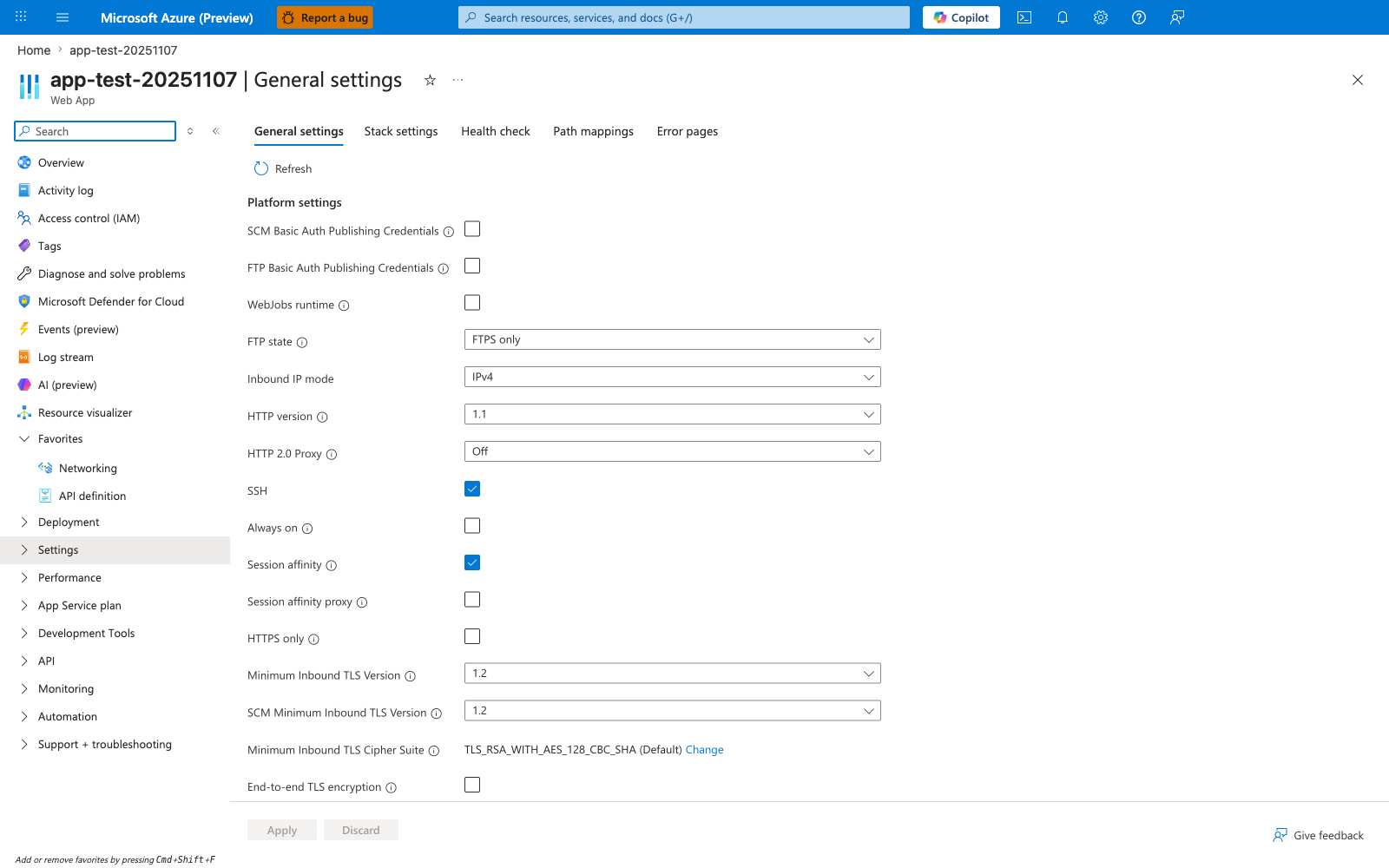
The Configuration > General settings blade is the Portal verification surface for the platform-level az webapp config set adjustments this tutorial makes. In the visible Platform settings list, HTTPS only, Always on, FTP state, HTTP version, and Minimum Inbound TLS Version are the same runtime controls you tune from the CLI. App-level settings such as JAVA_OPTS and SPRING_PROFILES_ACTIVE live on the separate Environment variables blade instead of this General settings page. This screenshot also makes the default state concrete: Always on and HTTPS only are both unchecked here, so you should not assume production-ready defaults after app creation. Use this blade after the CLI steps to confirm the platform settings applied to the Spring Boot app before moving on to app settings and connection strings.