01. Local Run
Run the Spring Boot reference app locally using the same runtime assumptions Azure App Service uses in production.
Infrastructure Context
Service: App Service (Linux, Standard S1) | Network: VNet integrated | VNet: ✅
This tutorial assumes a production-ready App Service deployment with VNet integration, private endpoints for backend services, and managed identity for authentication.
flowchart TD
    INET[Internet] -->|HTTPS| WA["Web App\nApp Service S1\nLinux Java 17"]

    subgraph VNET["VNet 10.0.0.0/16"]
        subgraph INT_SUB["Integration Subnet 10.0.1.0/24\nDelegation: Microsoft.Web/serverFarms"]
            WA
        end
        subgraph PE_SUB["Private Endpoint Subnet 10.0.2.0/24"]
            PE_KV[PE: Key Vault]
            PE_SQL[PE: Azure SQL]
            PE_ST[PE: Storage]
        end
    end

    PE_KV --> KV[Key Vault]
    PE_SQL --> SQL[Azure SQL]
    PE_ST --> ST[Storage Account]

    subgraph DNS[Private DNS Zones]
        DNS_KV[privatelink.vaultcore.azure.net]
        DNS_SQL[privatelink.database.windows.net]
        DNS_ST[privatelink.blob.core.windows.net]
    end

    PE_KV -.-> DNS_KV
    PE_SQL -.-> DNS_SQL
    PE_ST -.-> DNS_ST

    WA -.->|System-Assigned MI| ENTRA[Microsoft Entra ID]
    WA --> AI[Application Insights]

    style WA fill:#0078d4,color:#fff
    style VNET fill:#E8F5E9,stroke:#4CAF50
    style DNS fill:#E3F2FD
flowchart TD
A[Run ./mvnw spring-boot:run] --> B[Bind server.port to PORT or 8080]
B --> C[Test /health and /info]
C --> D[Test /api/requests/log-levels]
D --> E[Validate local vs production profile behavior]Prerequisites
- Java 17 installed (
java --version) - Maven Wrapper executable in
apps/java-springboot/(./mvnw) curlfor endpoint validation
What you'll learn
- How to run the app with
./mvnw spring-boot:run - Why
server.port=${PORT:8080}is required for App Service compatibility - How to validate
/health,/info, and/api/requests/log-levels - How to simulate production profile behavior locally
Main Content
Start the application
From the repository root:
| Command/Code | Purpose |
|---|---|
cd apps/java-springboot | Moves into the Spring Boot app directory before running Maven commands. |
./mvnw spring-boot:run | Starts the application locally with the Maven Wrapper and Spring Boot plugin. |
Expected startup behavior:
- Spring Boot starts on
8080whenPORTis unset - CORS config is applied from
WebConfig - Controllers map
/health,/info, and/api/requests/log-levels
Understand port binding for App Service
The app uses this property:
| Command/Code | Purpose |
|---|---|
server.port=${PORT:8080} | Binds the app to the App Service PORT value when present, or falls back to local port 8080. |
This gives two safe modes:
- Local mode:
PORTmissing → runs on8080 - App Service mode: platform injects
PORT→ app listens where reverse proxy expects
Do not hardcode a fixed port
On App Service, traffic is forwarded to the process port assigned by the platform. If your app ignores PORT, health checks fail and startup may loop.
Verify core endpoints locally
In a second terminal:
curl http://localhost:8080/health
curl http://localhost:8080/info
curl "http://localhost:8080/api/requests/log-levels?userId=local-user"
| Command/Code | Purpose |
|---|---|
curl http://localhost:8080/health | Checks that the health endpoint responds locally. |
curl http://localhost:8080/info | Verifies runtime and environment metadata exposed by the app. |
curl "http://localhost:8080/api/requests/log-levels?userId=local-user" | Triggers sample requests that emit logs at multiple severity levels. |
Typical /health response:
Typical /info response:
{
  "name": "azure-app-service-practical-guide",
  "version": "1.0.0",
  "java": "17",
  "framework": "Spring Boot 3.2",
  "environment": "local"
}
Generate and inspect log levels
The RequestController intentionally emits DEBUG, INFO, WARN, and ERROR events:
logger.debug("debug log emitted for userId={}", userId);
logger.info("info log emitted for userId={}", userId);
logger.warn("warn log emitted for userId={}", userId);
logger.error("error log emitted for userId={} at={}", userId, Instant.now());
| Command/Code | Purpose |
|---|---|
logger.debug(...) | Emits a DEBUG log entry for low-level diagnostic detail. |
logger.info(...) | Emits an INFO log entry for normal application activity. |
logger.warn(...) | Emits a WARN log entry for recoverable or suspicious conditions. |
logger.error(...) | Emits an ERROR log entry with a timestamp for failure tracking. |
Call the endpoint and inspect terminal output for all severities.
Run in production profile locally
Test production log formatting and profile behavior:
| Command/Code | Purpose |
|---|---|
SPRING_PROFILES_ACTIVE=production | Forces the app to use the production Spring profile during local execution. |
./mvnw spring-boot:run | Starts the app with Maven Wrapper so you can test production profile behavior locally. |
In production profile, logback-spring.xml switches to JSON console output suitable for ingestion by Application Insights.
Optional: emulate App Service port locally
PORT=8181 SPRING_PROFILES_ACTIVE=production ./mvnw spring-boot:run
curl http://localhost:8181/health
| Command/Code | Purpose |
|---|---|
PORT=8181 | Simulates the platform-provided port assignment locally. |
SPRING_PROFILES_ACTIVE=production | Runs the app with the same profile expected in App Service. |
./mvnw spring-boot:run | Launches the app with the simulated port and profile settings. |
curl http://localhost:8181/health | Confirms the app listens successfully on the injected port. |
Why this test matters
This validates the same startup contract used by App Service (PORT, production profile, structured logs) before your first deployment.
Platform architecture
For platform architecture details, see Platform: How App Service Works.
Verification
./mvnw spring-boot:runstarts without errors/healthreturns HTTP 200/infoshows expected metadata and environment/api/requests/log-levelsreturnsstatus: okand log lines appear in terminal- Production profile emits JSON logs
Troubleshooting
Port already in use
Stop the conflicting process or run with another port:
| Command/Code | Purpose |
|---|---|
PORT=8181 | Overrides the default local port to avoid conflicts. |
./mvnw spring-boot:run | Restarts the app on the alternate port using Maven Wrapper. |
./mvnw permission denied
| Command/Code | Purpose |
|---|---|
chmod +x ./mvnw | Makes the Maven Wrapper executable on Unix-like systems. |
./mvnw spring-boot:run | Runs the app again after fixing wrapper permissions. |
Endpoint returns 404
Ensure you are hitting the correct base URL and port (localhost:8080 by default), and confirm startup completed before testing.
Run It in the Portal
Portal view: App Service plan (Linux) - the deployment target this tutorial emulates locally
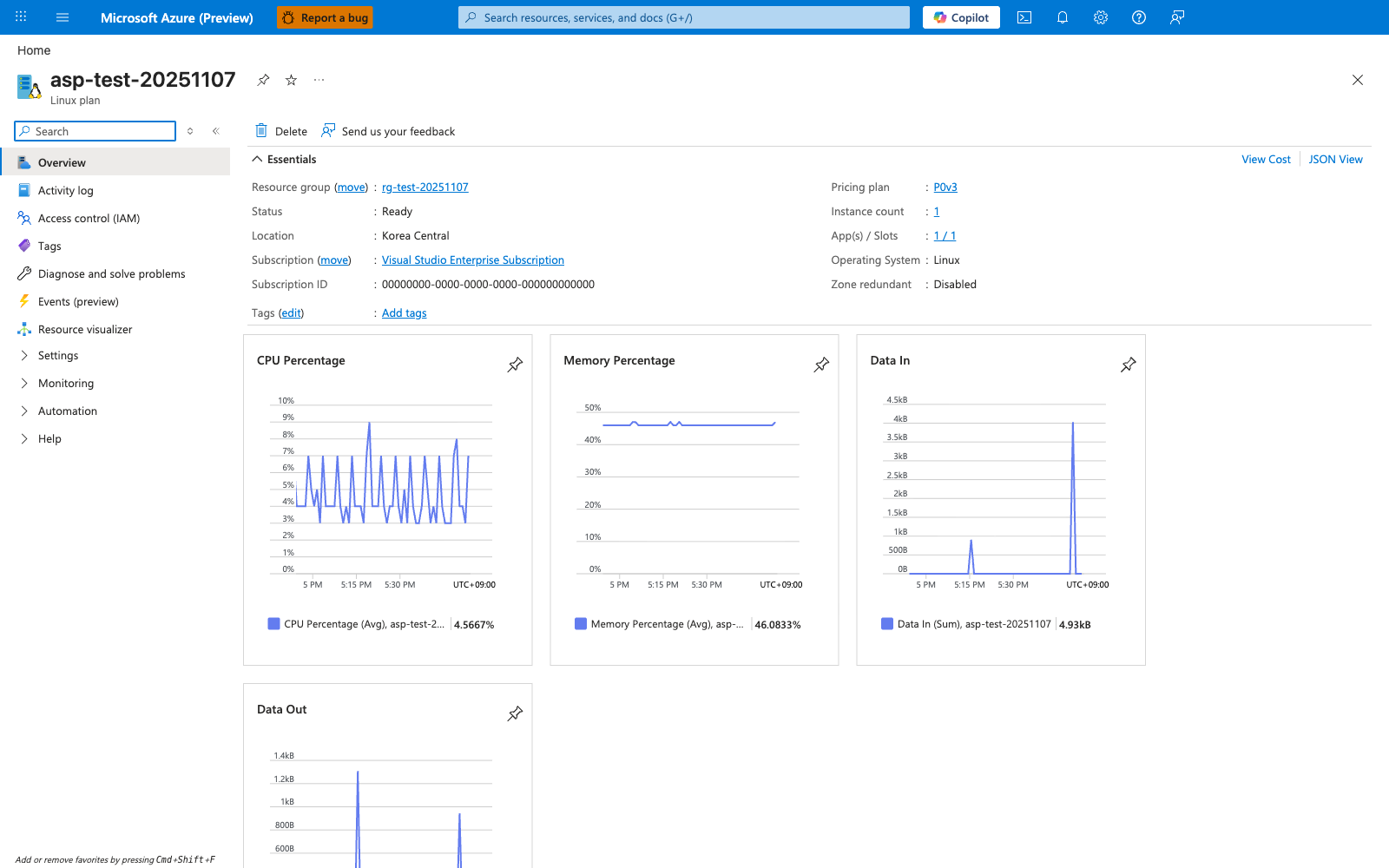
Your local Spring Boot + Maven Wrapper setup in this tutorial is meant to mirror the runtime shape of a Linux App Service app, not every plan-level limit shown on this blade. The visible Operating system: Linux confirms the worker OS, and the hosted-app list on the right shows that an App Service plan is the shared deployment target used by later tutorials. The CPU Percentage and Memory Percentage charts are the Portal-side signals you compare against when local ./mvnw spring-boot:run tests suggest the JVM is using too much CPU or heap memory under load. Use this blade to verify that the target app runs on a Linux App Service plan before moving from local validation to Azure deployment.