Private Endpoints
Connect App Service to backend services over private networking using VNet integration and private endpoints for SQL, Redis, and Key Vault.
flowchart TD
    A[App Service with VNet integration] --> B[Private DNS zones]
    B --> C[Private Endpoint SQL]
    B --> D[Private Endpoint Redis]
    B --> E[Private Endpoint Key Vault]
    C --> F[Private backend connectivity]
    D --> F
E --> FPrerequisites
- App Service Plan tier that supports VNet integration
- Virtual network with dedicated integration subnet
- Backend services configured for private endpoint support
Main Content
1) Networking architecture
Recommended layout:
snet-appservice-integration: delegated for App Service VNet integrationsnet-private-endpoints: hosts private endpoint NICs- Private DNS zones linked to the VNet
2) Enable VNet integration (Linux App Service)
az webapp vnet-integration add \
  --resource-group "$RG" \
  --name "$APP_NAME" \
  --vnet "$VNET_NAME" \
  --subnet "snet-appservice-integration" \
  --output json
3) Create private endpoint for Azure SQL
az network private-endpoint create \
  --resource-group "$RG" \
  --name "pe-sql-guide" \
  --vnet-name "$VNET_NAME" \
  --subnet "snet-private-endpoints" \
  --private-connection-resource-id "/subscriptions/<subscription-id>/resourceGroups/<sql-rg>/providers/Microsoft.Sql/servers/<sql-server>" \
  --group-id sqlServer \
  --connection-name "pe-sql-guide-conn" \
  --output json
4) Create private endpoint for Redis
az network private-endpoint create \
  --resource-group "$RG" \
  --name "pe-redis-guide" \
  --vnet-name "$VNET_NAME" \
  --subnet "snet-private-endpoints" \
  --private-connection-resource-id "/subscriptions/<subscription-id>/resourceGroups/<redis-rg>/providers/Microsoft.Cache/Redis/<redis-name>" \
  --group-id redisCache \
  --connection-name "pe-redis-guide-conn" \
  --output json
5) NSG and route guidance
Allow outbound from integration subnet to:
- SQL private endpoint IP on 1433
- Redis private endpoint IP on 6380
- Key Vault private endpoint IP on 443
Block broad internet egress only after dependencies are confirmed reachable.
6) Connection string and DNS assumptions
Keep service hostnames unchanged (for example, <sql-server>.database.windows.net). Private DNS resolution should map these names to private endpoint IPs within the VNet.
7) App code stays unchanged
Spring Boot automatically picks up connection details from environment variables or application.properties.
# application.properties
spring.datasource.url=jdbc:sqlserver://<sql-server>.database.windows.net:1433;database=<db-name>;encrypt=true;
spring.data.redis.host=<redis-name>.redis.cache.windows.net
spring.data.redis.port=6380
spring.data.redis.ssl=true
The same code can run with public or private networking if configuration and DNS are consistent.
8) GitHub Actions networking validation step
- name: Validate private endpoint state
  run: |
    az network private-endpoint list \
      --resource-group "$RG" \
      --output table
Private endpoint without DNS is incomplete
Most connectivity incidents are DNS-related, not code-related. Always validate private DNS zone links and effective name resolution from the app environment.
Verification
- Confirm VNet integration is connected.
- Confirm private endpoints are in
Approvedstate. - Confirm app can reach SQL/Redis with normal hostnames.
Use dependency telemetry and synthetic API checks to verify end-to-end connectivity.
Troubleshooting
Name resolution still points to public IP
- Validate private DNS zone records.
- Ensure VNet links are correct.
- Confirm app is integrated with expected VNet/subnet.
Connection timeout to backend
- Review NSG rules and UDRs.
- Confirm backend firewall permits private endpoint traffic.
- Check TLS settings for SQL/Redis client configuration.
Intermittent connectivity during scale events
Use resilient retry settings (Spring Data JPA retry logic, Redis reconnect behavior) and monitor transient errors.
Run It in the Portal
Portal view: Networking blade (app-side precondition for backend private endpoints)
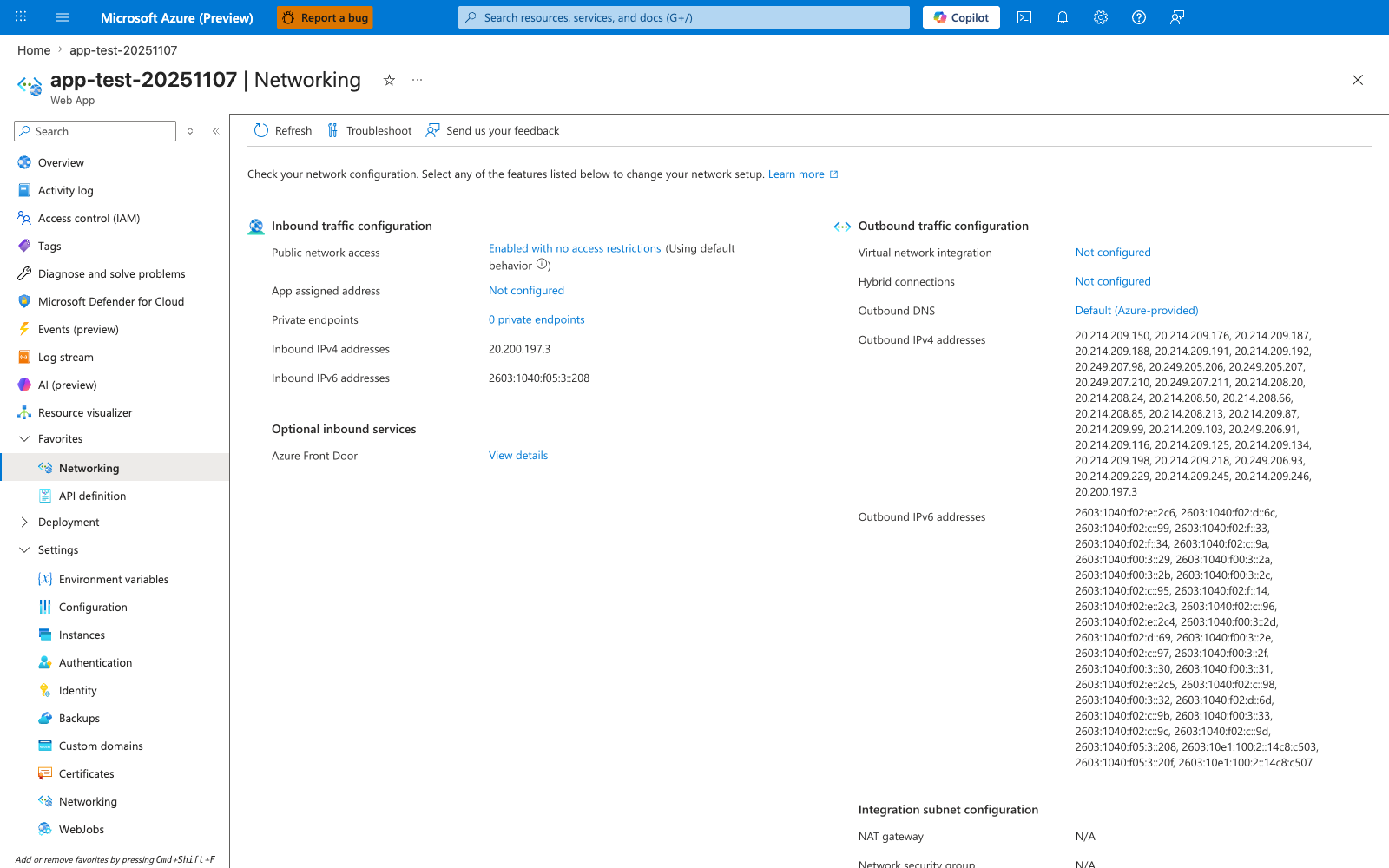
This web-app Networking blade is a supporting before-state for the recipe rather than the place where the SQL, Redis, and Key Vault private endpoints themselves are listed. The visible Virtual network integration: Not configured row is the app-side prerequisite the recipe changes before private DNS for those backend services can work, while Private endpoints: 0 private endpoints also makes clear the screenshot is not showing downstream private endpoints attached to other resources. Use this capture as the pre-integration checkpoint before running the recipe's VNet integration and backend private-endpoint steps, then revisit Spring's data-access retry settings (JPA retry logic, Redis Lettuce reconnect) once the private path is live.