Managed Identity (Passwordless Access)
Use system-assigned managed identity with DefaultAzureCredential so your Spring Boot app accesses Azure resources without embedded secrets.
Prerequisites
- App Service app deployed
- Permission to assign RBAC roles on target resources
- Azure Identity Java SDK available in app dependencies
Main Content
Why managed identity first
Managed identity removes credential rotation burden from application code:
- no client secret in App Settings
- no secret exposure in CI logs
- centralized RBAC control per environment
Architecture
flowchart TD
    A[Spring Boot App Service] --> B[DefaultAzureCredential]
    B --> C[Managed Identity endpoint]
    C --> D[Microsoft Entra token]
    D --> E[Azure Resource API]
How RBAC Connects Identity to Resources
A managed identity alone does not grant access. Azure RBAC binds three elements into a role assignment:
flowchart TD
    P[Principal<br/>Who: Managed Identity or Service Principal] --> RA[Role Assignment<br/>Unique GUID per binding]
    RD[Role Definition<br/>What: Key Vault Secrets User, Storage Blob Data Reader, etc.] --> RA
    S[Scope<br/>Where: Subscription, Resource Group, or Resource] --> RA
    RA --> ACCESS[Access Granted]

style RA fill:#f5c542,stroke:#333,color:#000| Element | Question it answers | Example |
|---|---|---|
| Principal | Who needs access? | App Service's managed identity |
| Role Definition | What permission? | Key Vault Secrets User, Storage Blob Data Reader |
| Scope | On which resource? | A specific Key Vault, Storage account, or resource group |
| Role Assignment | The binding itself | Unique GUID — one per (principal + role + scope) combination |
Azure RBAC enforces a uniqueness constraint: only one role assignment can exist for the same (principal, role definition, scope) triple. Attempting to create a duplicate with a different assignment GUID results in a RoleAssignmentExists conflict.
Add dependency (pom.xml)
<dependency>
  <groupId>com.azure</groupId>
  <artifactId>azure-identity</artifactId>
  <version>1.12.2</version>
</dependency>
Enable system-assigned identity on web app
Masked output example:
{
  "principalId": "xxxxxxxx-xxxx-xxxx-xxxx-xxxxxxxxxxxx",
  "tenantId": "<tenant-id>",
  "type": "SystemAssigned"
}
Retrieve principal ID for role assignment
export APP_PRINCIPAL_ID=$(az webapp identity show \
  --resource-group "$RG" \
  --name "$APP_NAME" \
  --query principalId \
  --output tsv)
Assign least-privilege RBAC role
Example: grant Key Vault Secrets User on one vault scope:
export KV_ID="/subscriptions/<subscription-id>/resourceGroups/$RG/providers/Microsoft.KeyVault/vaults/<vault-name>"

az role assignment create \
  --assignee-object-id "$APP_PRINCIPAL_ID" \
  --assignee-principal-type ServicePrincipal \
  --role "Key Vault Secrets User" \
  --scope "$KV_ID" \
  --output json
For Azure SQL/Cosmos/Storage, change role and scope accordingly.
Use DefaultAzureCredential in Spring Boot
import com.azure.identity.DefaultAzureCredential;
import com.azure.identity.DefaultAzureCredentialBuilder;

@Bean
public DefaultAzureCredential defaultAzureCredential() {
    return new DefaultAzureCredentialBuilder().build();
}
When running on App Service, this resolves to managed identity. Locally, it can use Azure CLI or developer credentials.
Token request example
TokenRequestContext context = new TokenRequestContext()
    .addScopes("https://vault.azure.net/.default");

AccessToken token = credential.getToken(context).block();
Local development parity
Use the same code locally after:
No branching logic is needed between local and cloud identity paths.
RBAC propagation delay
New role assignments can take several minutes to become effective. Temporary 403 responses immediately after assignment are common.
Scope narrowly
Assign roles at the smallest scope possible (resource level preferred over subscription level).
Platform architecture
For platform architecture details, see Platform: How App Service Works.
Verification
- Identity exists on App Service (
az webapp identity show) - Role assignment present on intended scope
- App performs token-based call successfully without secrets
Troubleshooting
ManagedIdentityCredential authentication unavailable
Verify the app is running on Azure App Service with identity enabled; local runs rely on alternate credentials in the chain.
403 Forbidden despite assigned role
Check role name, scope, and principal ID correctness; wait for propagation and retry.
Works locally, fails in Azure
Likely local credential succeeded but cloud identity lacks RBAC. Re-check Azure role assignments for app principal.
Run It in the Portal
Portal view: Identity blade (canonical managed-identity enablement surface)
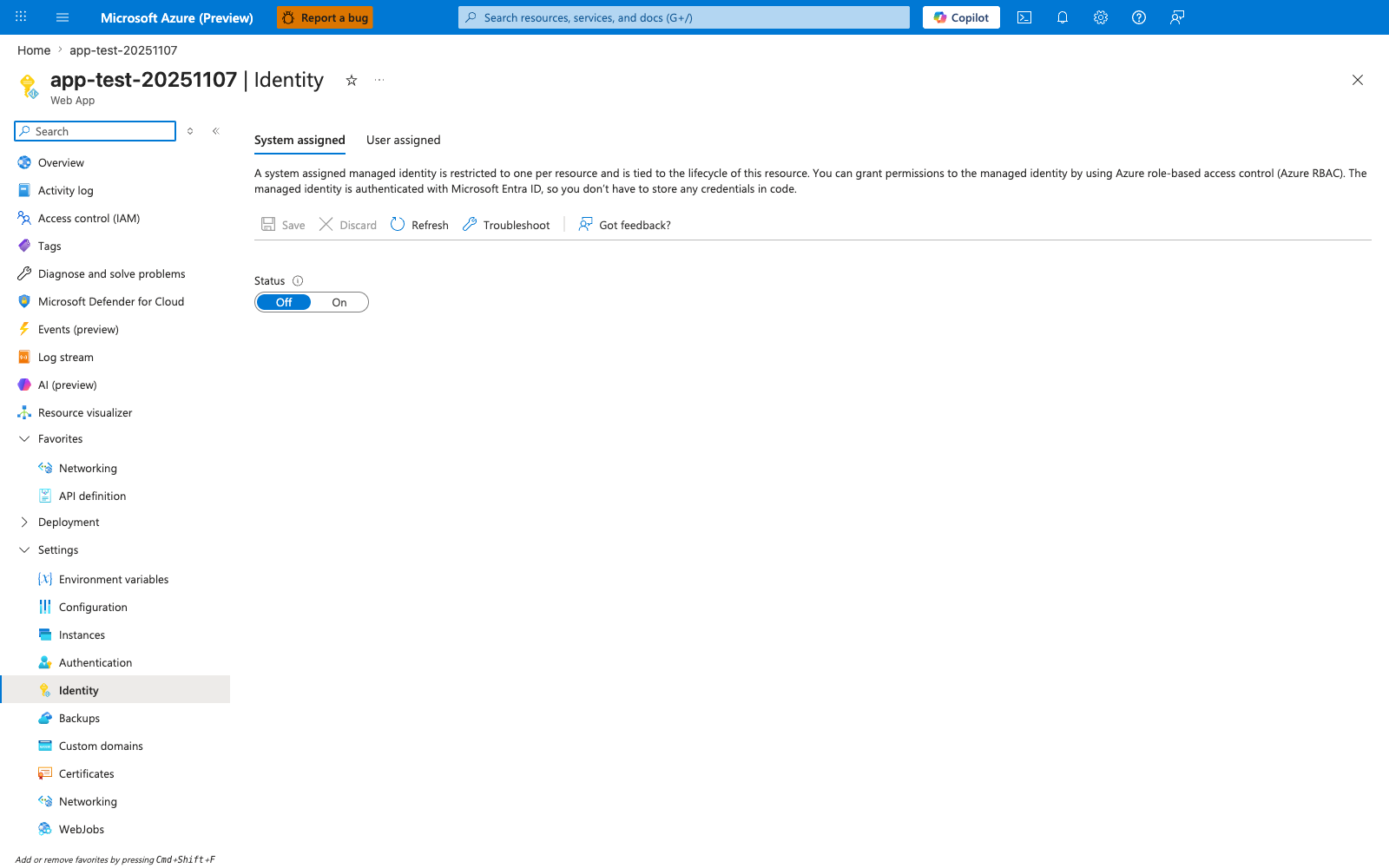
The Identity blade is the canonical Portal surface for the managed-identity flow this recipe walks through. With System assigned active and the Status toggle moved from Off to On, App Service creates the Entra ID principal that the recipe then uses to grant downstream RBAC roles for Storage, Key Vault, SQL, or any other Entra-aware service. The descriptive header on this blade restates the lifecycle guarantee the recipe relies on — the identity is tied to the resource — and the User assigned tab is the alternative path the recipe covers for identities shared across multiple apps. Use this blade as step 1 of the recipe before issuing any downstream role assignments via the CLI and before initializing DefaultAzureCredentialBuilder().build() in the Spring Boot app.