Deployment Slots for Zero-Downtime Releases
Use App Service deployment slots to validate Java releases in staging, then swap traffic to production with near-zero downtime.
Prerequisites
- App Service Plan tier that supports deployment slots
- Production app deployed and healthy
- CI/CD pipeline capable of targeting a slot
Main Content
Slot-based release flow
flowchart TD
    A[Deploy new build to staging slot] --> B[Run smoke tests on staging URL]
    B --> C[Warm up app and dependencies]
    C --> D[Swap staging -> production]
    D --> E[Monitor and rollback if needed]
Step 1: create staging slot
export SLOT_NAME="staging"

az webapp deployment slot create \
  --resource-group "$RG" \
  --name "$APP_NAME" \
  --slot "$SLOT_NAME" \
  --configuration-source "$APP_NAME" \
  --output json
Step 2: mark slot-sticky settings
Keep environment-specific values pinned to each slot:
az webapp config appsettings set \
  --resource-group "$RG" \
  --name "$APP_NAME" \
  --slot "$SLOT_NAME" \
  --slot-settings \
    SPRING_PROFILES_ACTIVE=staging \
    API_BASE_URL=https://staging-api.example.internal \
  --output json
Examples of often-sticky settings:
- third-party API endpoints
- diagnostic verbosity
- canary feature flags
Step 3: deploy to slot with Maven plugin
Set plugin target slot before deploy (plugin config/profile or command parameter strategy), then deploy artifact to staging slot from CI.
If using Azure CLI zip deploy for slot-specific release verification:
az webapp deploy \
  --resource-group "$RG" \
  --name "$APP_NAME" \
  --slot "$SLOT_NAME" \
  --src-path "apps/java-springboot/target/<artifact-name>.jar" \
  --type jar \
  --output json
Step 4: run staging smoke tests
curl "https://$APP_NAME-$SLOT_NAME.azurewebsites.net/health"
curl "https://$APP_NAME-$SLOT_NAME.azurewebsites.net/info"
curl "https://$APP_NAME-$SLOT_NAME.azurewebsites.net/api/requests/log-levels?userId=slot-test"
Step 5: perform swap
az webapp deployment slot swap \
  --resource-group "$RG" \
  --name "$APP_NAME" \
  --slot "$SLOT_NAME" \
  --target-slot production \
  --output json
After swap, former production becomes staging for quick rollback.
Canary routing option
Split traffic before full swap:
az webapp traffic-routing set \
  --resource-group "$RG" \
  --name "$APP_NAME" \
  --distribution "$SLOT_NAME"=10 \
  --output json
Gradually increase canary percentage as confidence grows.
Rollback strategy
If production regression is detected, swap back immediately:
az webapp deployment slot swap \
  --resource-group "$RG" \
  --name "$APP_NAME" \
  --slot "$SLOT_NAME" \
  --target-slot production \
  --output json
Sticky setting hygiene
Misclassified slot settings are a common source of swap incidents. Audit swap behavior before production cutover.
Pre-warm critical paths
Hit /health and one business endpoint repeatedly on staging before swap to reduce post-swap cold latency.
Platform architecture
For platform architecture details, see Platform: How App Service Works.
Verification
- Staging slot is healthy before swap
- Production remains available during swap
- Post-swap health and log checks succeed
- Rollback path is tested and documented
Troubleshooting
Swap succeeds but app errors increase
Validate slot-sticky settings, backend dependency endpoints, and profile-specific config differences.
Staging behaves differently than production
Ensure parity for non-sticky settings and dependent resource access policies.
Canary routing not taking effect
Check slot name, distribution values, and caching/CDN layers that may mask split traffic behavior.
Run It in the Portal
Portal view: Deployment slots with Swap dialog (zero-downtime promotion)
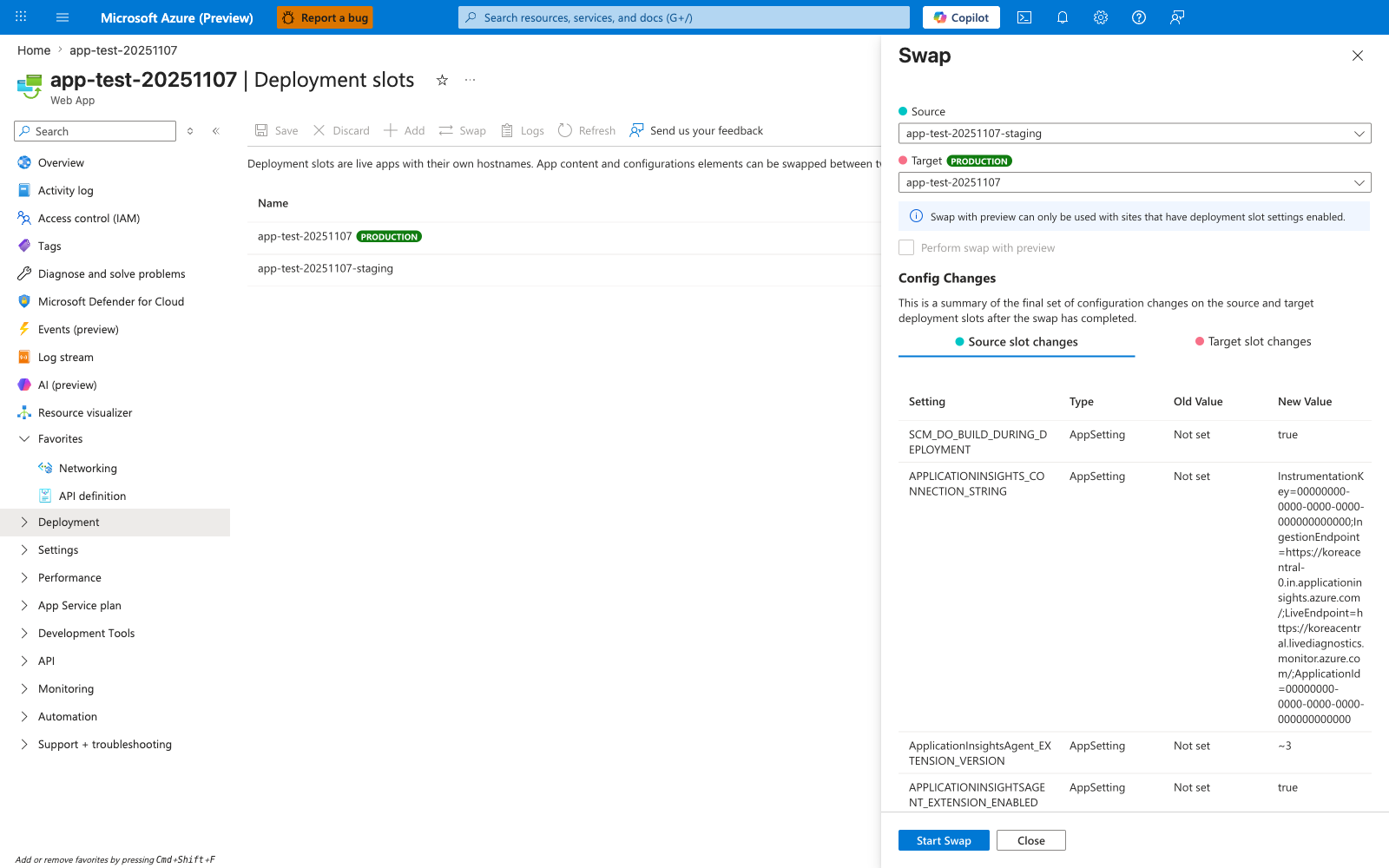
The Deployment slots blade with the Swap panel open is the Portal counterpart to the az webapp deployment slot swap command this recipe drives from CI. The Source: app-test-20251107-staging and Target: app-test-20251107 selectors mirror the staging-to-production promotion direction the recipe validates against. The Config Changes table at the bottom previews how slot-sticky settings will move during the swap, including the APPLICATIONINSIGHTS_CONNECTION_STRING and SCM_DO_BUILD_DURING_DEPLOYMENT rows visible here — the same delta you should inspect before clicking Start Swap. Use this Portal view as the manual checkpoint complementing the automated pre-swap warm-up and health probe steps the recipe issues against the staging slot.