Java Runtime
Runtime reference for Java 17 on Azure App Service Linux with Spring Boot 3.2.x. Use this document as the Java equivalent of a runtime compatibility and tuning sheet.
graph TD
    A[App Service Front End] --> B[Java SE container]
    B --> C[Spring Boot JAR process]
    C --> D[server.port uses PORT]
    E[JAVA_OPTS memory and GC] --> C
    F[linuxFxVersion JAVA 17-java17] --> B
Supported baseline in this guide
- Runtime target: Java 17
- Packaging target: executable JAR
- Hosting model: Java SE
- Framework baseline: Spring Boot 3.2.5
- Deployment baseline: Maven plugin (
azure-webapp-maven-plugin)
Runtime configuration commands
Set Java runtime:
az webapp config set \
  --resource-group $RG \
  --name $APP_NAME \
  --linux-fx-version "JAVA|17-java17" \
  --output json
| Command/Code | Purpose |
|---|---|
az webapp config set | Updates the App Service runtime configuration. |
--resource-group $RG | Targets the resource group that contains the web app. |
--name $APP_NAME | Selects the web app whose runtime will be changed. |
--linux-fx-version "JAVA|17-java17" | Sets the Linux runtime stack to Java 17. |
--output json | Returns the runtime configuration change in JSON format. |
Inspect runtime settings:
az webapp config show \
  --resource-group $RG \
  --name $APP_NAME \
  --query "{linuxFxVersion:linuxFxVersion,alwaysOn:alwaysOn,healthCheckPath:healthCheckPath}" \
  --output json
| Command/Code | Purpose |
|---|---|
az webapp config show | Reads the effective runtime configuration for the app. |
--query "{linuxFxVersion:linuxFxVersion,alwaysOn:alwaysOn,healthCheckPath:healthCheckPath}" | Limits the output to the most important runtime and health settings. |
--output json | Returns the selected configuration fields as JSON. |
JAVA_OPTS reference
Recommended baseline:
Apply via app settings:
az webapp config appsettings set \
  --resource-group $RG \
  --name $APP_NAME \
  --settings "JAVA_OPTS=-XX:InitialRAMPercentage=25.0 -XX:MaxRAMPercentage=70.0 -XX:+UseG1GC -XX:+ExitOnOutOfMemoryError" \
  --output json
| Command/Code | Purpose |
|---|---|
az webapp config appsettings set | Stores JVM tuning values as App Service application settings. |
--settings "JAVA_OPTS=-XX:InitialRAMPercentage=25.0 -XX:MaxRAMPercentage=70.0 -XX:+UseG1GC -XX:+ExitOnOutOfMemoryError" | Applies the recommended heap sizing, GC, and OOM behavior flags. |
--output json | Returns the updated app settings in JSON format. |
Startup command patterns
Most Java SE deployments can use platform defaults. For explicit startup control:
az webapp config set \
  --resource-group $RG \
  --name $APP_NAME \
  --startup-file "java $JAVA_OPTS -jar /home/site/wwwroot/*.jar --server.port=\$PORT" \
  --output json
| Command/Code | Purpose |
|---|---|
az webapp config set | Sets an explicit startup command for the Java app. |
--startup-file "java $JAVA_OPTS -jar /home/site/wwwroot/*.jar --server.port=\$PORT" | Launches the deployed JAR with JAVA_OPTS and binds it to the App Service port. |
--output json | Returns the startup command update in JSON format. |
Spring Boot runtime essentials
Required properties:
| Command/Code | Purpose |
|---|---|
server.port=${PORT:8080} | Uses the App Service-assigned port in Azure and falls back to 8080 locally. |
server.shutdown=graceful | Enables graceful shutdown handling for in-flight requests. |
spring.lifecycle.timeout-per-shutdown-phase=20s | Gives Spring components up to 20 seconds to stop cleanly. |
Optional production-oriented settings:
| Command/Code | Purpose |
|---|---|
management.endpoints.web.exposure.include=health,info | Exposes the health and info management endpoints over HTTP. |
spring.main.banner-mode=off | Disables the Spring Boot startup banner in logs. |
Tomcat Hosting Model (WAR Deployment)
This guide's baseline is Java SE with executable JARs (Spring Boot), but App Service Linux also provides a managed Tomcat container that runs traditional WAR deployments without you packaging the servlet container yourself.
| Hosting model | Artifact | Startup |
|---|---|---|
| Java SE | executable JAR | platform invokes java -jar against your JAR |
| Tomcat | WAR | Tomcat serves a WAR deployed via az webapp deploy --type war |
Representative Linux stack identifiers (run az webapp list-runtimes --os linux --output table for the current authoritative list):
- Java SE:
JAVA|17-java17 - Tomcat:
TOMCAT|10.1-java17
Set the Tomcat runtime stack:
az webapp config set \
  --resource-group $RG \
  --name $APP_NAME \
  --linux-fx-version "TOMCAT|10.1-java17" \
  --output json
| Command/Code | Purpose |
|---|---|
az webapp config set | Updates the App Service runtime configuration. |
--linux-fx-version "TOMCAT|10.1-java17" | Selects the managed Tomcat 10.1 container running on Java 17. |
--output json | Returns the runtime configuration change in JSON format. |
Deploy a WAR to the running Tomcat:
az webapp deploy \
  --resource-group $RG \
  --name $APP_NAME \
  --src-path ./target/myapp.war \
  --type war \
  --output json
Deployment path conventions
az webapp deploy --type war uploads through the OneDeploy endpoint. By default, the WAR is renamed and placed under /home/site/wwwroot/app.war, regardless of the local file name, and is served at the root context (/). Because this default targets a single path, the OneDeploy method effectively supports one WAR per app.
If you need to deploy multiple WARs to a single Tomcat instance, use --target-path to control where each artifact lands (for example, deploying to webapps/<name>.war under wwwroot), or use a multi-WAR-friendly deployment method such as FTP/SCM file copy into the Tomcat webapps directory. Consult Microsoft Learn for the authoritative behavior of each deployment method.
JVM tuning with CATALINA_OPTS
Tomcat reads CATALINA_OPTS (in addition to JAVA_OPTS) for server-process JVM flags. Use CATALINA_OPTS for Tomcat-specific tuning so the flags are unambiguously scoped to the servlet container:
az webapp config appsettings set \
  --resource-group $RG \
  --name $APP_NAME \
  --settings "CATALINA_OPTS=-XX:InitialRAMPercentage=25.0 -XX:MaxRAMPercentage=70.0 -XX:+UseG1GC -XX:+ExitOnOutOfMemoryError" \
  --output json
The heap sizing, GC, and OOM behavior guidance in the next section applies to both hosting models — the only difference is which environment variable carries the flags.
Choosing between Java SE and Tomcat
Choose Tomcat when you have an existing WAR-based pipeline, dependency on servlet container features (JSP, JNDI resources), or organizational standardization on Tomcat. New greenfield services on App Service generally use Java SE with an embedded server (Spring Boot, Quarkus, Micronaut), which gives you full control over the container, framework version, and startup behavior. The remaining sections of this document focus on the Java SE hosting model used by the rest of this guide.
Memory defaults and tuning heuristics
| Workload type | Suggested max RAM percentage |
|---|---|
| Light API | 65-70% |
| Typical business API | 70-75% |
| Heavy in-memory processing | 75-80% (with testing) |
Leave remaining memory for non-heap allocations and platform overhead.
Common JVM flags for App Service
| Flag | Purpose |
|---|---|
-XX:MaxRAMPercentage | heap cap relative to container memory |
-XX:InitialRAMPercentage | initial heap sizing |
-XX:+UseG1GC | balanced GC for server workloads |
-XX:+ExitOnOutOfMemoryError | fail fast for clean platform recovery |
-Djava.security.egd=file:/dev/urandom | reduce entropy blocking on startup (if needed) |
Validate effective runtime at deployment time
az webapp config appsettings list --resource-group $RG --name $APP_NAME --output table
az webapp log tail --resource-group $RG --name $APP_NAME
| Command/Code | Purpose |
|---|---|
az webapp config appsettings list --resource-group $RG --name $APP_NAME --output table | Reviews the applied App Service settings, including JAVA_OPTS. |
az webapp log tail --resource-group $RG --name $APP_NAME | Streams startup logs so you can confirm Java version, profile, and port binding. |
Look for startup logs confirming Java version, active profiles, and listening port.
Runtime anti-patterns
- fixed
-Xmxcopied across all SKUs - production deployments without explicit OOM behavior
- long, unbounded startup hooks
- mixing conflicting runtime settings between startup command and app settings
Java-Specific Considerations
- Keep runtime policy in version-controlled ops docs, not tribal memory.
- Re-evaluate
JAVA_OPTSafter every SKU or workload profile change. - Standardize one startup pattern per environment to reduce drift.
- Verify runtime assumptions in staging slot before production swap.
Run It in the Portal
Portal view: Environment variables blade (runtime app settings managed here)
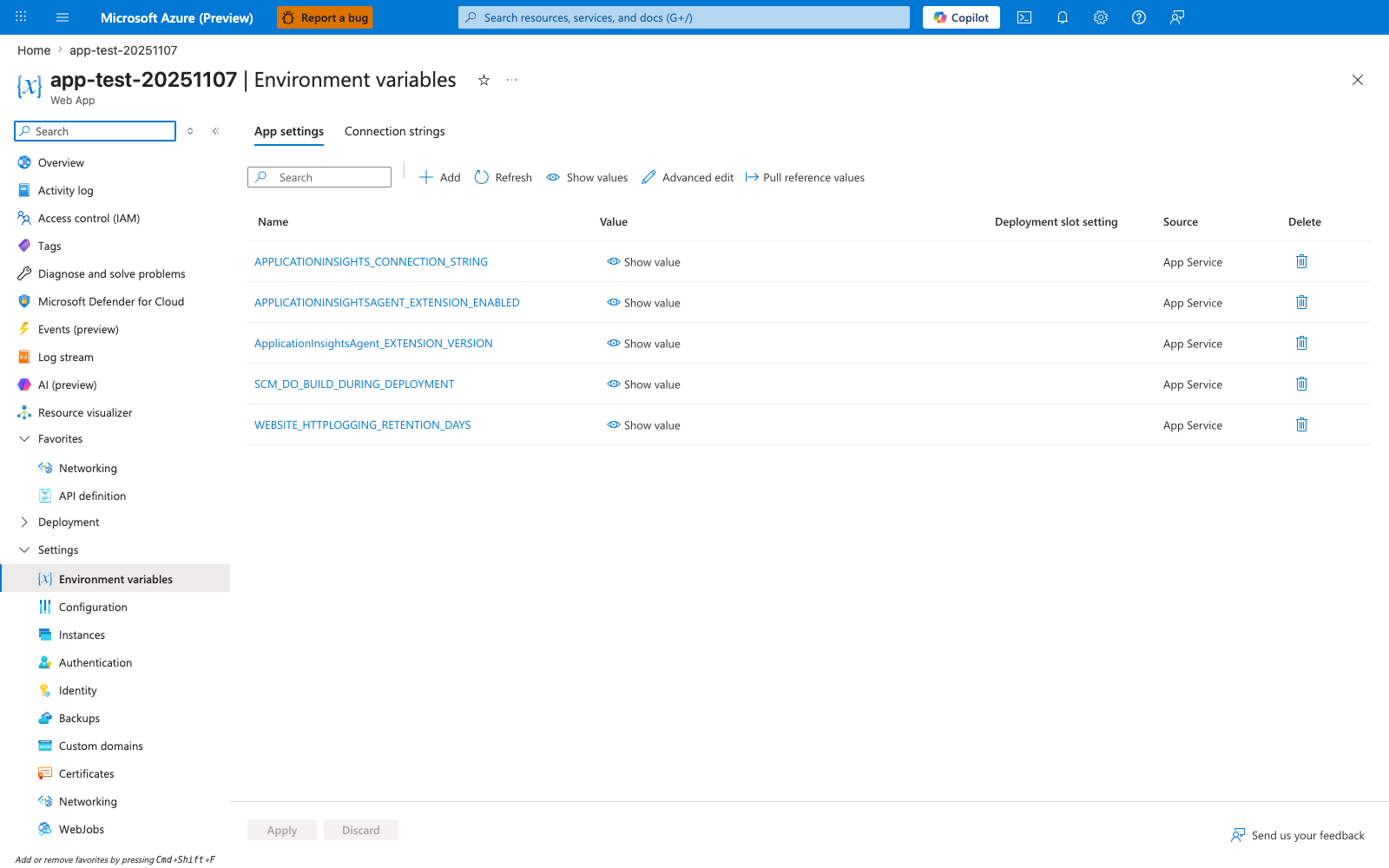
The Environment variables blade with the App settings tab selected is the Portal view of the runtime settings table for this Java app. In this screenshot the visible rows — APPLICATIONINSIGHTS_CONNECTION_STRING, APPLICATIONINSIGHTSAGENT_EXTENSION_ENABLED, ApplicationInsightsAgent_EXTENSION_VERSION, SCM_DO_BUILD_DURING_DEPLOYMENT, and WEBSITE_HTTPLOGGING_RETENTION_DAYS — appear in the same Name, Value, Deployment slot setting, and Source layout you read with az webapp config appsettings list. The Show value, Advanced edit, and Pull reference values actions in the toolbar make this the same surface where Java runtime settings such as JAVA_OPTS and SPRING_PROFILES_ACTIVE are inspected when added. The highlighted Environment variables entry in the left navigation confirms the exact blade readers should open when checking runtime configuration.
See Also
- Reference: CLI Cheatsheet
- Reference: Platform Limits
- Operations: Scaling
- Platform: How App Service Works