06. CI/CD with Azure DevOps
Implement continuous integration and deployment for the .NET guide using Azure DevOps Pipelines as the primary delivery workflow.
Infrastructure Context
Service: App Service (Windows, Standard S1) | Network: VNet integrated | VNet: ✅
This tutorial assumes a production-ready App Service deployment with VNet integration, private endpoints for backend services, and managed identity for authentication.
flowchart TD
    INET[Internet] -->|HTTPS| WA["Web App\nApp Service S1\nWindows .NET 8"]

    subgraph VNET["VNet 10.0.0.0/16"]
        subgraph INT_SUB["Integration Subnet 10.0.1.0/24\nDelegation: Microsoft.Web/serverFarms"]
            WA
        end
        subgraph PE_SUB["Private Endpoint Subnet 10.0.2.0/24"]
            PE_KV[PE: Key Vault]
            PE_SQL[PE: Azure SQL]
            PE_ST[PE: Storage]
        end
    end

    PE_KV --> KV[Key Vault]
    PE_SQL --> SQL[Azure SQL]
    PE_ST --> ST[Storage Account]

    subgraph DNS[Private DNS Zones]
        DNS_KV[privatelink.vaultcore.azure.net]
        DNS_SQL[privatelink.database.windows.net]
        DNS_ST[privatelink.blob.core.windows.net]
    end

    PE_KV -.-> DNS_KV
    PE_SQL -.-> DNS_SQL
    PE_ST -.-> DNS_ST

    WA -.->|System-Assigned MI| ENTRA[Microsoft Entra ID]
    WA --> AI[Application Insights]

    style WA fill:#0078d4,color:#fff
    style VNET fill:#E8F5E9,stroke:#4CAF50
    style DNS fill:#E3F2FD
flowchart TD
A[Commit to main] --> B[Build stage restore/build/test]
B --> C[Publish artifact]
C --> D[Deploy stage to App Service]
D --> E[Environment approval]
E --> F[Production validation]Prerequisites
- Tutorial 05. Infrastructure as Code completed
- Azure DevOps project with pipeline permissions
- Azure Resource Manager service connection configured
What you'll learn
- How
azure-pipelines.ymlbuilds and publishes the app - How deployment stage pushes package to Windows App Service
- How environments and approvals protect production
- Which variables and service connections are required
Main content
1) Review pipeline structure
The guide uses a two-stage pipeline:
- Build: restore, build, test, publish artifact
- Deploy: deploy artifact with
AzureWebApp@1
Pipeline skeleton:
trigger:
  branches:
    include:
      - main

pool:
  vmImage: 'windows-latest'

stages:
  - stage: Build
  - stage: Deploy
2) Build stage details
- task: UseDotNet@2
  inputs:
    packageType: sdk
    version: $(dotnetVersion)

- script: dotnet restore
  displayName: Restore dependencies
  workingDirectory: apps/dotnet-aspnetcore/GuideApi

- script: dotnet build --configuration $(buildConfiguration) --no-restore
  displayName: Build
  workingDirectory: apps/dotnet-aspnetcore/GuideApi

- script: dotnet test --configuration $(buildConfiguration) --no-build
  displayName: Test
  workingDirectory: apps/dotnet-aspnetcore/GuideApi
3) Publish stage artifact
- script: dotnet publish --configuration $(buildConfiguration) --output $(Build.ArtifactStagingDirectory)
  displayName: Publish app artifacts
  workingDirectory: apps/dotnet-aspnetcore/GuideApi

- publish: $(Build.ArtifactStagingDirectory)
  artifact: drop
4) Deploy stage to App Service
- stage: Deploy
  dependsOn: Build
  condition: succeeded()
  jobs:
    - deployment: Deploy
      environment: 'production'
      strategy:
        runOnce:
          deploy:
            steps:
              - task: AzureWebApp@1
                inputs:
                  azureSubscription: $(azureSubscription)
                  appType: webApp
                  appName: $(webAppName)
                  package: '$(Pipeline.Workspace)/drop/**/*.zip'
5) Required variables
Define these securely (pipeline variables or variable group):
azureSubscription: service connection namewebAppName: target app service nameresourceGroupName: target resource groupdotnetVersion:8.0.x
6) Add environment approvals
Use Azure DevOps Environment checks for production:
- Create
productionenvironment in Azure DevOps. - Add manual approval policy.
- Attach deployment job to
environment: 'production'.
7) Align application code with pipeline output
builder.Services.AddControllers();
builder.Services.AddApplicationInsightsTelemetry();
app.MapControllers();
app.Run();
| Command/Code | Purpose |
|---|---|
builder.Services.AddControllers(); | Registers controller support for the API application. |
builder.Services.AddApplicationInsightsTelemetry(); | Enables telemetry collection in deployed environments. |
app.MapControllers(); | Maps attribute-routed controller endpoints into the request pipeline. |
app.Run(); | Starts the ASP.NET Core application. |
Because pipeline deploys published binaries, startup behavior must not depend on local-only files.
8) Optional smoke test in pipeline
- task: AzureCLI@2
  displayName: Smoke test health endpoint
  inputs:
    azureSubscription: $(azureSubscription)
    scriptType: bash
    scriptLocation: inlineScript
    inlineScript: |
      curl --fail --silent "https://$(webAppName).azurewebsites.net/health"
9) Manual equivalent commands
Use these for debugging outside pipeline:
dotnet publish "apps/dotnet-aspnetcore/GuideApi/GuideApi.csproj" --configuration Release --output "/tmp/guideapi-publish"
az webapp deploy --resource-group "$RESOURCE_GROUP_NAME" --name "$WEB_APP_NAME" --src-path "/tmp/guideapi.zip" --type zip --output json
| Command/Code | Purpose |
|---|---|
dotnet publish "apps/dotnet-aspnetcore/GuideApi/GuideApi.csproj" --configuration Release --output "/tmp/guideapi-publish" | Produces release-ready publish output outside the pipeline for debugging. |
az webapp deploy --resource-group "$RESOURCE_GROUP_NAME" --name "$WEB_APP_NAME" --src-path "/tmp/guideapi.zip" --type zip --output json | Deploys a zip package manually to App Service. |
Why Azure DevOps is the differentiator
This guide is intentionally Azure DevOps-first. Keep your YAML as the source of truth for repeatable enterprise deployment.
Verification
After a successful run:
- Build stage artifacts contain published .NET output.
- Deploy stage targets the correct app.
/healthreturns HTTP 200.- Deployment appears in App Service deployment history.
| Command/Code | Purpose |
|---|---|
curl --include "https://$WEB_APP_NAME.azurewebsites.net/health" | Verifies the deployed app health endpoint and returns HTTP headers. |
Troubleshooting
Service connection authorization failure
Re-authorize the Azure Resource Manager service connection and ensure pipeline has permission to use it.
Package path not found
Confirm artifact name (drop) and deploy package glob path exactly match published artifact layout.
Runtime startup errors after deployment
Inspect Log Stream and Kudu diagnostics; redeploy after a clean publish from the same SDK version as pipeline.
Run It in the Portal
Portal view: Deployment Center blade (built-in GitHub integration shown for comparison)
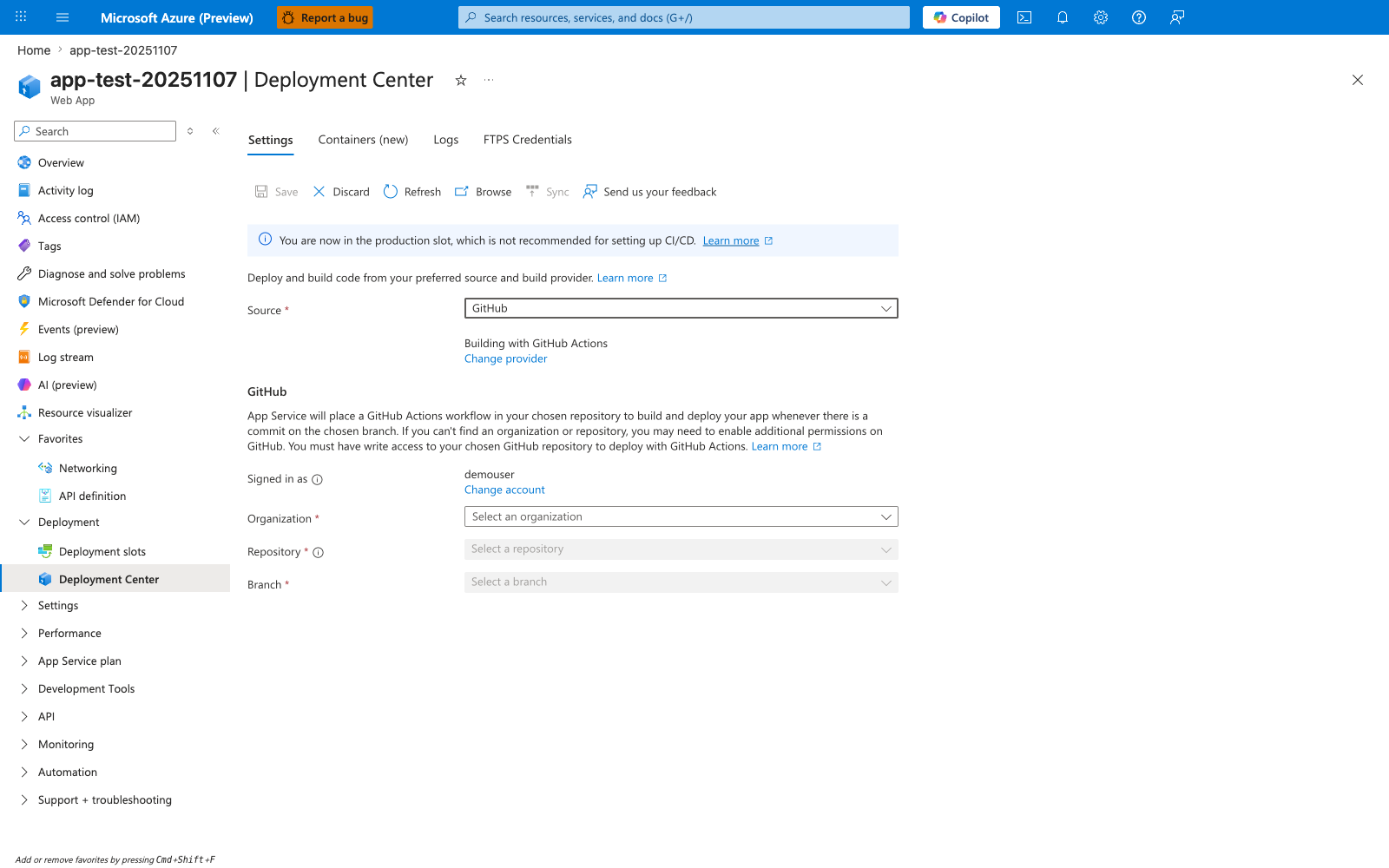
The Deployment Center blade shown here is App Service's built-in GitHub integration surface: the visible Source: GitHub, Building with GitHub Actions, and empty Organization / Repository / Branch selectors all belong to that flow. This .NET tutorial uses Azure DevOps Pipelines instead, so treat this capture as a contrast with App Service-managed CI/CD rather than the verification surface for the AzureWebApp@1 pipeline defined above. The production-slot banner is still useful context because it shows the app is being configured directly on the live slot.
See Also
- 07. Custom Domain & SSL
- Reference: Azure DevOps Pipeline Variables
- For platform details, see Azure App Service Guide