05. Infrastructure as Code
Use Bicep to provision reproducible Windows App Service infrastructure for ASP.NET Core 8, including diagnostics and deployment-ready outputs.
Infrastructure Context
Service: App Service (Windows, Standard S1) | Network: VNet integrated | VNet: ✅
This tutorial assumes a production-ready App Service deployment with VNet integration, private endpoints for backend services, and managed identity for authentication.
flowchart TD
    INET[Internet] -->|HTTPS| WA["Web App\nApp Service S1\nWindows .NET 8"]

    subgraph VNET["VNet 10.0.0.0/16"]
        subgraph INT_SUB["Integration Subnet 10.0.1.0/24\nDelegation: Microsoft.Web/serverFarms"]
            WA
        end
        subgraph PE_SUB["Private Endpoint Subnet 10.0.2.0/24"]
            PE_KV[PE: Key Vault]
            PE_SQL[PE: Azure SQL]
            PE_ST[PE: Storage]
        end
    end

    PE_KV --> KV[Key Vault]
    PE_SQL --> SQL[Azure SQL]
    PE_ST --> ST[Storage Account]

    subgraph DNS[Private DNS Zones]
        DNS_KV[privatelink.vaultcore.azure.net]
        DNS_SQL[privatelink.database.windows.net]
        DNS_ST[privatelink.blob.core.windows.net]
    end

    PE_KV -.-> DNS_KV
    PE_SQL -.-> DNS_SQL
    PE_ST -.-> DNS_ST

    WA -.->|System-Assigned MI| ENTRA[Microsoft Entra ID]
    WA --> AI[Application Insights]

    style WA fill:#0078d4,color:#fff
    style VNET fill:#E8F5E9,stroke:#4CAF50
    style DNS fill:#E3F2FD
flowchart TD
A[Define Bicep parameters] --> B[Create App Service Plan reserved:false]
B --> C[Create Web App netFrameworkVersion v8.0]
C --> D[Apply site settings and diagnostics]
D --> E[Export outputs for deployment]Prerequisites
- Tutorial 04. Logging & Monitoring completed
- Basic understanding of Azure Resource Manager and Bicep modules
What you'll learn
- How the guide's Bicep template models Windows App Service
- Why
reserved: falseis required for Windows plans - How runtime metadata (
netFrameworkVersion,CURRENT_STACK) is set - How outputs support manual deploy and Azure DevOps stages
Main content
1) Core deployment command
az deployment group create \
  --resource-group "$RESOURCE_GROUP_NAME" \
  --template-file "infra/main.bicep" \
  --parameters baseName="$BASE_NAME" location="$LOCATION" appServicePlanSku="B1" \
  --output table
| Command/Code | Purpose |
|---|---|
az deployment group create --resource-group "$RESOURCE_GROUP_NAME" --template-file "infra/main.bicep" --parameters baseName="$BASE_NAME" location="$LOCATION" appServicePlanSku="B1" --output table | Deploys the Bicep template to the target resource group with the supplied parameters. |
2) Windows App Service plan essentials
In Bicep, Windows App Service must not be marked as Linux reserved.
resource appServicePlan 'Microsoft.Web/serverfarms@2023-01-01' = {
  name: appServicePlanName
  location: location
  sku: {
    name: appServicePlanSku
    tier: 'Basic'
  }
  kind: 'app'
  properties: {
    reserved: false
  }
}
| Command/Code | Purpose |
|---|---|
resource appServicePlan 'Microsoft.Web/serverfarms@2023-01-01' | Declares the App Service plan resource in Bicep. |
sku: { name: appServicePlanSku tier: 'Basic' } | Sets the pricing SKU and tier for the hosting plan. |
kind: 'app' | Marks the plan as an App Service plan for web apps. |
reserved: false | Ensures the plan is created as Windows, not Linux. |
3) Web app runtime settings for .NET 8
resource webApp 'Microsoft.Web/sites@2023-01-01' = {
  name: webAppName
  location: location
  kind: 'app'
  properties: {
    serverFarmId: appServicePlan.id
    siteConfig: {
      netFrameworkVersion: 'v8.0'
      metadata: [
        {
          name: 'CURRENT_STACK'
          value: 'dotnet'
        }
      ]
    }
  }
}
| Command/Code | Purpose |
|---|---|
resource webApp 'Microsoft.Web/sites@2023-01-01' | Declares the App Service site resource in Bicep. |
serverFarmId: appServicePlan.id | Links the web app to the App Service plan created earlier. |
netFrameworkVersion: 'v8.0' | Configures the Windows App Service runtime for .NET 8. |
metadata: [{ name: 'CURRENT_STACK' value: 'dotnet' }] | Sets stack metadata so the portal reflects the intended runtime. |
These fields keep the portal/runtime aligned with the intended stack for Windows-hosted .NET apps.
4) App settings defined as code
resource appSettings 'Microsoft.Web/sites/config@2023-01-01' = {
  name: '${webApp.name}/appsettings'
  properties: {
    ASPNETCORE_ENVIRONMENT: 'Production'
    WEBSITE_RUN_FROM_PACKAGE: '1'
    APPLICATIONINSIGHTS_CONNECTION_STRING: appInsights.properties.ConnectionString
  }
}
| Command/Code | Purpose |
|---|---|
resource appSettings 'Microsoft.Web/sites/config@2023-01-01' | Declares the App Settings configuration resource for the web app. |
ASPNETCORE_ENVIRONMENT: 'Production' | Sets the app to run with production configuration by default. |
WEBSITE_RUN_FROM_PACKAGE: '1' | Tells App Service to run the app from a deployed package. |
APPLICATIONINSIGHTS_CONNECTION_STRING: appInsights.properties.ConnectionString | Injects the Application Insights connection string into app settings. |
5) Outputs for downstream automation
output webAppName string = webApp.name
output webAppUrl string = 'https://${webApp.properties.defaultHostName}'
output appInsightsName string = appInsights.name
| Command/Code | Purpose |
|---|---|
output webAppName string = webApp.name | Exposes the deployed web app name for downstream scripts or pipelines. |
output webAppUrl string = 'https://${webApp.properties.defaultHostName}' | Exposes the default HTTPS URL of the deployed web app. |
output appInsightsName string = appInsights.name | Exposes the Application Insights resource name for later steps. |
Outputs are consumed by deployment scripts and pipeline variable mapping.
6) Tie IaC choices to application code
var port = Environment.GetEnvironmentVariable("HTTP_PLATFORM_PORT")
    ?? Environment.GetEnvironmentVariable("PORT")
    ?? "5000";

builder.WebHost.UseUrls($"http://+:{port}");
builder.Services.AddApplicationInsightsTelemetry();
| Command/Code | Purpose |
|---|---|
Environment.GetEnvironmentVariable("HTTP_PLATFORM_PORT") | Reads the platform-provided port used by Windows App Service. |
Environment.GetEnvironmentVariable("PORT") | Falls back to another common hosting port variable. |
builder.WebHost.UseUrls($"http://+:{port}") | Binds the app to the resolved port so infrastructure and app agree. |
builder.Services.AddApplicationInsightsTelemetry(); | Enables telemetry collection that matches the provisioned monitoring resources. |
Infrastructure and code should agree on runtime assumptions: port injection, telemetry connection string, and production environment.
7) Azure DevOps IaC stage example
- stage: Infra
  displayName: Provision Infrastructure
  jobs:
    - job: DeployBicep
      steps:
        - task: AzureCLI@2
          inputs:
            azureSubscription: $(azureSubscription)
            scriptType: bash
            scriptLocation: inlineScript
            inlineScript: |
              az deployment group create \
                --resource-group $(resourceGroupName) \
                --template-file infra/main.bicep \
                --parameters baseName=$(baseName) location=$(location) \
                --output table
Separate infra and app deploy in production
Keep infrastructure deployment idempotent and infrequent. Deploy app code frequently against stable infrastructure.
Verification
| Command/Code | Purpose |
|---|---|
az webapp show --resource-group "$RESOURCE_GROUP_NAME" --name "$WEB_APP_NAME" --output json | Retrieves the deployed web app resource definition for verification. |
Check:
- App Service Plan kind is
app(Windows) reservedisfalse- Site runtime metadata reflects .NET stack
- App Insights connection string exists in App Settings
Troubleshooting
Runtime mismatch in portal
Confirm siteConfig.netFrameworkVersion and metadata were applied in the deployed template.
Bicep deployment drift
Run a what-if before applying changes:
az deployment group what-if \
  --resource-group "$RESOURCE_GROUP_NAME" \
  --template-file "infra/main.bicep" \
  --parameters baseName="$BASE_NAME" location="$LOCATION"
| Command/Code | Purpose |
|---|---|
az deployment group what-if --resource-group "$RESOURCE_GROUP_NAME" --template-file "infra/main.bicep" --parameters baseName="$BASE_NAME" location="$LOCATION" | Previews infrastructure changes before applying the Bicep deployment. |
Hidden dependency ordering issue
Split resources into modules and expose explicit outputs/inputs to avoid implicit timing assumptions.
CLI Alternative (No Bicep)
Use this imperative path when you need quick provisioning without changing your Bicep workflow.
Step 1: Set variables
SUBSCRIPTION_ID="<subscription-id>"
RG="rg-dotnet-tutorial"
LOCATION="koreacentral"
PLAN_NAME="plan-dotnet-tutorial-s1"
APP_NAME="app-dotnet-tutorial-abc123"
VNET_NAME="vnet-dotnet-tutorial"
INTEGRATION_SUBNET_NAME="snet-appsvc-integration"
| Command/Code | Purpose |
|---|---|
SUBSCRIPTION_ID="<subscription-id>" | Stores the Azure subscription used for imperative provisioning. |
RG, LOCATION, PLAN_NAME, APP_NAME | Define the core resource group, region, plan, and web app names. |
VNET_NAME, INTEGRATION_SUBNET_NAME | Define the networking resources used for VNet integration. |
Expected output
Step 2: Create resource group, plan, and app
az account set --subscription $SUBSCRIPTION_ID
az group create --name $RG --location $LOCATION
az appservice plan create --resource-group $RG --name $PLAN_NAME --sku S1
az webapp create --resource-group $RG --plan $PLAN_NAME --name $APP_NAME --runtime "DOTNETCORE|8.0"
| Command/Code | Purpose |
|---|---|
az account set --subscription $SUBSCRIPTION_ID | Sets the active subscription for the CLI session. |
az group create --name $RG --location $LOCATION | Creates the resource group for the manual deployment path. |
az appservice plan create --resource-group $RG --name $PLAN_NAME --sku S1 | Creates the App Service plan that will host the app. |
az webapp create --resource-group $RG --plan $PLAN_NAME --name $APP_NAME --runtime "DOTNETCORE\|8.0" | Creates the .NET 8 App Service instance. |
Expected output
Step 3: Configure app settings
az webapp config appsettings set --resource-group $RG --name $APP_NAME --settings ASPNETCORE_ENVIRONMENT=Production WEBSITE_RUN_FROM_PACKAGE=1
| Command/Code | Purpose |
|---|---|
az webapp config appsettings set --resource-group $RG --name $APP_NAME --settings ASPNETCORE_ENVIRONMENT=Production WEBSITE_RUN_FROM_PACKAGE=1 | Applies production environment and package-based deployment settings to the app. |
Expected output
Step 4 (Optional): Add VNet integration
az network vnet create --resource-group $RG --name $VNET_NAME --location $LOCATION --address-prefixes 10.0.0.0/16
az network vnet subnet create --resource-group $RG --vnet-name $VNET_NAME --name $INTEGRATION_SUBNET_NAME --address-prefixes 10.0.1.0/24 --delegations Microsoft.Web/serverFarms
az webapp vnet-integration add --resource-group $RG --name $APP_NAME --vnet $VNET_NAME --subnet $INTEGRATION_SUBNET_NAME
| Command/Code | Purpose |
|---|---|
az network vnet create --resource-group $RG --name $VNET_NAME --location $LOCATION --address-prefixes 10.0.0.0/16 | Creates the virtual network for the manual provisioning path. |
az network vnet subnet create --resource-group $RG --vnet-name $VNET_NAME --name $INTEGRATION_SUBNET_NAME --address-prefixes 10.0.1.0/24 --delegations Microsoft.Web/serverFarms | Creates the delegated subnet required by App Service VNet integration. |
az webapp vnet-integration add --resource-group $RG --name $APP_NAME --vnet $VNET_NAME --subnet $INTEGRATION_SUBNET_NAME | Attaches the web app to the integration subnet. |
Expected output
Step 5: Validate effective configuration
az webapp config show --resource-group $RG --name $APP_NAME --query "{netFrameworkVersion:netFrameworkVersion, windowsFxVersion:windowsFxVersion}" --output json
az webapp config appsettings list --resource-group $RG --name $APP_NAME --query "[?name=='ASPNETCORE_ENVIRONMENT' || name=='WEBSITE_RUN_FROM_PACKAGE']" --output json
| Command/Code | Purpose |
|---|---|
az webapp config show --resource-group $RG --name $APP_NAME --query "{netFrameworkVersion:netFrameworkVersion, windowsFxVersion:windowsFxVersion}" --output json | Checks the effective runtime stack configuration on the deployed app. |
az webapp config appsettings list --resource-group $RG --name $APP_NAME --query "[?name=='ASPNETCORE_ENVIRONMENT' || name=='WEBSITE_RUN_FROM_PACKAGE']" --output json | Verifies the key App Settings applied to the app. |
Run It in the Portal
Portal view: Resource group overview (verifying Bicep deployment outputs)
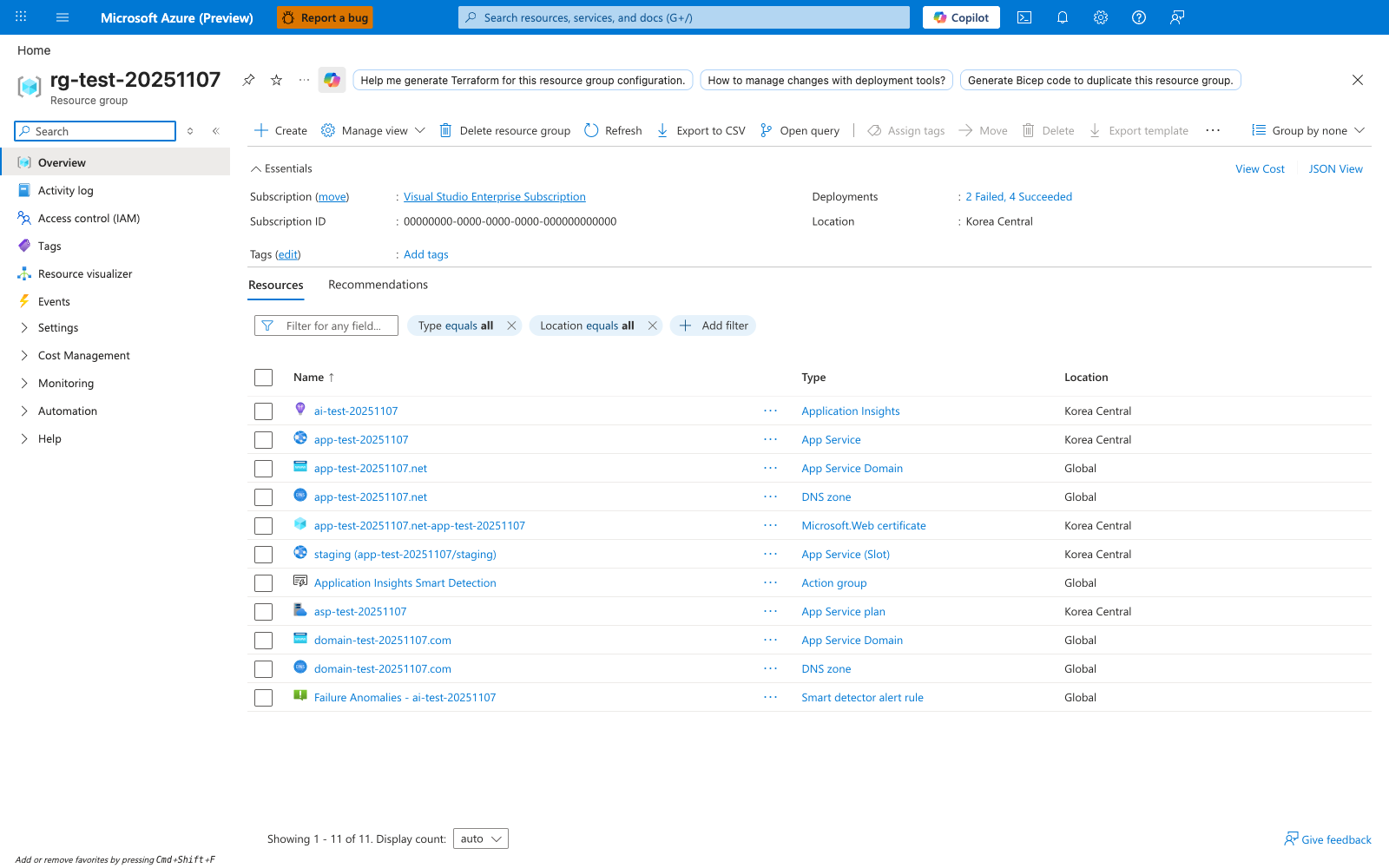
After running az deployment group create --template-file ./infra/main.bicep, the resource group overview is the Portal surface for checking what the deployment produced. The visible Resources tab shows App Service, App Service Plan, Application Insights, and other related rows grouped under one resource group, while the Deployments entry in Essentials is the link to follow when you need deployment history after a partial failure. The Export template button is also useful when you want to compare the deployed ARM state with the Bicep source in your repository.
See Also
- 06. CI/CD
- 02. First Deploy
- For platform details, see Azure App Service Guide