Private Network Deploy
Use this recipe after 02 - First Deploy when you need outbound VNet integration, private endpoints for dependencies, and managed identity for passwordless access.
flowchart TD
    USER[Browser] -->|HTTPS| APP[App Service\n.NET 8 app]

    subgraph VNET[Virtual network]
        APP --> INT[Integration subnet]
        PE_SQL[Private Endpoint: Azure SQL]
        PE_KV[Private Endpoint: Key Vault]
    end

    INT --> PE_SQL
    INT --> PE_KV
    PE_SQL --> SQL[Azure SQL]
    PE_KV --> KV[Key Vault]
    APP -.-> MI[System-assigned managed identity]
    MI -.-> ENTRA[Microsoft Entra ID]

    style APP fill:#0078d4,color:#fff
    style VNET fill:#E8F5E9,stroke:#4CAF50
flowchart TD
    A[Create VNet and subnets] --> B[Integrate App Service]
    B --> C[Enable managed identity]
    C --> D[Create private endpoints and DNS links]
    D --> E[Grant RBAC and deploy config]
    E --> F[Validate private connectivity]
Prerequisites
- Completed 02 - First Deploy
- App Service plan tier that supports VNet integration
- Existing Azure SQL server and Key Vault, or equivalent private-link capable services
- Permissions to configure networking, private DNS, RBAC, and managed identity
Main Content
Step 1: Set advanced deployment variables
RG="rg-dotnet-guide"
APP_NAME="app-dotnet-guide-abc123"
LOCATION="koreacentral"
VNET_NAME="vnet-dotnet-guide"
INTEGRATION_SUBNET_NAME="snet-appsvc-integration"
PRIVATE_ENDPOINT_SUBNET_NAME="snet-private-endpoints"
SQL_SERVER_NAME="sql-dotnet-guide"
KEY_VAULT_NAME="kv-dotnet-guide"
| Command/Parameter | Purpose |
RG="rg-dotnet-guide" | Reuses the resource group from the earlier deployment. |
APP_NAME="app-dotnet-guide-abc123" | Identifies the target App Service app. |
LOCATION="koreacentral" | Sets the Azure region for the networking resources. |
VNET_NAME="vnet-dotnet-guide" | Defines the virtual network for private connectivity. |
INTEGRATION_SUBNET_NAME="snet-appsvc-integration" | Names the delegated subnet used by App Service VNet integration. |
PRIVATE_ENDPOINT_SUBNET_NAME="snet-private-endpoints" | Names the subnet that hosts private endpoint NICs. |
SQL_SERVER_NAME="sql-dotnet-guide" | Identifies the Azure SQL server used in the example. |
KEY_VAULT_NAME="kv-dotnet-guide" | Identifies the Key Vault used with managed identity. |
Step 2: Create the VNet and required subnets
az network vnet create --resource-group "$RG" --name "$VNET_NAME" --location "$LOCATION" --address-prefixes "10.0.0.0/16"
az network vnet subnet create --resource-group "$RG" --vnet-name "$VNET_NAME" --name "$INTEGRATION_SUBNET_NAME" --address-prefixes "10.0.1.0/24" --delegations "Microsoft.Web/serverFarms"
az network vnet subnet create --resource-group "$RG" --vnet-name "$VNET_NAME" --name "$PRIVATE_ENDPOINT_SUBNET_NAME" --address-prefixes "10.0.2.0/24" --disable-private-endpoint-network-policies true
| Command/Parameter | Purpose |
az network vnet create | Creates the virtual network used by the private deployment pattern. |
--resource-group "$RG" | Places the VNet in the selected resource group. |
--name "$VNET_NAME" | Sets the VNet name. |
--location "$LOCATION" | Creates the VNet in the selected Azure region. |
--address-prefixes "10.0.0.0/16" | Defines the VNet CIDR block. |
az network vnet subnet create | Creates a subnet inside the VNet. |
--vnet-name "$VNET_NAME" | Targets the named VNet. |
--name "$INTEGRATION_SUBNET_NAME" | Names the App Service integration subnet. |
--address-prefixes "10.0.1.0/24" | Defines the CIDR range for the integration subnet. |
--delegations "Microsoft.Web/serverFarms" | Delegates the subnet to App Service. |
--name "$PRIVATE_ENDPOINT_SUBNET_NAME" | Names the private endpoint subnet. |
--address-prefixes "10.0.2.0/24" | Defines the CIDR range for the private endpoint subnet. |
--disable-private-endpoint-network-policies true | Disables policies that block private endpoint NICs. |
Step 3: Integrate the web app and enable managed identity
az webapp vnet-integration add --resource-group "$RG" --name "$APP_NAME" --vnet "$VNET_NAME" --subnet "$INTEGRATION_SUBNET_NAME"
az webapp identity assign --resource-group "$RG" --name "$APP_NAME"
| Command/Parameter | Purpose |
az webapp vnet-integration add | Connects outbound app traffic to the delegated VNet subnet. |
--resource-group "$RG" | Selects the resource group containing the app. |
--name "$APP_NAME" | Targets the web app to integrate. |
--vnet "$VNET_NAME" | Chooses the virtual network used for integration. |
--subnet "$INTEGRATION_SUBNET_NAME" | Chooses the delegated integration subnet. |
az webapp identity assign | Enables a system-assigned managed identity for passwordless Azure access. |
Step 4: Create private endpoints and private DNS links
SQL_SERVER_ID="$(az sql server show --resource-group "$RG" --name "$SQL_SERVER_NAME" --query id --output tsv)"
KEY_VAULT_ID="$(az keyvault show --resource-group "$RG" --name "$KEY_VAULT_NAME" --query id --output tsv)"

az network private-endpoint create --resource-group "$RG" --name "pe-sql-dotnet-guide" --vnet-name "$VNET_NAME" --subnet "$PRIVATE_ENDPOINT_SUBNET_NAME" --private-connection-resource-id "$SQL_SERVER_ID" --group-id sqlServer --connection-name "pe-sql-dotnet-guide-connection"
az network private-endpoint create --resource-group "$RG" --name "pe-kv-dotnet-guide" --vnet-name "$VNET_NAME" --subnet "$PRIVATE_ENDPOINT_SUBNET_NAME" --private-connection-resource-id "$KEY_VAULT_ID" --group-id vault --connection-name "pe-kv-dotnet-guide-connection"

az network private-dns zone create --resource-group "$RG" --name "privatelink.database.windows.net"
az network private-dns zone create --resource-group "$RG" --name "privatelink.vaultcore.azure.net"
az network private-dns link vnet create --resource-group "$RG" --zone-name "privatelink.database.windows.net" --name "sql-link" --virtual-network "$VNET_NAME" --registration-enabled false
az network private-dns link vnet create --resource-group "$RG" --zone-name "privatelink.vaultcore.azure.net" --name "kv-link" --virtual-network "$VNET_NAME" --registration-enabled false
| Command/Parameter | Purpose |
SQL_SERVER_ID="$(...)" | Stores the Azure SQL server resource ID in a shell variable. |
az sql server show | Reads the Azure SQL server metadata. |
--resource-group "$RG" | Selects the resource group containing the backend resources. |
--name "$SQL_SERVER_NAME" | Targets the Azure SQL server. |
--query id | Returns only the Azure SQL resource ID. |
--output tsv | Formats the ID as plain text for shell assignment. |
KEY_VAULT_ID="$(...)" | Stores the Key Vault resource ID in a shell variable. |
az keyvault show | Reads the Key Vault metadata. |
--name "$KEY_VAULT_NAME" | Targets the Key Vault. |
az network private-endpoint create | Creates a private endpoint in the private endpoint subnet. |
--name "pe-sql-dotnet-guide" | Names the Azure SQL private endpoint. |
--vnet-name "$VNET_NAME" | Places the endpoint in the selected VNet. |
--subnet "$PRIVATE_ENDPOINT_SUBNET_NAME" | Uses the subnet reserved for private endpoints. |
--private-connection-resource-id "$SQL_SERVER_ID" | Connects the endpoint to the Azure SQL server resource. |
--group-id sqlServer | Targets the Azure SQL private link subresource. |
--connection-name "pe-sql-dotnet-guide-connection" | Names the SQL private link connection object. |
--name "pe-kv-dotnet-guide" | Names the Key Vault private endpoint. |
--private-connection-resource-id "$KEY_VAULT_ID" | Connects the endpoint to the Key Vault resource. |
--group-id vault | Targets the Key Vault private link subresource. |
--connection-name "pe-kv-dotnet-guide-connection" | Names the Key Vault private link connection object. |
az network private-dns zone create | Creates a private DNS zone for private endpoint name resolution. |
--name "privatelink.database.windows.net" | Creates the Azure SQL private DNS zone. |
--name "privatelink.vaultcore.azure.net" | Creates the Key Vault private DNS zone. |
az network private-dns link vnet create | Links a private DNS zone to the VNet. |
--zone-name "privatelink.database.windows.net" | Selects the Azure SQL private DNS zone. |
--name "sql-link" | Names the Azure SQL VNet DNS link. |
--virtual-network "$VNET_NAME" | Links the DNS zone to the App Service VNet. |
--registration-enabled false | Disables auto-registration for service-managed records. |
--zone-name "privatelink.vaultcore.azure.net" | Selects the Key Vault private DNS zone. |
--name "kv-link" | Names the Key Vault VNet DNS link. |
DNS is part of the deployment
Private endpoints without private DNS links usually fail at runtime even when the endpoint itself shows as created.
WEB_APP_PRINCIPAL_ID="$(az webapp identity show --resource-group "$RG" --name "$APP_NAME" --query principalId --output tsv)"

az role assignment create --assignee-object-id "$WEB_APP_PRINCIPAL_ID" --assignee-principal-type ServicePrincipal --role "Key Vault Secrets User" --scope "$KEY_VAULT_ID"

az webapp config appsettings set --resource-group "$RG" --name "$APP_NAME" --settings \
  ConnectionStrings__SqlServer="Server=tcp:${SQL_SERVER_NAME}.database.windows.net,1433;Database=<database-name>;Encrypt=True;TrustServerCertificate=False;" \
  KeyVault__Uri="https://${KEY_VAULT_NAME}.vault.azure.net/"
| Command/Parameter | Purpose |
WEB_APP_PRINCIPAL_ID="$(...)" | Stores the web app managed identity object ID in a shell variable. |
az webapp identity show | Reads the managed identity details for the web app. |
--resource-group "$RG" | Selects the resource group containing the app. |
--name "$APP_NAME" | Targets the configured App Service app. |
--query principalId | Returns only the managed identity principal ID. |
--output tsv | Formats the principal ID as plain text for shell assignment. |
az role assignment create | Creates an RBAC assignment for the managed identity. |
--assignee-object-id "$WEB_APP_PRINCIPAL_ID" | Targets the web app's managed identity object ID. |
--assignee-principal-type ServicePrincipal | Tells Azure RBAC that the assignee is a service principal. |
--role "Key Vault Secrets User" | Grants secret read access in Key Vault. |
--scope "$KEY_VAULT_ID" | Applies the role assignment at the Key Vault scope. |
az webapp config appsettings set | Writes application settings into App Service configuration. |
--settings | Passes the key/value settings to store. |
ConnectionStrings__SqlServer="Server=tcp:${SQL_SERVER_NAME}.database.windows.net,1433;Database=<database-name>;Encrypt=True;TrustServerCertificate=False;" | Stores the SQL connection string shape while relying on token-based auth instead of a password. |
KeyVault__Uri="https://${KEY_VAULT_NAME}.vault.azure.net/" | Stores the Key Vault URI used by the app. |
using Azure.Identity;
using Azure.Security.KeyVault.Secrets;
using Microsoft.Data.SqlClient;

var credential = new DefaultAzureCredential();

builder.Services.AddSingleton(_ =>
    new SecretClient(new Uri(builder.Configuration["KeyVault:Uri"]!), credential));

var sqlToken = (await credential.GetTokenAsync(
    new Azure.Core.TokenRequestContext(new[] { "https://database.windows.net/.default" })
)).Token;

var sqlConnection = new SqlConnection(builder.Configuration.GetConnectionString("SqlServer"))
{
    AccessToken = sqlToken
};
| Command/Code | Purpose |
new DefaultAzureCredential() | Uses local developer identity locally and managed identity in App Service. |
new SecretClient(new Uri(builder.Configuration["KeyVault:Uri"]!), credential) | Creates a Key Vault client that authenticates with the managed identity token source. |
credential.GetTokenAsync(new Azure.Core.TokenRequestContext(new[] { "https://database.windows.net/.default" })) | Requests an Azure SQL access token for Microsoft Entra authentication. |
new SqlConnection(builder.Configuration.GetConnectionString("SqlServer")) | Opens the SQL connection using the configured server and database settings. |
AccessToken = sqlToken | Authenticates SQL connections without embedding passwords in configuration. |
Step 6: Validate the private deployment
az webapp vnet-integration list --resource-group "$RG" --name "$APP_NAME" --output table
az network private-endpoint list --resource-group "$RG" --output table
az webapp log tail --resource-group "$RG" --name "$APP_NAME"
| Command/Parameter | Purpose |
az webapp vnet-integration list | Confirms that the web app is attached to the expected integration subnet. |
--resource-group "$RG" | Selects the app resource group. |
--name "$APP_NAME" | Targets the web app being validated. |
--output table | Formats the VNet integration output for quick inspection. |
az network private-endpoint list | Lists private endpoints in the resource group. |
--resource-group "$RG" | Limits the private endpoint list to the current resource group. |
--output table | Formats the private endpoint list for quick review. |
az webapp log tail | Streams runtime logs while testing SQL and Key Vault access. |
--resource-group "$RG" | Selects the app resource group for log streaming. |
--name "$APP_NAME" | Targets the web app whose runtime logs you want to follow. |
Verification
az webapp vnet-integration list shows the correct VNet and subnet- Private endpoints show as created and approved
- The app can resolve SQL and Key Vault hostnames through private DNS
DefaultAzureCredential succeeds in App Service without secrets
Troubleshooting
Private endpoint exists but app cannot connect
- Validate private DNS zone links first.
- Confirm the app is integrated with the expected VNet and subnet.
- Review NSG and route table rules on both subnets.
Managed identity authentication fails
- Confirm the web app identity is enabled.
- Wait for RBAC propagation after role assignment.
- Verify the SQL or Key Vault permission model matches your target service.
SQL hostname still resolves publicly
- Check the
privatelink.database.windows.net zone link. - Confirm no custom DNS server is overriding Azure private DNS behavior.
Run It in the Portal
Portal view: Access Restrictions blade (public reachability before separate inbound hardening)
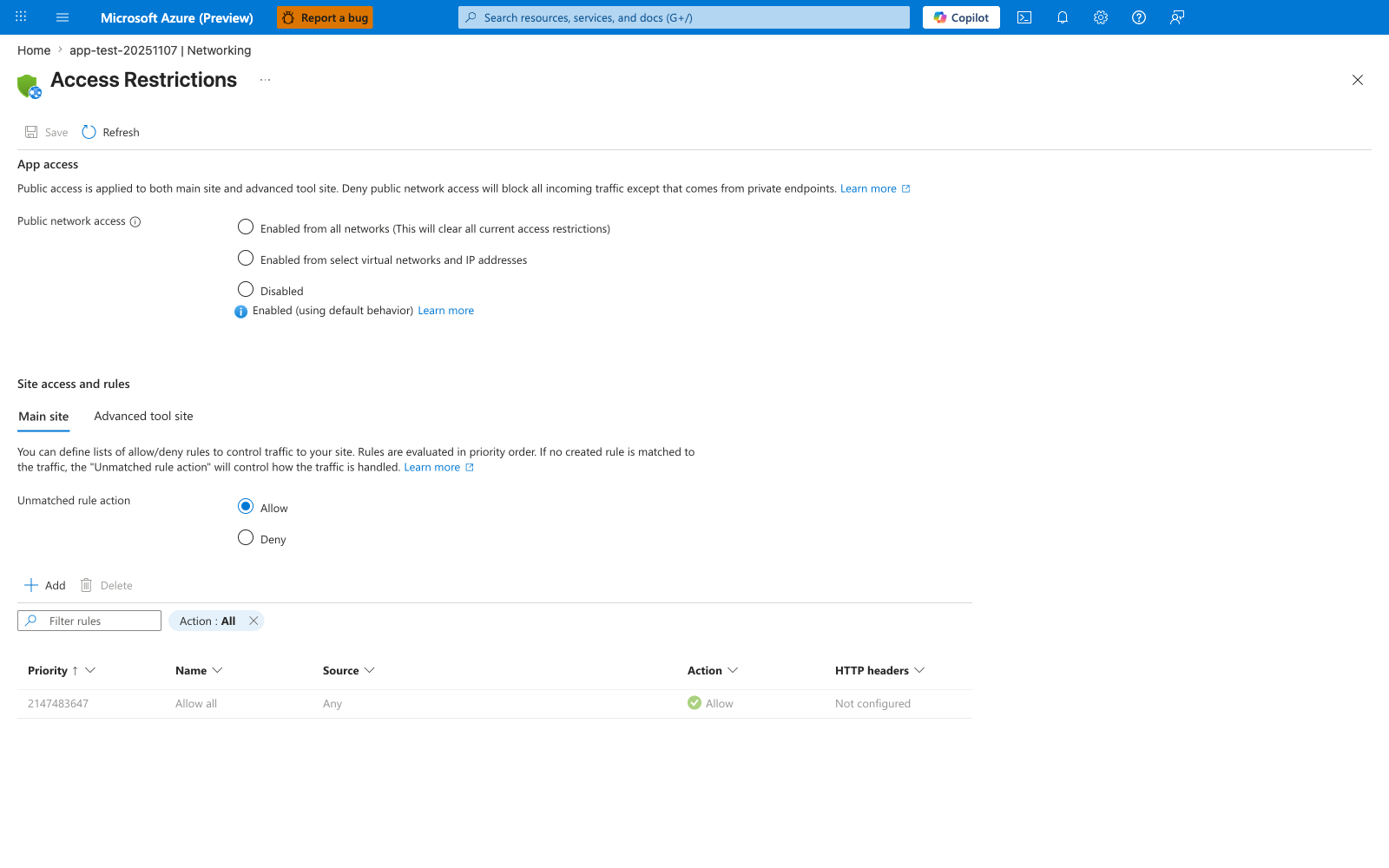
The Access Restrictions blade is the Portal surface that shows whether the ASP.NET Core app is still publicly reachable while you work through the recipe's VNet integration, managed identity, and backend private endpoint steps. In the visible default state, Public network access is open and the rules table contains only Allow all, so this screenshot works as a before-state reminder that those outbound/private-connectivity steps do not automatically change inbound access. Use this blade only as a public-reachability check around the recipe, not as evidence that the recipe itself has already added access-restriction rules.
See Also
Sources