mTLS Client Certificates
Use ASP.NET Core middleware to parse X-ARR-ClientCert, validate the forwarded certificate with X509Certificate2, and attach a client certificate to outbound HttpClient requests.
flowchart TD
    Client[Client certificate] --> FE[App Service front end]
    FE --> Header[X-ARR-ClientCert]
    Header --> Middleware[ASP.NET Core middleware]
    Middleware --> Policy[Thumbprint or subject allowlist]
Middleware --> HttpClient[HttpClientHandler with client certificate]Prerequisites
- ASP.NET Core 8 app on Azure App Service
- Inbound client certificates enabled on the site
- Outbound client certificate available on the Windows certificate store for code-based apps, or the Linux filesystem / Windows container runtime paths for containerized hosting
GuideApi.csproj additions if needed:
<ItemGroup>
  <PackageReference Include="Microsoft.ApplicationInsights.AspNetCore" Version="2.22.0" />
</ItemGroup>
What You'll Build
- Middleware that parses and validates
X-ARR-ClientCert - A certificate loader that supports Linux and Windows paths
- An
HttpClientconfigured for outbound mTLS
Steps
1. Add middleware and outbound client setup
using System.Security.Cryptography.X509Certificates;
using Microsoft.AspNetCore.Mvc;

var builder = WebApplication.CreateBuilder(args);

builder.Services.AddControllers();
builder.Services.AddHttpClient("mtls")
    .ConfigurePrimaryHttpMessageHandler(() =>
    {
        var handler = new HttpClientHandler();
        handler.ClientCertificates.Add(LoadOutboundCertificate());
        return handler;
    });

var app = builder.Build();

var allowedCommonNames = (Environment.GetEnvironmentVariable("ALLOWED_CLIENT_CERT_COMMON_NAMES")
        ?? "api-client.contoso.com")
    .Split(',', StringSplitOptions.RemoveEmptyEntries | StringSplitOptions.TrimEntries)
    .ToHashSet(StringComparer.OrdinalIgnoreCase);

var allowedThumbprints = (Environment.GetEnvironmentVariable("ALLOWED_CLIENT_CERT_THUMBPRINTS")
        ?? string.Empty)
    .Split(',', StringSplitOptions.RemoveEmptyEntries | StringSplitOptions.TrimEntries)
    .Select(value => value.ToUpperInvariant())
    .ToHashSet(StringComparer.OrdinalIgnoreCase);

app.Use(async (context, next) =>
{
    if (context.Request.Path.Equals("/health", StringComparison.OrdinalIgnoreCase))
    {
        await next();
        return;
    }

    var headerValue = context.Request.Headers["X-ARR-ClientCert"].ToString();
    if (string.IsNullOrWhiteSpace(headerValue))
    {
        context.Response.StatusCode = StatusCodes.Status403Forbidden;
        await context.Response.WriteAsJsonAsync(new { error = "client certificate header missing" });
        return;
    }

    var pem = $"-----BEGIN CERTIFICATE-----\n{headerValue}\n-----END CERTIFICATE-----\n";
    using var certificate = X509Certificate2.CreateFromPem(pem);
    var thumbprint = certificate.Thumbprint?.ToUpperInvariant();
    var commonName = certificate.GetNameInfo(X509NameType.SimpleName, false);

    var thumbprintAllowed = !string.IsNullOrEmpty(thumbprint) && allowedThumbprints.Contains(thumbprint);
    var commonNameAllowed = !string.IsNullOrEmpty(commonName) && allowedCommonNames.Contains(commonName);

    if (!thumbprintAllowed && !commonNameAllowed)
    {
        context.Response.StatusCode = StatusCodes.Status403Forbidden;
        await context.Response.WriteAsJsonAsync(new { error = "client certificate is not allowlisted" });
        return;
    }

    context.Items["ClientCertificateThumbprint"] = thumbprint;
    context.Items["ClientCertificateCommonName"] = commonName;
    await next();
});

app.MapGet("/health", () => Results.Ok(new { status = "ok" }));

app.MapGet("/cert-info", (HttpContext context) => Results.Ok(new
{
    thumbprint = context.Items["ClientCertificateThumbprint"],
    commonName = context.Items["ClientCertificateCommonName"]
}));

app.MapGet("/outbound-mtls", async (IHttpClientFactory httpClientFactory) =>
{
    var client = httpClientFactory.CreateClient("mtls");
    var response = await client.GetAsync(Environment.GetEnvironmentVariable("REMOTE_API_URL") ?? "https://api.contoso.com/health");
    response.EnsureSuccessStatusCode();
    return Results.Ok(new { statusCode = (int)response.StatusCode });
});

app.Run();

static X509Certificate2 LoadOutboundCertificate()
{
    if (OperatingSystem.IsWindows())
    {
        var thumbprint = Environment.GetEnvironmentVariable("OUTBOUND_CLIENT_CERT_THUMBPRINT");
        if (string.IsNullOrWhiteSpace(thumbprint))
        {
            throw new InvalidOperationException("OUTBOUND_CLIENT_CERT_THUMBPRINT is required for Windows code-based apps.");
        }

        using var store = new X509Store(StoreName.My, StoreLocation.CurrentUser);
        store.Open(OpenFlags.ReadOnly);
        var matchingCertificates = store.Certificates.Find(
            X509FindType.FindByThumbprint,
            thumbprint,
            validOnly: false);

        if (matchingCertificates.Count == 0)
        {
            throw new InvalidOperationException("Outbound certificate not found in CurrentUser\\My for the Windows code-based hosting model.");
        }

        return matchingCertificates[0];
    }

    var pfxPath = Environment.GetEnvironmentVariable("OUTBOUND_CLIENT_CERT_PATH")
        ?? "/var/ssl/private/<thumbprint>.p12";
    var password = Environment.GetEnvironmentVariable("OUTBOUND_CLIENT_CERT_PASSWORD") ?? string.Empty;

    return new X509Certificate2(
        pfxPath,
        password,
        X509KeyStorageFlags.Exportable | X509KeyStorageFlags.EphemeralKeySet);
}
2. Configure environment variables
Linux example:
az webapp config appsettings set \
  --resource-group $RG \
  --name $APP_NAME \
  --settings \
    ALLOWED_CLIENT_CERT_COMMON_NAMES="api-client.contoso.com,partner-gateway.contoso.com" \
    ALLOWED_CLIENT_CERT_THUMBPRINTS="" \
    OUTBOUND_CLIENT_CERT_PATH="/var/ssl/private/<thumbprint>.p12" \
    OUTBOUND_CLIENT_CERT_PASSWORD="<certificate-password>" \
    REMOTE_API_URL="https://api.contoso.com/health" \
  --output json
Windows example:
az webapp config appsettings set \
  --resource-group $RG \
  --name $APP_NAME \
  --settings \
    ALLOWED_CLIENT_CERT_COMMON_NAMES="api-client.contoso.com,partner-gateway.contoso.com" \
    ALLOWED_CLIENT_CERT_THUMBPRINTS="" \
    OUTBOUND_CLIENT_CERT_THUMBPRINT="<thumbprint>" \
    REMOTE_API_URL="https://api.contoso.com/health" \
  --output json
Windows hosting model matters
CurrentUser\My is the documented lookup location for Windows-hosted App Service code. Windows containers can use different filesystem paths or certificate stores, so validate the exact hosting model before copying the Windows lookup logic unchanged.
3. Test with curl
curl --include \
  --cert ./client.pem \
  --key ./client.key \
  "https://$APP_NAME.azurewebsites.net/cert-info"
Verification
/cert-inforeturns the parsed certificate details for an allowlisted caller- Requests without a valid client certificate return
403 - On Linux, outbound mTLS succeeds only when the
.p12file exists under/var/ssl/private/ - On Windows code-based apps, outbound mTLS succeeds only when the certificate exists in
CurrentUser\My - On Windows containers, outbound mTLS succeeds only when the app uses the correct container-specific certificate path or store
Next Steps / Clean Up
- Replace basic allowlist checks with issuer and chain validation
- Centralize certificate validation in a dedicated service for controller reuse
- Audit whether diagnostics endpoints should be removed after rollout
Run It in the Portal
Portal view: Configuration > General settings > Incoming client certificates section
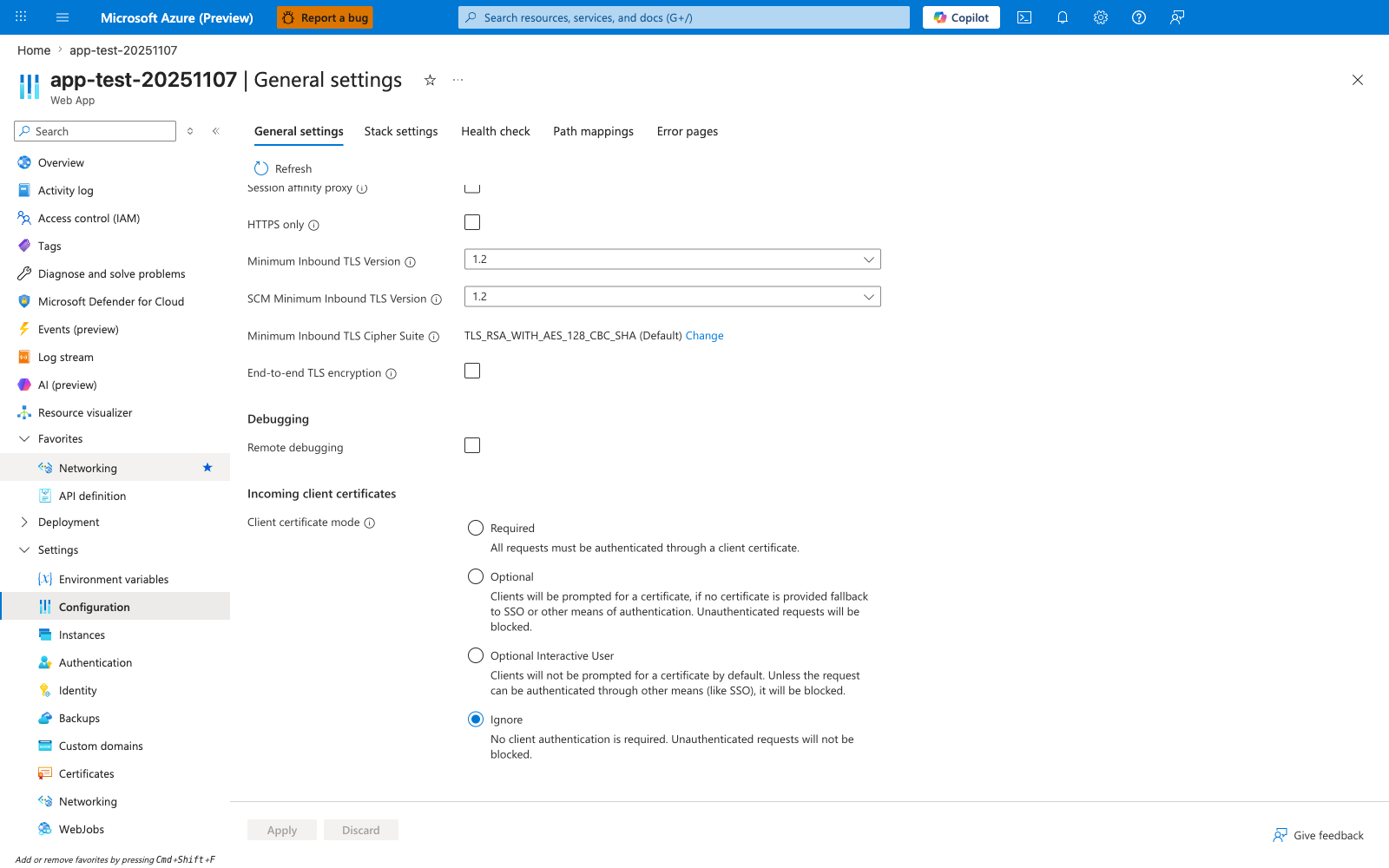
The Configuration > General settings blade scrolled to Incoming client certificates is the Portal surface that shows the four platform modes this recipe depends on before the ASP.NET Core middleware can consume X-ARR-ClientCert and validate it as an X509Certificate2. The visible Client certificate mode radios — Required, Optional, Optional Interactive User, and Ignore — are the settings the .NET-side certificate parsing logic must align with, and the screenshot clearly shows Ignore as the current default state. Use this blade as the verification point that the intended client-certificate mode is set before testing the .NET middleware against incoming certificate-bearing requests.