Key Vault References
Use Azure App Service Key Vault References to inject secrets into configuration without embedding secret values in code or pipeline variables.
sequenceDiagram
    participant APP as App Service App
    participant MI as Managed Identity
    participant KV as Azure Key Vault
    participant CFG as IConfiguration
    APP->>KV: Resolve @Microsoft.KeyVault reference via MI
    KV-->>APP: Secret value
    APP->>CFG: Expose as App Setting
CFG-->>APP: Read ConnectionStrings:MainDbPrerequisites
- Azure Key Vault with at least one secret
- App Service managed identity enabled
- Managed identity granted
Key Vault Secrets Useron vault
Main content
1) Create and verify secret
az keyvault secret set \
  --vault-name "$KEY_VAULT_NAME" \
  --name "sql-connection" \
  --value "Server=tcp:<sql-server>.database.windows.net,1433;Database=<db>;Authentication=Active Directory Managed Identity;Encrypt=True;" \
  --output json
2) Set Key Vault reference in App Settings
az webapp config appsettings set \
  --resource-group "$RESOURCE_GROUP_NAME" \
  --name "$WEB_APP_NAME" \
  --settings ConnectionStrings__MainDb="@Microsoft.KeyVault(SecretUri=https://$KEY_VAULT_NAME.vault.azure.net/secrets/sql-connection/)" \
  --output json
Reference format:
@Microsoft.KeyVault(SecretUri=https://<vault-name>.vault.azure.net/secrets/<secret-name>/<optional-version>)
3) Read secret value through normal IConfiguration
var mainDb = builder.Configuration["ConnectionStrings:MainDb"]
    ?? throw new InvalidOperationException("Connection string missing.");
No Key Vault SDK code is required for this pattern.
4) Optional SDK-based configuration provider alternative
If you need richer behavior (labels, filtering, explicit reload logic), use configuration provider:
<ItemGroup>
  <PackageReference Include="Azure.Extensions.AspNetCore.Configuration.Secrets" Version="1.4.0" />
  <PackageReference Include="Azure.Identity" Version="1.12.0" />
</ItemGroup>
using Azure.Extensions.AspNetCore.Configuration.Secrets;
using Azure.Identity;

builder.Configuration.AddAzureKeyVault(
    new Uri("https://<vault-name>.vault.azure.net/"),
    new DefaultAzureCredential(),
    new KeyVaultSecretManager());
5) Secret rotation behavior
Key Vault references refresh automatically, but not instantly. For urgent secret rollovers, restart app after setting a new secret version.
6) Slot-safe secret references
Use slot settings to prevent staging secrets from swapping into production:
az webapp config appsettings set \
  --resource-group "$RESOURCE_GROUP_NAME" \
  --name "$WEB_APP_NAME" \
  --slot "staging" \
  --slot-settings PaymentApi__Key="@Microsoft.KeyVault(SecretUri=https://$KEY_VAULT_NAME.vault.azure.net/secrets/payment-api-key/)" \
  --output json
7) Azure DevOps snippet with reference values
- task: AzureAppServiceSettings@1
  inputs:
    azureSubscription: $(azureSubscription)
    appName: $(webAppName)
    resourceGroupName: $(resourceGroupName)
    appSettings: |
      [
        {
          "name": "ConnectionStrings__MainDb",
          "value": "@Microsoft.KeyVault(SecretUri=https://<vault-name>.vault.azure.net/secrets/sql-connection/)",
          "slotSetting": true
        }
      ]
Do not log resolved secret values
Key Vault references reduce secret sprawl only if you avoid printing resolved values in logs, errors, and debugging output.
Verification
- Confirm App Setting value is reference expression (not plaintext).
- Hit an endpoint that uses the secret-backed setting.
- Validate successful dependency call.
az webapp config appsettings list --resource-group "$RESOURCE_GROUP_NAME" --name "$WEB_APP_NAME" --output table
Troubleshooting
Secret resolution fails
- Ensure managed identity has vault access role.
- Ensure secret URI is correct.
- Check vault firewall/network restrictions.
Value remains stale after rotation
- Use versioned URI for deterministic rollout.
- Restart app after rotation if immediate effect is required.
Works in production but not staging
Validate slot-specific identity and slot-specific app settings configuration.
Run It in the Portal
Portal view: Environment variables blade (Key Vault references surface in App settings)
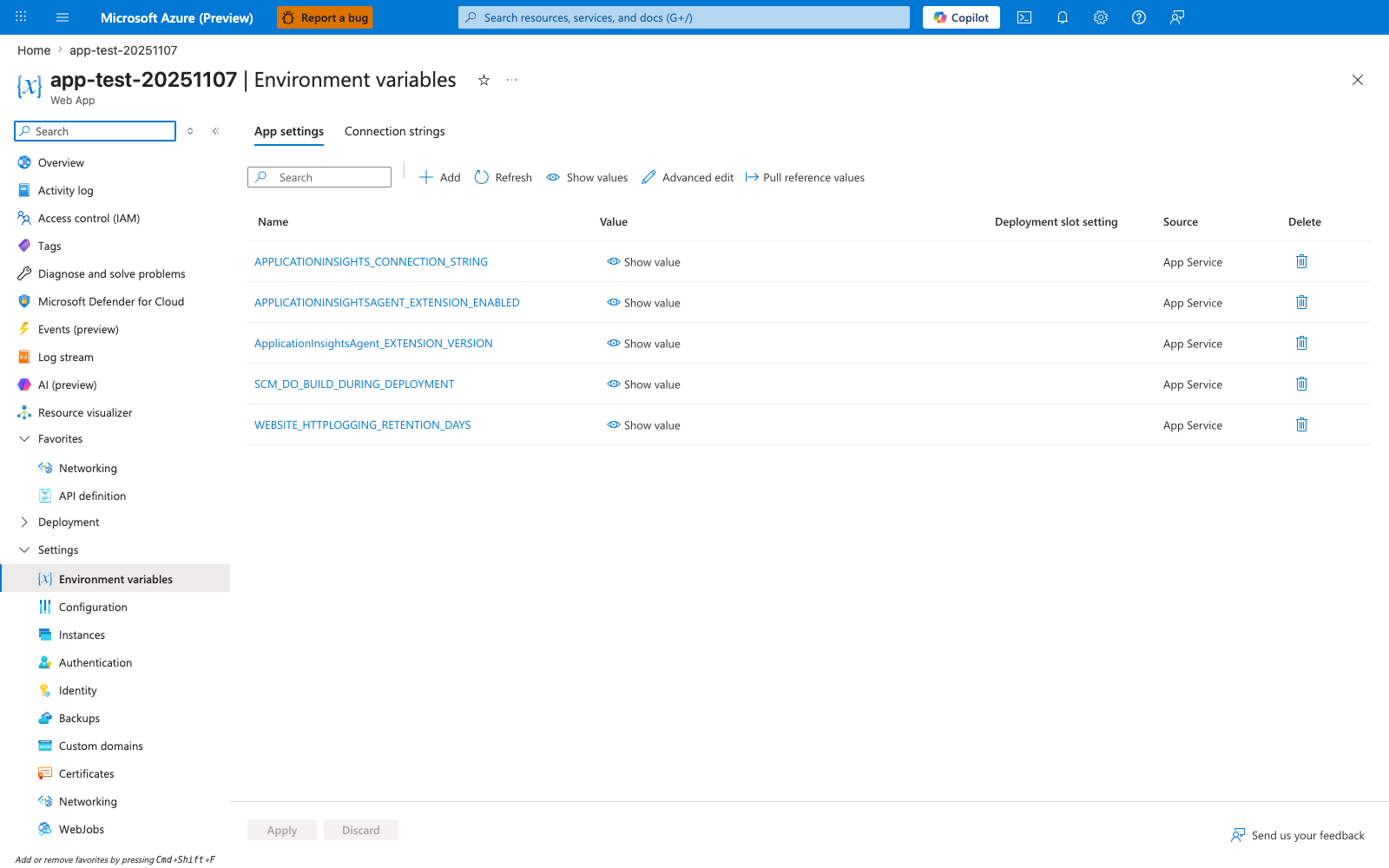
The Environment variables blade with the App settings tab selected is the Portal surface where Key Vault-backed app settings are reviewed. The visible screenshot shows the shared Name / Value / Deployment slot setting / Source / Delete table layout, plus the Refresh, Show values, Advanced edit, and Pull reference values actions in the toolbar. Use this blade to inspect reference-backed settings alongside the platform-managed entries for the ASP.NET Core app.
See Also
- Managed Identity
- Azure SQL
- For platform details, see Azure App Service Guide