.NET Runtime on Windows App Service (.NET 8)
Runtime alignment is critical for startup reliability. This reference summarizes .NET 8 runtime settings, environment variables, web.config behavior, and startup conventions for this guide.
graph TD
    A[App Service Front End] --> B[IIS + ASP.NET Core Module]
    B -->|in-process| C1[w3wp.exe + IISHttpServer]
    B -->|out-of-process| C2[dotnet.exe + Kestrel]
    C1 --> D[GuideApi net8.0]
    C2 --> D
    E[HTTP_PLATFORM_PORT or PORT] --> C2
    F[App Settings and web.config] --> D
Common Guide Reference
For platform-level runtime behavior, see Reference in the Azure App Service Guide.
Runtime baseline in this repository
- Project SDK:
Microsoft.NET.Sdk.Web - Target framework:
net8.0 - Core package:
Microsoft.ApplicationInsights.AspNetCore - Hosting path: Windows App Service with IIS + ASP.NET Core Module (in-process via
IISHttpServerinsidew3wp.exe, or out-of-process via Kestrel in a separatedotnet.exe; see Hosting Model)
GuideApi.csproj excerpt:
<Project Sdk="Microsoft.NET.Sdk.Web">
  <PropertyGroup>
    <TargetFramework>net8.0</TargetFramework>
    <Nullable>enable</Nullable>
    <ImplicitUsings>enable</ImplicitUsings>
  </PropertyGroup>
</Project>
| Command/Code | Purpose |
|---|---|
<Project Sdk="Microsoft.NET.Sdk.Web"> | Declares the project as an ASP.NET Core web application. |
<TargetFramework>net8.0</TargetFramework> | Targets the .NET 8 runtime for build and deployment. |
<Nullable>enable</Nullable> | Enables nullable reference type analysis in the project. |
<ImplicitUsings>enable</ImplicitUsings> | Automatically includes common .NET namespaces. |
Port and startup binding contract
Windows App Service commonly provides HTTP_PLATFORM_PORT to child process hosts.
Program.cs excerpt:
var port = Environment.GetEnvironmentVariable("HTTP_PLATFORM_PORT")
    ?? Environment.GetEnvironmentVariable("PORT")
    ?? "5000";

builder.WebHost.UseUrls($"http://+:{port}");
| Command/Code | Purpose |
|---|---|
Environment.GetEnvironmentVariable("HTTP_PLATFORM_PORT") | Reads the port assigned by Windows App Service hosting. |
Environment.GetEnvironmentVariable("PORT") | Falls back to another common hosting port variable. |
?? "5000" | Uses 5000 as the local default when no hosting variable is present. |
builder.WebHost.UseUrls($"http://+:{port}") | Binds the app to the resolved port (used by Kestrel in out-of-process hosting; ignored in in-process where IIS controls binding). |
This pattern is safe for both App Service Windows and local fallback.
ASPNETCORE_ENVIRONMENT guidance
- Production slot:
ASPNETCORE_ENVIRONMENT=Production - Staging slot:
ASPNETCORE_ENVIRONMENT=Staging(slot-sticky) - Avoid
Developmentin any internet-facing environment.
Set via CLI:
az webapp config appsettings set --resource-group $RESOURCE_GROUP_NAME --name $WEB_APP_NAME --settings ASPNETCORE_ENVIRONMENT=Production --output json
| Command/Code | Purpose |
|---|---|
az webapp config appsettings set --resource-group $RESOURCE_GROUP_NAME --name $WEB_APP_NAME --settings ASPNETCORE_ENVIRONMENT=Production --output json | Sets the production ASP.NET Core environment in App Service settings. |
web.config on Windows App Service
For code deployment, dotnet publish may provide a web.config (generated or explicit) controlling process startup.
Typical concerns:
processPathshould bedotnet.argumentsshould reference the correct application DLL.- Handler/module configuration must match expected runtime model.
Startup failures often come from mismatched arguments or missing published DLL.
Hosting Model: In-Process vs Out-of-Process
On Windows App Service, the ASP.NET Core Module (ANCM) can host your app in one of two models. The choice affects request latency, process topology, and which HTTP server is in front of your code.
In-process (default since .NET Core 3.0)
The ASP.NET Core Module loads the .NET runtime and your app directly inside the IIS worker process (w3wp.exe). HTTP requests are handed off to your app via IISHttpServer — Kestrel is not used in this mode. There is one process and one HTTP listener (HTTP.sys via IIS).
- Lower request latency — no inter-process hop between IIS and a separate .NET process.
- Higher per-worker throughput.
dotnet.exeis not spawned; the app runs insidew3wp.exe.
Out-of-process
The ASP.NET Core Module spawns a separate dotnet.exe process that runs Kestrel, then reverse-proxies requests from IIS to Kestrel over localhost.
- Useful when you specifically need Kestrel features that cannot run inside
w3wp.exe. - Required for some scenarios that depend on a separate Kestrel process being addressable.
- Adds one IIS-to-Kestrel reverse-proxy hop per request.
Set the model via web.config
The hosting model is selected by the hostingModel attribute on the <aspNetCore> element. Setting it explicitly avoids relying on SDK defaults:
<configuration>
  <system.webServer>
    <handlers>
      <add name="aspNetCore" path="*" verb="*" modules="AspNetCoreModuleV2" resourceType="Unspecified" />
    </handlers>
    <aspNetCore processPath="dotnet"
                arguments=".\GuideApi.dll"
                stdoutLogEnabled="false"
                stdoutLogFile=".\logs\stdout"
                hostingModel="inprocess" />
  </system.webServer>
</configuration>
Valid hostingModel values: inprocess or outofprocess.
You can also pin the hosting model in the project file so dotnet publish emits the right web.config:
| Model | HTTP server in front of your app | Process | When to choose |
|---|---|---|---|
| In-process | IISHttpServer (inside w3wp.exe) | runs inside w3wp.exe | default — use unless you have a specific reason not to |
| Out-of-process | Kestrel (in a separate dotnet.exe) | separate dotnet.exe, IIS reverse-proxies | required for custom Kestrel scenarios or legacy diagnostics |
In-process startup failures and HTTP Error 500.30
In-process startup failures surface as HTTP Error 500.30 - ANCM In-Process Start Failure. The error indicates the ASP.NET Core Module failed to load your app inside w3wp.exe. Capture stdout logs (set stdoutLogEnabled="true" in web.config) to see the actual startup exception. Out-of-process startup failures usually surface as HTTP Error 502.5 with the underlying error in the spawned process's stdout.
Kestrel runtime settings
Kestrel is your HTTP server runtime in out-of-process hosting (where IIS reverse-proxies to a separate dotnet.exe running Kestrel). In in-process hosting, the HTTP server is IISHttpServer instead of Kestrel — ConfigureKestrel(...) calls have no effect in that mode. Use ConfigureIISServerOptions(...) to tune the in-process server instead.
Common Kestrel tune points (out-of-process only):
- Request limits (
MaxRequestBodySize) when needed. - Keep-alive and header timeouts for abuse resilience.
- HTTPS redirection policies (while TLS terminates upstream).
| Command/Code | Purpose |
|---|---|
builder.WebHost.ConfigureKestrel(options => { ... }) | Customizes Kestrel server behavior during startup. |
options.AddServerHeader = false; | Removes the default server header from HTTP responses. |
Startup command notes
For standard .NET code deployments, App Service starts from site configuration and artifact metadata; custom startup commands are less common than container scenarios.
If custom startup is used, validate it does not conflict with handler/module startup path.
Runtime verification commands
az webapp config show --resource-group $RESOURCE_GROUP_NAME --name $WEB_APP_NAME --output json
az webapp list-runtimes --os windows --output table
az webapp show --resource-group $RESOURCE_GROUP_NAME --name $WEB_APP_NAME --output json
| Command/Code | Purpose |
|---|---|
az webapp config show --resource-group $RESOURCE_GROUP_NAME --name $WEB_APP_NAME --output json | Shows the effective runtime configuration for the web app. |
az webapp list-runtimes --os windows --output table | Lists the Windows runtimes supported by App Service. |
az webapp show --resource-group $RESOURCE_GROUP_NAME --name $WEB_APP_NAME --output json | Retrieves the web app resource metadata for inspection. |
Production runtime checklist
- Target framework and platform runtime align.
HTTP_PLATFORM_PORTbinding logic present.ASPNETCORE_ENVIRONMENTexplicitly set per slot.- Health endpoint configured and responsive.
- Startup logs clean after restart and slot swap.
Common runtime failure signatures
| Signature | Interpretation | Action |
|---|---|---|
HTTP Error 500.30 | App failed during startup | Check runtime, config, startup exceptions |
| Missing framework version | Runtime mismatch | Update stack or retarget build |
| Port binding failure | Wrong URL binding assumptions | Ensure HTTP_PLATFORM_PORT flow used |
.NET on Linux App Service: Key Differences
This document focuses on Windows App Service, where IIS hosts ASP.NET Core apps via the ASP.NET Core Module — the HTTP server depends on the chosen hosting model (IISHttpServer in-process inside w3wp.exe, or Kestrel in a separate dotnet.exe for out-of-process). .NET also runs on Linux App Service, but the hosting model is different: there is no IIS, no ASP.NET Core Module, and web.config is not consulted. Use this section to understand the differences if you deploy to Linux.
| Concern | Windows App Service | Linux App Service |
|---|---|---|
| Process model | IIS via the ASP.NET Core Module (AspNetCoreModuleV2); HTTP server depends on hosting model (IISHttpServer in-process, Kestrel out-of-process) | Kestrel runs directly as the entrypoint process inside the container |
| Reverse proxy | In-process: IIS (w3wp.exe) hosts the app directly via IISHttpServer (no proxy hop). Out-of-process: IIS reverse-proxies to Kestrel running in a separate dotnet.exe | platform front end forwards to Kestrel; no IIS layer |
| Port variable | HTTP_PLATFORM_PORT (preferred), with PORT as fallback | PORT (typically 8080) |
| Startup config | web.config with <aspNetCore> element | startup command on the App Service app; web.config is ignored |
| Hosting models | in-process or out-of-process (see Hosting Model) | not applicable — Kestrel is the only process |
Linux runtime stack identifier:
az webapp config set \
  --resource-group $RESOURCE_GROUP_NAME \
  --name $WEB_APP_NAME \
  --linux-fx-version "DOTNETCORE|8.0" \
  --output json
Linux port binding pattern (no HTTP_PLATFORM_PORT involvement):
var port = Environment.GetEnvironmentVariable("PORT") ?? "8080";
builder.WebHost.UseUrls($"http://+:{port}");
The HTTP_PLATFORM_PORT fallback shown in Port and startup binding contract is harmless on Linux — HTTP_PLATFORM_PORT is simply not set, so the lookup falls through to PORT. The same Program.cs snippet works on both Windows and Linux.
HTTP Error 500.30 is Windows-only
Startup errors on Linux do not surface as HTTP Error 500.30 because there is no ASP.NET Core Module to emit that error page. On Linux, startup failures show up as container restart loops in az webapp log tail and Application Insights — look for stack traces in stdout instead.
Run It in the Portal
Portal view: Environment variables blade (where ASPNETCORE_ENVIRONMENT is managed)
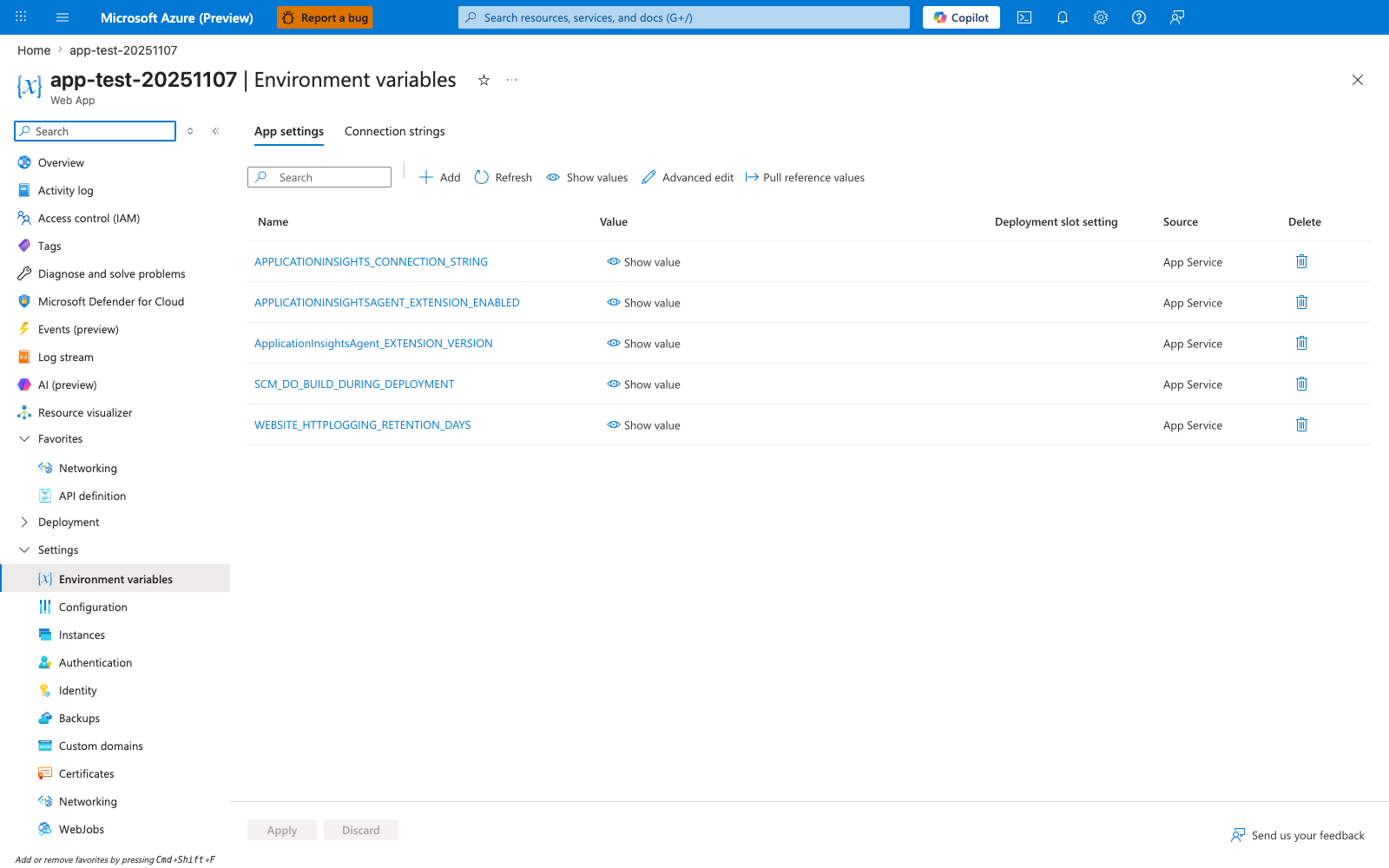
The Environment variables blade with the App settings tab selected is the Portal surface where App Service app settings are managed. In this screenshot, the visible table columns are Name, Value, Deployment slot setting, Source, and Delete, and the toolbar exposes Add, Refresh, Show values, Advanced edit, and Pull reference values. Use the highlighted Environment variables entry in the left navigation to reach this blade when reviewing runtime configuration for the ASP.NET Core app.