Scaling Best Practices
Scaling guidance in App Service is a design decision, not only an operational toggle. This document helps you choose the right scaling model based on workload characteristics, architecture constraints, and cost boundaries.
Scaling Objectives
A production scaling strategy should balance:
- Performance under variable traffic
- Availability during instance loss or maintenance
- Cost efficiency at steady state and peak
- Predictable behavior during sudden load changes
Design judgment layer
Platform documentation explains what scaling options exist. This guide explains when and why to choose each option.
Prerequisites
Before tuning scaling behavior:
- Establish baseline traffic and latency metrics
- Define SLOs (availability, p95 latency, error rate)
- Configure health checks and application telemetry
- Validate statelessness assumptions for horizontal scaling
Vertical vs Horizontal Scaling Decision
Both scale-up and scale-out are valid. The right choice depends on bottlenecks and application architecture.
Vertical Scaling (Scale Up)
Scale up increases CPU/RAM resources per instance by changing App Service plan SKU.
Use when:
- CPU or memory pressure is constant even at low instance counts
- Application has limited horizontal concurrency capability
- Dependencies impose per-instance connection or session constraints
Limitations:
- Bigger instances can still become single bottlenecks
- Some outages affect all workload on the plan
- Unit cost can rise quickly at higher tiers
Horizontal Scaling (Scale Out)
Scale out increases instance count.
Use when:
- Workload is mostly stateless
- Throughput needs are bursty or seasonal
- You need fault tolerance across multiple instances
Limitations:
- Session state and cache locality can complicate behavior
- Downstream systems must tolerate increased parallel calls
Portal view: Scale out (App Service plan) blade
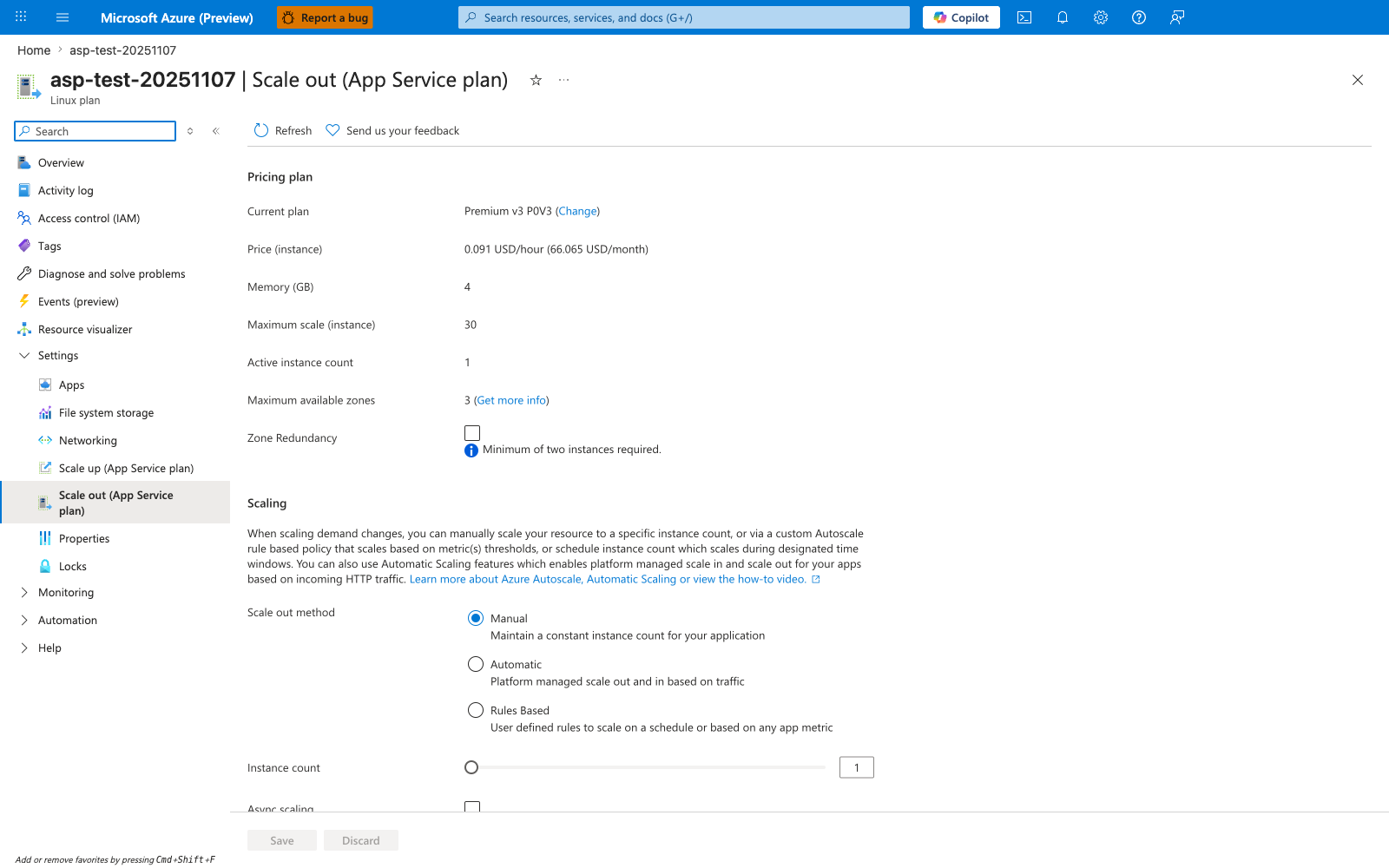
The Scale out blade is the operational expression of the horizontal-scaling decision tree below. The three Scale out method radio buttons separate the three valid strategies in practice: Manual for fixed capacity, Automatic for platform-managed scaling against HTTP traffic, and Rules Based for the custom autoscale rules this guide recommends for CPU and queue-length triggers. The visible defaults here are also the most common single-region anti-patterns called out elsewhere in this document: Active instance count: 1 is a single failure domain, and Zone Redundancy is unchecked because zone redundancy requires a minimum of two instances. Validate this blade matches the design intent — Maximum scale (instance): 30 is the SKU ceiling, but the autoscale max instance count you choose must sit below it with headroom for emergency manual scaling.
Scaling Decision Tree
flowchart TD
    A[Workload latency or saturation issue] --> B{Primary bottleneck identified?}
    B -- CPU or memory per instance --> C[Scale up first]
    B -- Request concurrency or burst traffic --> D[Scale out first]
    C --> E{Still violating SLO?}
    E -- Yes --> F[Combine scale up and scale out]
    E -- No --> G[Keep and monitor]
    D --> H{App stateless and dependency-safe?}
    H -- Yes --> I[Enable autoscale rules]
    H -- No --> J[Refactor state handling or use ARR affinity carefully]
    I --> K[Set min/max and cool-down policies]
Auto-Scale Rules Design
Autoscale rules should be intentional and measurable. Avoid reactive chaos by using small, tested rule sets.
CPU-Based Rules
CPU is useful as a broad saturation indicator.
Example baseline:
- Scale out when average CPU > 70% for 10 minutes
- Scale in when average CPU < 35% for 20 minutes
HTTP Queue Length Rules
Queue length is a strong signal when request concurrency exceeds instance capacity.
Use when:
- CPU is not saturated but response times rise
- Workloads have blocking I/O and thread-pool pressure
Custom Metrics Rules
Custom metrics are valuable for domain-specific bottlenecks.
Examples:
- Active background jobs
- Queue backlog size
- Domain transaction latency percentile
Avoid conflicting rules
Multiple aggressive rules on different metrics can cause oscillation (thrashing). Use cool-down windows and clear priority logic.
Scale-Out Limits per SKU
App Service scaling limits vary by tier and region capability. Plan limits should be checked before setting autoscale ceilings.
Design recommendations:
- Set max instance count below hard platform limits
- Reserve headroom for emergency manual scaling
- Re-check limits before seasonal traffic periods
Treat limits as design inputs
Do not discover scaling limits during an incident. Validate limits in advance and document expected capacity.
Per-App Scaling
Multiple apps can share one App Service plan. Per-app scaling allows each app to scale independently within plan constraints.
Use per-app scaling when:
- Shared plan contains workloads with different traffic patterns
- One app should not over-consume instances needed by others
- Cost optimization requires plan sharing with controlled isolation
Trade-offs:
- Capacity planning becomes more complex
- Noisy-neighbor risk still exists at plan resource level
Local Cache and ARR Affinity Considerations
Scaling strategy is tightly coupled to state behavior.
ARR Affinity
ARR affinity (sticky sessions) pins clients to instances.
- Helpful for legacy session-in-memory patterns
- Can hurt even load distribution during scale-out
- Can cause uneven utilization and tail latency issues
Recommendation:
- Prefer external distributed session stores over ARR affinity
- Disable ARR affinity for truly stateless workloads
Local Cache
Local cache can improve read performance for some workloads, but do not treat it as a shared persistence layer.
- Instance-local cache is not durable
- Cache warm-up behavior affects scale-out events
- Ensure cache miss paths are dependency-safe
Stateless first
If scale-out reliability is a goal, design for stateless request processing and externalize mutable state.
Practical Autoscale Configuration Pattern
- Set
minimum instance countbased on baseline traffic and HA needs - Set
maximum instance countfrom cost and limit analysis - Add one primary scale-out metric and one scale-in metric
- Test with controlled load profile
- Tune thresholds after observing production behavior
# Example: set always-on for production workload
az webapp config set \
    --resource-group $RG \
    --name $APP_NAME \
    --always-on true

# Example: show current App Service plan tier and capacity context
az appservice plan show \
    --resource-group $RG \
    --name $PLAN_NAME
Common Scaling Failure Modes
Mode 1: Scaling Does Not Improve Latency
Likely cause: downstream dependency bottleneck (database, external API).
Action:
- Add dependency latency telemetry
- Add retry with backoff and circuit breaker controls
- Consider dependency-side scaling or caching strategy
Mode 2: Instance Thrashing
Likely cause: overly sensitive thresholds and short cool-down periods.
Action:
- Increase evaluation period
- Add scale-in delay
- Remove duplicate or conflicting rules
Mode 3: Uneven Load Across Instances
Likely cause: sticky sessions and cached state pinned to hot instances.
Action:
- Reduce ARR affinity usage
- Externalize session state
- Validate load-balancer behavior with synthetic traffic
Capacity Planning Baseline
For each app, maintain a simple capacity sheet with:
- Requests per second at steady and peak windows
- Per-instance throughput estimate at acceptable latency
- Safety factor for unexpected demand spikes
- Maximum expected dependency concurrency
Capacity formula example:
required_instances = (peak_rps / per_instance_rps) * safety_factor
Governance and Review Cadence
- Monthly review of autoscale metrics and incidents
- Pre-event scale rehearsal for known peak periods
- Post-incident scaling retrospective with updated runbook
See Also
- Platform - Scaling
- Operations - Scaling
- Operations - Cost Optimization
- Best Practices - Reliability
- Best Practices - Common Anti-Patterns