Reliability Best Practices
Reliability in Azure App Service comes from deliberate architecture and operational discipline. This guide focuses on practical design decisions that reduce outage frequency, shorten recovery time, and improve user trust.
Reliability Goals
For production systems, reliability should be expressed through measurable targets:
- Availability target (for example, 99.9% or higher)
- Recovery Time Objective (RTO)
- Recovery Point Objective (RPO)
- Error budget and incident response thresholds
Reliability is multi-layered
Platform health, application behavior, and dependency resilience all contribute to end-to-end uptime.
Prerequisites
Before implementing advanced reliability patterns, ensure:
- Structured logging and distributed tracing are enabled
- Health endpoint exists and validates critical dependencies
- Backups are configured and periodically tested
- Incident runbooks have clear ownership and escalation
Health Check Probe Configuration
Health checks are the first reliability control in App Service. They allow unhealthy instances to be detected and removed from rotation.
Design Principles for Health Endpoints
- Keep response lightweight and deterministic
- Validate required dependencies (database, cache, key services)
- Separate readiness from deep diagnostics where possible
- Return clear status codes and minimal payload
Example Health Check Configuration
az webapp config set \
    --resource-group $RG \
    --name $APP_NAME \
    --generic-configurations '{"healthCheckPath":"/healthz"}'
What a Good /healthz Should Validate
- Process liveness and request handling loop
- Dependency connectivity with timeout guard
- Critical configuration presence
- Version metadata for rollout debugging
Portal view: Health check blade
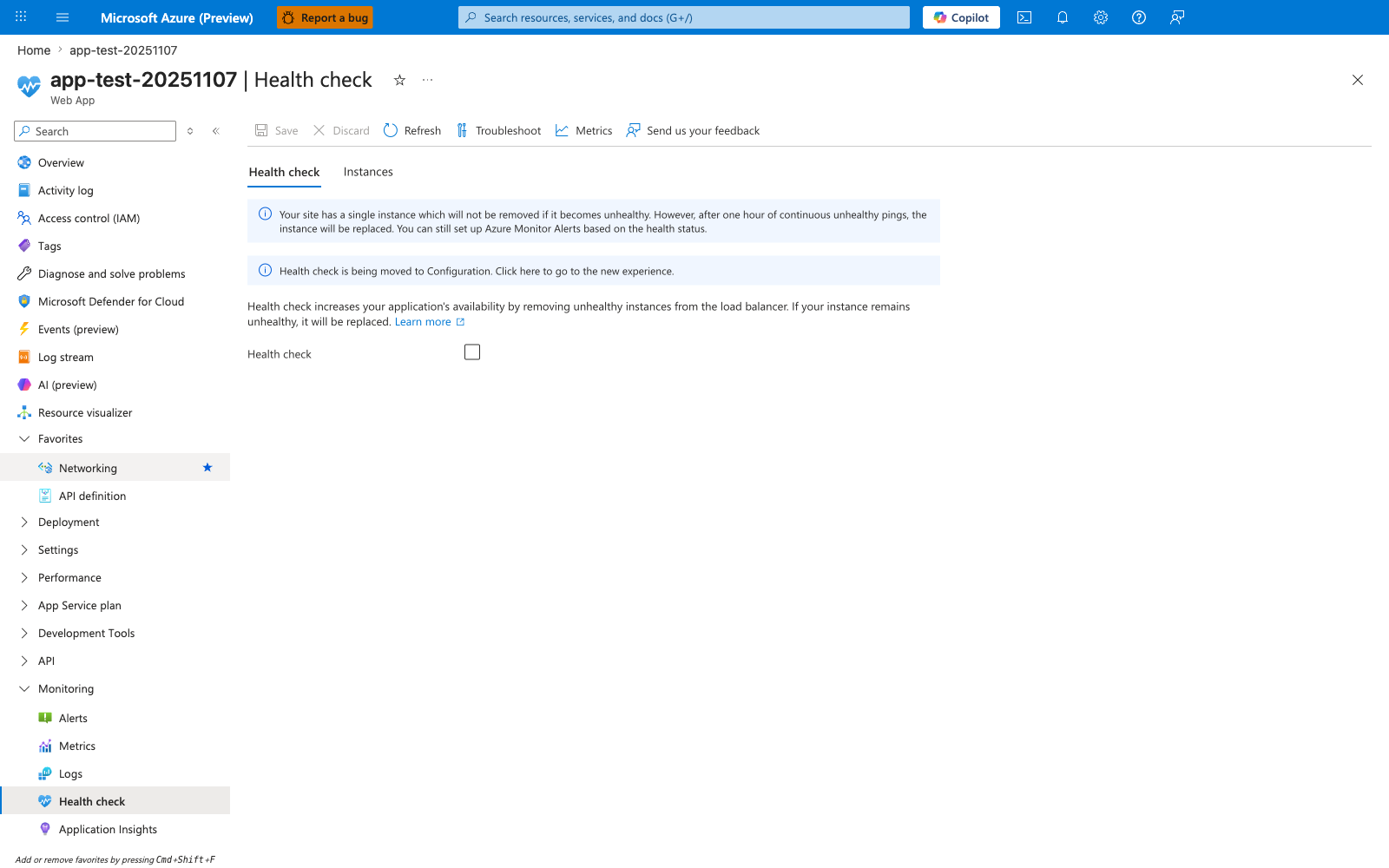
The Health check blade is the platform's enforcement point for the rotation-removal behavior every reliability strategy depends on. The visible state captures both the most common anti-pattern and the platform's own warning about it: the Health check checkbox is unchecked, and the blue banner explicitly states that a single-instance plan cannot remove an unhealthy instance — it can only be replaced after a full hour of failing pings. This is why this guide pairs /healthz configuration with the minimum two instances rule: without the checkbox enabled and at least two instances, neither rotation nor fast replacement is available. Enable the checkbox, set the path to /healthz, and verify the change moves the platform from "replace after an hour" to "remove from rotation immediately".
Do not fake healthy status
If key dependencies are unavailable, return unhealthy. Hiding failures delays detection and increases incident impact.
Multi-Region Deployment Patterns
Single-region design is often acceptable for low-criticality apps, but production-critical systems should plan for regional disruption.
Pattern 1: Active-Passive
- Primary region serves all traffic
- Secondary region stays warm for failover
- DNS or traffic manager performs failover routing
Pros:
- Simpler operational model
- Lower write consistency complexity
Cons:
- Secondary capacity may be underutilized
- Failover testing is mandatory to avoid surprise failures
Pattern 2: Active-Active
- Multiple regions serve traffic concurrently
- Global routing distributes traffic by priority, latency, or geography
- Requires stronger data and session architecture
Pros:
- Better regional resilience
- Potentially lower user latency by geography
Cons:
- Higher architecture and operations complexity
- Harder consistency and incident isolation
Reliability Architecture with Health Checks
flowchart TD
    U[Users] --> G[Global traffic routing]
    G --> R1[Region A App Service]
    G --> R2[Region B App Service]
    R1 --> H1[/healthz probes/]
    R2 --> H2[/healthz probes/]
    R1 --> D1[(Regional data tier)]
    R2 --> D2[(Regional data tier)]
    H1 --> M[Monitoring and alerting]
    H2 --> M
    M --> O[On-call and incident runbook]
Graceful Shutdown and SIGTERM Handling
App Service can recycle instances during scale, patching, and deployment events. Applications must handle termination signals gracefully.
Plan for a short grace period — and treat the exact value as a configurable upper bound
When App Service recycles a worker, it sends SIGTERM to the application process and then sends SIGKILL after a grace period. The exact duration depends on the hosting model:
- Code-based apps on App Service have a relatively short grace window (often described as on the order of a few tens of seconds) for in-flight request drain and cleanup.
- Custom containers default to 5 seconds before SIGKILL. You can extend this up to 1800 seconds by setting the
WEBSITES_CONTAINER_STOP_TIME_LIMITapp setting (see the Microsoft Learn "Configure a custom container" reference).
Treat the grace period as small and configurable, not as a fixed platform guarantee. In-flight request completion, connection draining, and cleanup work must finish well within whatever window your hosting model provides.
Why SIGTERM Handling Matters
- Prevents abrupt termination of in-flight requests
- Reduces partial writes and data corruption risk
- Enables cleaner release transitions and scale-in events
Graceful Shutdown Checklist
- Trap termination signals in application runtime
- Stop accepting new requests quickly (close the listener or health endpoint)
- Finish in-flight requests within the platform's grace window for your hosting model
- For custom containers, raise
WEBSITES_CONTAINER_STOP_TIME_LIMITif 5 seconds is insufficient (but keep it bounded) - Flush logs/telemetry and close outbound connections cleanly
- Move long-running cleanup (large flush, archive upload) outside the request path so it does not depend on shutdown
Language-specific implementation
Use this document for design guidance, then implement signal handlers in your language guide runtime section.
Retry and Circuit Breaker Patterns
Most production outages are dependency-driven, not web-tier-driven. Reliability requires controlled failure handling for downstream calls.
Retry Best Practices
- Retry only transient failure types
- Use exponential backoff with jitter
- Set upper bounds on attempts and timeout budget
- Avoid infinite retries
Circuit Breaker Best Practices
- Open circuit when error threshold exceeded
- Fail fast while circuit is open
- Probe with limited half-open requests
- Emit breaker state metrics for visibility
Retries can amplify outages
Without backoff and limits, retries create thundering herds against already-failing dependencies.
Backup and Restore Strategy
Backups are a reliability control for data/configuration recovery, not a substitute for high availability.
Strategy Components
- Scheduled app backups with defined retention
- Database-native backup alignment with app backup schedule
- Storage account durability review
- Documented restore sequence and ownership
Validation Requirements
- Perform periodic restore drills in non-production
- Measure real restore time against RTO target
- Verify restored app boots and passes health checks
# Example: list current backup configuration
az webapp config backup show \
    --resource-group $RG \
    --webapp-name $APP_NAME
Minimum Instance Count for High Availability
For production workloads, run at least two instances.
Why minimum two instances matters:
- Reduces single-instance failure impact
- Supports rolling maintenance without complete service loss
- Improves resilience during transient host issues
Single instance is a single failure domain
One instance in production means any restart, crash, or host issue can become user-visible downtime.
Failure Scenario Planning
Scenario A: One Instance Unhealthy
Expected behavior:
- Health checks detect and remove unhealthy instance from rotation
- Remaining instances continue serving traffic
Scenario B: Dependency Latency Spike
Expected behavior:
- Timeout and retry policy engages
- Circuit breaker opens if sustained failures occur
- Alerting notifies operators before full outage
Scenario C: Regional Outage
Expected behavior:
- Global routing removes affected region
- Secondary region serves traffic within RTO
- Post-failover validation runbook executes
Reliability Operating Model
Pre-Production
- Load and chaos-style failure testing
- Dependency failure simulations
- Runbook dry-runs for failover and restore
Production
- SLO dashboards and error budget tracking
- Alert tuning to reduce noise and improve signal
- Weekly review of high-severity incident trends
Post-Incident
- Root cause analysis with timeline accuracy
- Preventive action items with ownership and deadlines
- Documentation updates in operations and best-practices sections
See Also
- Platform - How App Service Works
- Operations - Health and Recovery
- Operations - Backup and Restore
- Best Practices - Deployment
- Best Practices - Common Anti-Patterns