Production Baseline
This guide defines a minimum production baseline for Azure App Service workloads. Use it to establish consistent defaults before language-specific implementation and before environment-specific optimization.
Prerequisites
- Azure subscription with permission to configure App Service resources
- Existing resource group, App Service Plan, and Web App
- Shared ownership between application and platform teams for baseline standards
- Variables set:
RGAPP_NAMEPLAN_NAME
Main Content
Baseline intent
The goal of a production baseline is to reduce accidental risk. Teams should not negotiate core controls app-by-app. Instead, establish defaults once and apply them consistently.
flowchart TD
    A[Production Readiness Checklist] --> B[Plan Tier]
    A --> C[Runtime Safety]
    A --> D[Health]
    A --> E[Observability]
    A --> F[Configuration Discipline]
    A --> G[Identity and Secrets]
    B --> B1[B1 for development and low-risk testing]
    B --> B2[S1 or higher for production baseline]
    B --> B3[P1v3 or higher for high performance profiles]
    C --> C1[Always On enabled]
    C --> C2[HTTPS Only enabled]
    C --> C3[Minimum TLS 1.2]
    D --> D1[Health check endpoint configured]
    D --> D2[Failure criteria validated]
    E --> E1[HTTP logs enabled]
    E --> E2[Console and app logs enabled]
    E --> E3[Platform diagnostics available]
    F --> F1[App settings separated from slot settings]
    G --> G1[Managed identity enabled]
    G --> G2[Connection strings avoided where possible]
1) App Service Plan selection
Plan tier selection is a design decision, not only a cost decision.
| Workload stage | Recommended plan | Why |
|---|---|---|
| Development and exploratory testing | B1 | Low cost for non-critical workloads, basic validation, and early iteration. |
| Production baseline | S1 or higher | Better reliability envelope and production-suitable operational posture. |
| High-performance or latency-sensitive workloads | P1v3 or higher | Improved CPU/memory characteristics and stronger performance headroom. |
Do not run production on Basic tier by default
Basic tiers can be useful for development, but most production workloads require at least Standard for reliable operational behavior and growth headroom.
Assess tier choice with these criteria:
- Peak throughput and concurrency profile
- Response-time SLO/SLA expectations
- Number of deployment slots required
- Memory pressure and GC behavior of runtime
- Dependency latency and retry amplification risk
Check current plan tier:
az appservice plan show \
  --resource-group $RG \
  --name $PLAN_NAME \
  --query "{sku:sku.name,tier:sku.tier,workers:numberOfWorkers}" \
  --output json
Sample output (PII-masked):
2) Runtime safety defaults
Every production app should enforce these settings:
- Always On: enabled
- HTTPS Only: enabled
- Minimum TLS: 1.2 or above
Apply baseline runtime settings:
az webapp config set \
  --resource-group $RG \
  --name $APP_NAME \
  --always-on true \
  --min-tls-version 1.2 \
  --output json

az webapp update \
  --resource-group $RG \
  --name $APP_NAME \
  --https-only true \
  --output json
Portal view: Configuration General settings
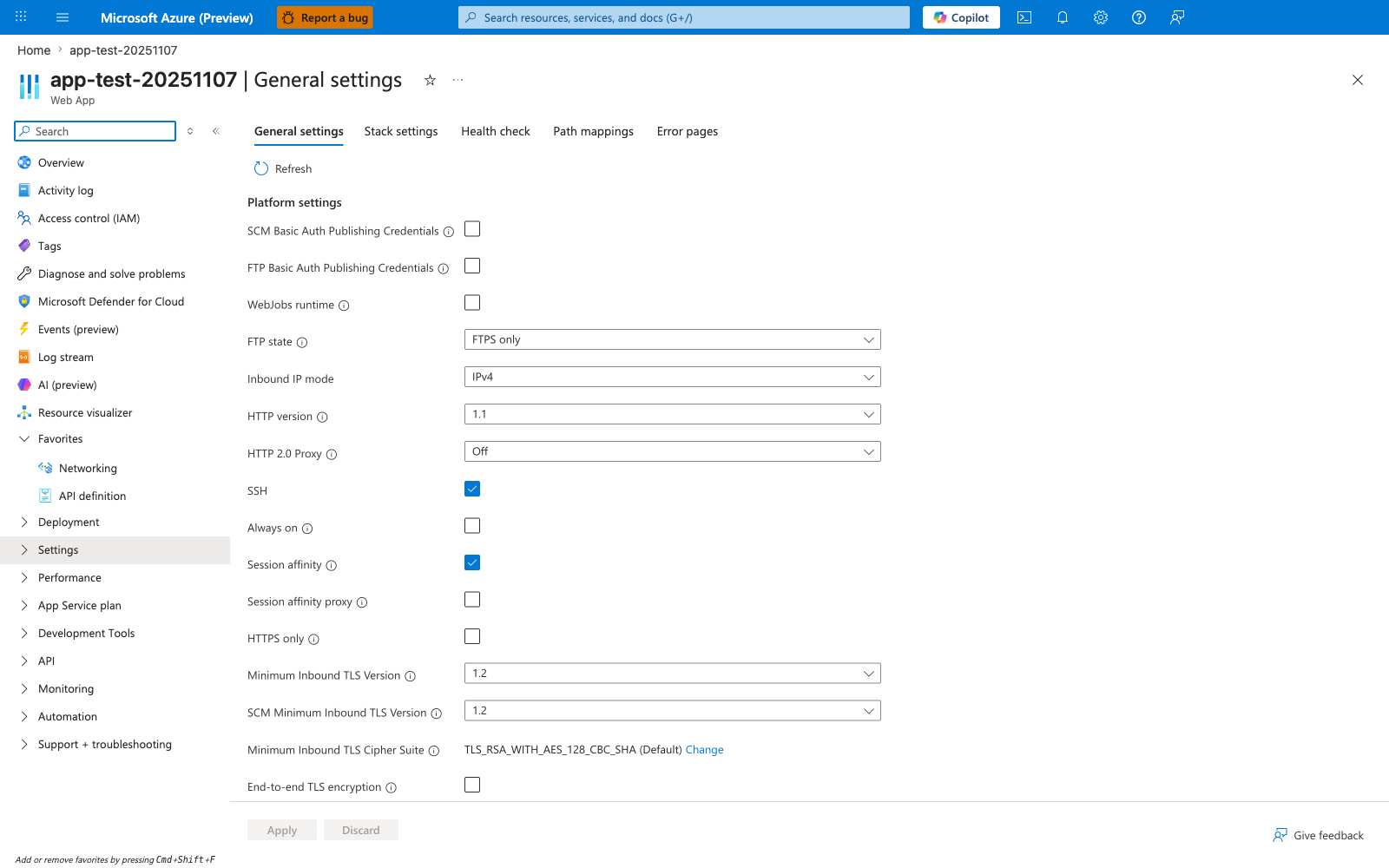
The Configuration General settings blade is where every runtime safety default in this baseline is read from and written to. The visible state here is the platform default for a newly created Web App and demonstrates exactly the configuration drift this section warns against: Always on and HTTPS only are both unchecked, which means background workloads can be paused on idle recycle and inbound traffic can still arrive over plain HTTP. Minimum Inbound TLS Version 1.2 is on by default, but it is not a substitute for HTTPS enforcement. Treat this blade as the authoritative verification surface after running the CLI baseline above — every checkbox that this guide marks as required should be visibly enabled here before an app is called production-ready.
Verify effective configuration:
az webapp show \
  --resource-group $RG \
  --name $APP_NAME \
  --query "{httpsOnly:httpsOnly,state:state,hostNames:hostNames}" \
  --output json

az webapp config show \
  --resource-group $RG \
  --name $APP_NAME \
  --query "{alwaysOn:alwaysOn,minTlsVersion:minTlsVersion,http20Enabled:http20Enabled}" \
  --output json
Always On matters for non-request workloads
Apps with scheduled background jobs, cache warm-up, or token refresh logic can fail unpredictably if Always On is disabled.
What Always On does and does not prevent
Always On prevents cold starts caused by idle recycle (the platform unloading an app that has received no requests for ~20 minutes on Basic and higher tiers). It does not prevent cold starts from:
- Planned platform maintenance and worker node patching
- Worker recycles or instance redeployment
- Explicit restarts (
az webapp restart) - Deployment-triggered restarts (including slot swaps)
- Regional failover recovery
Design startup paths to be fast and idempotent even with Always On enabled.
3) Health check configuration
Health checks are required for stable traffic handling and reliable restart behavior.
Recommended health endpoint design:
- Path:
/healthor/healthz - Response:
200only when app is ready to serve real traffic - Checks: critical dependencies with bounded timeout
- No secrets or detailed internals in response body
Configure health check path:
az webapp config set \
  --resource-group $RG \
  --name $APP_NAME \
  --generic-configurations '{"healthCheckPath":"/health"}' \
  --output json
Validate endpoint behavior:
Do not make health checks too deep
Health checks should detect readiness, not run expensive full-system diagnostics. Deep checks can create cascading failures under load.
4) Diagnostic logging baseline
At minimum, production workloads should have:
AppServiceHTTPLogsfor request-level traceabilityAppServiceConsoleLogsfor application runtime diagnosticsAppServicePlatformLogsfor infrastructure-level events
Enable web server and application logging where relevant:
az webapp log config \
  --resource-group $RG \
  --name $APP_NAME \
  --web-server-logging filesystem \
  --detailed-error-messages true \
  --failed-request-tracing true \
  --application-logging filesystem \
  --level information \
  --output json
For centralized retention and analytics, route diagnostics to Log Analytics / Azure Monitor.
Example diagnostic settings creation:
az monitor diagnostic-settings create \
  --name "diag-$APP_NAME" \
  --resource $(az webapp show --resource-group $RG --name $APP_NAME --query id --output tsv) \
  --workspace "<log-analytics-workspace-resource-id>" \
  --logs '[{"category":"AppServiceHTTPLogs","enabled":true},{"category":"AppServiceConsoleLogs","enabled":true},{"category":"AppServicePlatformLogs","enabled":true}]' \
  --metrics '[{"category":"AllMetrics","enabled":true}]' \
  --output json
Category names can vary by API version
Validate available diagnostic categories in your environment and API version before automation. Keep your IaC and CLI commands aligned.
Check active diagnostic settings:
az monitor diagnostic-settings list \
  --resource $(az webapp show --resource-group $RG --name $APP_NAME --query id --output tsv) \
  --output json
5) App settings vs slot settings
Separate configuration by lifecycle behavior:
- App settings: values that should move with deployment
- Slot settings (sticky): values that must stay with a slot during swap
Typical slot-sticky settings:
- Production-only endpoints
- Production-only credentials
- Monitoring destination overrides per environment
Set a normal app setting:
az webapp config appsettings set \
  --resource-group $RG \
  --name $APP_NAME \
  --settings "FEATURE_FLAG_X=true" \
  --output json
Mark selected settings as slot-specific:
az webapp config appsettings set \
  --resource-group $RG \
  --name $APP_NAME \
  --slot-settings "API_ENDPOINT=https://api.contoso.internal" "CACHE_TTL_SECONDS=60" \
  --output json
Misclassified settings break swaps
If environment-specific values are not sticky, slot swap can promote invalid endpoints or credentials into production.
6) Managed identity over connection strings
Prefer managed identity for Azure service access to remove static credential handling from applications.
Why managed identity is the default:
- Reduces secret sprawl
- Supports least-privilege RBAC
- Simplifies rotation and operational burden
- Improves auditability of access patterns
Enable system-assigned managed identity:
Inspect identity state:
az webapp identity show \
  --resource-group $RG \
  --name $APP_NAME \
  --query "{type:type,principalId:principalId,tenantId:tenantId}" \
  --output json
Sample output (PII-masked):
{
  "type": "SystemAssigned",
  "principalId": "xxxxxxxx-xxxx-xxxx-xxxx-xxxxxxxxxxxx",
  "tenantId": "<tenant-id>"
}
When migration from connection strings is not immediate:
- Keep secrets in Key Vault references.
- Assign minimum required privileges.
- Track retirement date for each remaining secret.
Baseline verification checklist
Run this checklist before calling an app production-ready:
- [ ] Plan tier selected with documented rationale.
- [ ] Always On enabled.
- [ ] HTTPS-only enabled.
- [ ] Minimum TLS set to 1.2 or higher.
- [ ] Health check endpoint configured and validated.
- [ ] Diagnostic logging categories enabled and retained centrally.
- [ ] Slot settings defined for environment-specific values.
- [ ] Managed identity enabled and permissions scoped.
Common baseline anti-patterns
- Treating B1 as permanent production infrastructure.
- Enabling logs without retention or query ownership.
- Using health checks that always return success.
- Keeping production credentials as plain app settings.
- Performing slot swaps without sticky setting review.
Advanced Topics
- Create separate baselines for internet-facing APIs, internal apps, and batch-triggered web workloads.
- Automate baseline enforcement with Azure Policy and IaC validation gates.
- Add synthetic probes that confirm full request path behavior, not only process liveness.
- Correlate baseline deviations with incident metrics to prioritize hardening work.