Networking Best Practices
Networking design in Azure App Service is primarily about controlling direction and trust boundaries: private inbound paths, predictable outbound paths, and reliable DNS behavior across those paths.
Prerequisites
- Existing Web App and App Service Plan
- Existing virtual network and required subnets
- Permissions to manage App Service, networking, and private DNS resources
- Variables set:
RGAPP_NAMEVNET_NAMEINTEGRATION_SUBNET_NAMEPRIVATE_ENDPOINT_SUBNET_NAME
Main Content
Networking goals for production
Use App Service networking to achieve four outcomes:
- Inbound exposure is intentionally restricted.
- Outbound traffic to private dependencies is deterministic.
- SNAT behavior is managed under concurrency.
- DNS resolution aligns with your private topology.
graph TD
    Internet[Internet Users] --> WAF[WAF or Reverse Proxy]
    WAF --> PE[Private Endpoint for App Service]

    subgraph VNet[Azure Virtual Network]
        subgraph PE_SUBNET[Private Endpoint Subnet]
            PE
        end
        subgraph APP_SUBNET[VNet Integration Subnet]
            VNETINT[VNet Integration]
        end
        subgraph DEP_SUBNET[Private Dependency Subnet]
            SQL[(Azure SQL Private Endpoint)]
            REDIS[(Azure Cache Private Endpoint)]
            API[Internal API]
        end
        DNS[Private DNS Zones]
    end

    App[Azure App Service App] --> VNETINT
    VNETINT --> SQL
    VNETINT --> REDIS
    VNETINT --> API
    App --> DNS
    DNS --> PE
    DNS --> SQL
    DNS --> REDIS
1) Use VNet Integration for outbound traffic
VNet Integration is the primary App Service feature for private outbound connectivity.
Use it when your app must reach:
- Private endpoints for PaaS dependencies
- Internal services reachable through peering/express routes
- Internal DNS zones and split-horizon naming schemes
Configure integration:
az webapp vnet-integration add \
  --resource-group $RG \
  --name $APP_NAME \
  --vnet $VNET_NAME \
  --subnet $INTEGRATION_SUBNET_NAME \
  --output json
Route all app outbound through VNet path where required:
az webapp config appsettings set \
  --resource-group $RG \
  --name $APP_NAME \
  --settings WEBSITE_VNET_ROUTE_ALL=1 \
  --output json
Validate integration state:
Outbound only
VNet Integration controls outbound connectivity. It does not make inbound access private by itself.
2) Use Private Endpoint for inbound privacy
Private Endpoint is the standard pattern for private inbound access to an App Service app.
Use it when:
- App must not be publicly reachable
- Access should originate only from approved VNets
- You need private IP resolution for app endpoints
Create private endpoint:
APP_RESOURCE_ID=$(az webapp show \
  --resource-group $RG \
  --name $APP_NAME \
  --query id \
  --output tsv)

az network private-endpoint create \
  --resource-group $RG \
  --name "pe-$APP_NAME" \
  --vnet-name $VNET_NAME \
  --subnet $PRIVATE_ENDPOINT_SUBNET_NAME \
  --private-connection-resource-id $APP_RESOURCE_ID \
  --group-id sites \
  --connection-name "pec-$APP_NAME" \
  --output json
Check connection status:
az network private-endpoint show \
  --resource-group $RG \
  --name "pe-$APP_NAME" \
  --query "{state:provisioningState,connection:privateLinkServiceConnections[0].privateLinkServiceConnectionState.status}" \
  --output json
3) Design for SNAT port efficiency
SNAT exhaustion is a frequent cause of intermittent outbound failures under concurrency.
Use these patterns to reduce SNAT pressure:
- Connection pooling for database and HTTP clients
- Async I/O patterns to avoid thread starvation and long-held sockets
- Reuse HTTP clients instead of creating per-request clients
- Bounded retries with jitter to avoid retry storms
- Short dependency timeouts to free sockets faster
Practical implementation guidance:
| Dependency type | SNAT-friendly pattern | Anti-pattern |
|---|---|---|
| HTTP APIs | Shared client instance with keep-alive | New client object per request |
| SQL/DB | Runtime-level connection pool | Open/close connection on every small operation |
| Cache | Reused multiplexer/client | Frequent reconnect loops |
| Messaging | Persistent channels where supported | Burst connect/disconnect cycles |
SNAT symptoms are often misleading
SNAT exhaustion can look like random timeouts, dependency flakiness, or transient DNS failures. Always inspect connection lifecycle and concurrency patterns before blaming downstream services.
4) Own DNS behavior in private topologies
Private networking fails most often at DNS, not at routing.
For App Service private endpoint scenarios:
- Configure
privatelink.azurewebsites.netprivate DNS zone. - Link the zone to the correct VNets.
- Ensure clients resolve app hostname to private IP.
- Validate dependency hostnames resolve to private addresses where expected.
Create and link private DNS zone:
az network private-dns zone create \
  --resource-group $RG \
  --name privatelink.azurewebsites.net \
  --output json

az network private-dns link vnet create \
  --resource-group $RG \
  --zone-name privatelink.azurewebsites.net \
  --name "link-$VNET_NAME" \
  --virtual-network $VNET_NAME \
  --registration-enabled false \
  --output json
Validate DNS from private network context:
Expected: private IP address in your VNet range.
Do not mix unresolved DNS ownership
If platform, network, and app teams each assume another team owns DNS, incidents become long and repetitive. Assign explicit DNS ownership and validation steps.
5) Hybrid Connections vs VNet Integration
VNet Integration provides outbound private connectivity. Private Endpoint provides inbound private access. They solve different directions of traffic flow.
| Decision area | Hybrid Connections | VNet Integration |
|---|---|---|
| Connectivity model | App-level relay to specific host:port endpoints | Network-level integration to a delegated subnet |
| Scope | Targeted dependency access | Broad private network access |
| Operational complexity | Simpler for limited cases | Better for comprehensive private dependency strategy |
| Protocol flexibility | Host/port specific constraints | Works with broader private routing patterns |
| Typical use case | Few legacy endpoints without full VNet adoption | Standard enterprise private architecture |
Decision guideline:
- Choose Hybrid Connections for a narrow, transitional requirement.
- Choose VNet Integration for strategic private networking.
flowchart TD
    A[Need private outbound connectivity?] --> B{Only a few specific host:port endpoints?}
    B -->|Yes| C[Consider Hybrid Connections]
    B -->|No| D[Use VNet Integration]
    C --> E{Long-term enterprise private architecture?}
    E -->|Yes| D
    E -->|No| F[Keep Hybrid Connections with explicit limits]
    D --> G[Plan DNS, routes, and subnet capacity]
6) Inbound control layering
Even with private endpoints, define layered inbound control:
- Edge control (WAF/reverse proxy)
- App access restrictions for explicit allow/deny where applicable
- Private endpoint approval workflow
- Monitoring for unauthorized or unexpected requests
Example access restriction rule:
az webapp config access-restriction add \
  --resource-group $RG \
  --name $APP_NAME \
  --rule-name AllowCorp \
  --action Allow \
  --ip-address 203.0.113.0/24 \
  --priority 100 \
  --output json
Portal view: Access Restrictions blade
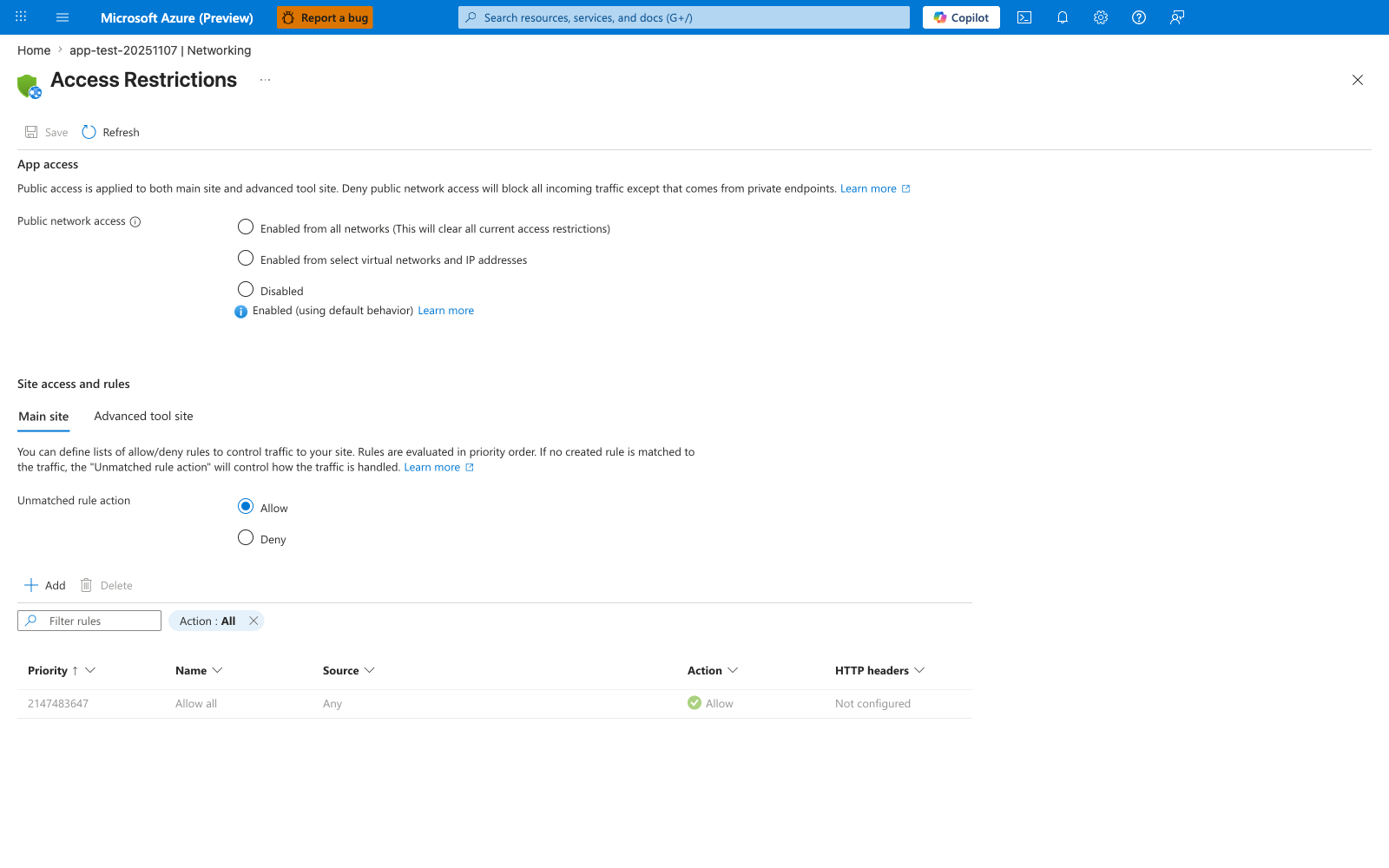
The Access Restrictions blade is where the layered inbound model described above is enforced. The visible default state shows the two most important behaviors this guide warns against assuming away: Public network access is Enabled (using default behavior) meaning the app is publicly reachable, and the implicit Allow all rule at priority 2147483647 with Unmatched rule action: Allow means that without any explicit rules, every source is permitted. The Main site and Advanced tool site tabs separate runtime traffic from SCM/Kudu management traffic — both must be hardened. After running the az webapp config access-restriction add command above with priority 100, the new AllowCorp rule should appear above the default Allow all row, and the Unmatched rule action should be flipped to Deny to convert the implicit allow-by-default posture into an explicit deny-by-default posture.
7) Outbound dependency validation checklist
Before production cutover:
- [ ] App can resolve private dependency FQDNs correctly.
- [ ] App can connect to dependency private endpoints.
- [ ] Connection pooling is enabled and tuned.
- [ ] Dependency timeouts are explicit and bounded.
- [ ] Retry policy prevents connection storms.
- [ ] NAT/SNAT behavior is observed under peak load tests.
8) Troubleshooting patterns to pre-plan
Include these commands in runbooks:
az webapp show \
  --resource-group $RG \
  --name $APP_NAME \
  --query "{defaultHostName:defaultHostName,outboundIpAddresses:outboundIpAddresses}" \
  --output json

az network private-endpoint list \
  --resource-group $RG \
  --output table

az network private-dns record-set a list \
  --resource-group $RG \
  --zone-name privatelink.azurewebsites.net \
  --output table
9) Manage IP address changes proactively
App Service IP addresses are not static. Treating them as fixed causes allowlist drift, broken firewall rules, and silent connectivity failures after scale events.
Outbound IP allowlist strategy
Two CLI fields exist for outbound IPs — use the right one:
| Field | What it represents | When to use |
|---|---|---|
outboundIpAddresses | IPs currently active | Read-only diagnostics |
possibleOutboundIpAddresses | All IPs the app may ever use on this plan | Firewall allowlists — always use this |
Query both to understand current vs. potential exposure:
az webapp show \
    --resource-group "$RG" \
    --name "$APP_NAME" \
    --query "{active:outboundIpAddresses,possible:possibleOutboundIpAddresses}" \
    --output json
Example output (PII masked):
{
  "active": "4.217.128.55,4.217.128.64,4.217.128.65,4.217.128.66,4.217.128.67,4.217.128.80,20.41.120.146,20.196.112.47,20.41.120.193,20.196.112.79,20.41.120.195,20.196.112.159,20.41.66.225",
  "possible": "20.194.32.78,20.194.38.125,20.194.38.174,20.194.38.52,20.194.7.226,20.194.7.69,20.196.112.159,20.196.112.173,20.196.112.182,20.196.112.202,20.196.112.213,20.196.112.228,20.196.112.47,20.196.112.79,20.41.120.146,20.41.120.148,20.41.120.149,20.41.120.151,20.41.120.154,20.41.120.193,20.41.120.195,20.41.120.200,20.41.120.201,20.41.120.202,20.41.66.225,4.217.128.55,4.217.128.64,4.217.128.65,4.217.128.66,4.217.128.67,4.217.128.80"
}
Events that change outbound IPs
- Scaling the App Service Plan up or down (SKU change)
- Moving the app to a different region or scale unit
- Enabling or disabling VNet Integration
- Platform-side infrastructure updates
After any of these events, re-query possibleOutboundIpAddresses and update downstream allowlists before traffic is restored.
Outbound IP behavior under VNet Integration
With route-all enabled (formerly WEBSITE_VNET_ROUTE_ALL=1, now exposed as a platform setting through the portal or CLI), all outbound traffic is routed through the VNet. The source IP remains one of the app's standard outbound IPs unless the integration subnet uses a NAT Gateway or forces traffic through a firewall or NVA, in which case the egress IP becomes that device's IP.
Verify after enabling:
# Confirm VNet integration is active
az webapp vnet-integration list \
    --resource-group "$RG" \
    --name "$APP_NAME" \
    --output table

# Confirm route-all setting
az webapp config appsettings list \
    --resource-group "$RG" \
    --name "$APP_NAME" \
    --query "[?name=='WEBSITE_VNET_ROUTE_ALL']" \
    --output table
Location       Name              ResourceGroup     VnetResourceId
-------------  ----------------  ----------------  -------------------------------------------------
Korea Central  snet-integration  rg-<masked>       .../virtualNetworks/vnet-<masked>/subnets/snet-integration
Update downstream allowlists after enabling VNet Integration
Route-all changes the path of outbound traffic, but not necessarily the observed source IP. Downstream services will continue to see one of the app's standard outbound IPs unless the integration subnet uses a NAT Gateway or routes traffic through a firewall or NVA. Update allowlists to reflect the actual egress design before enabling route-all in production.
Inbound IP and Private Endpoint behavior
Creating a Private Endpoint assigns a private IP from the endpoint subnet. The public inbound endpoint is not automatically disabled. For private-only inbound access, disable public network access on the app or apply access restrictions that enforce the intended exposure model.
Query the current inbound IP:
az webapp show \
    --resource-group "$RG" \
    --name "$APP_NAME" \
    --query "inboundIpAddress" \
    --output tsv
Query the Private Endpoint's assigned private IP:
az network private-endpoint show \
    --resource-group "$RG" \
    --name "pe-$APP_NAME" \
    --query "customDnsConfigs[0].ipAddresses" \
    --output json
Example output:
Validate that DNS resolves to the private IP from within the VNet:
When run from a VM inside the VNet with the private DNS zone configured, the response resolves to the Private Endpoint IP (for example, 192.0.2.4) instead of the public IP. The Private Endpoint IP was confirmed via az network private-endpoint show (koreacentral, 2026-05-01) and sanitized for publication.
Private Endpoint does not automatically block public access
After creating a Private Endpoint, the public endpoint remains reachable until you disable public network access on the app or apply access restrictions that enforce private-only inbound access. Complete the sequence:
- Create the Private Endpoint.
- Verify DNS resolves to the private IP from the target VNet.
- Disable public network access on the app or add access restrictions that block unintended public inbound traffic.
- Validate from public internet that access is denied according to the control you applied.
Common networking anti-patterns
- Enabling VNet Integration but forgetting DNS design.
- Creating private endpoints without private DNS zone links.
- Assuming private endpoint also controls outbound traffic.
- Treating intermittent timeouts as dependency faults without SNAT analysis.
- Using Hybrid Connections as a permanent architecture without review.
Advanced Topics
- Use Azure Front Door or Application Gateway with WAF for edge security plus private origin reachability.
- Add synthetic connectivity probes from inside trusted networks.
- Build dependency maps with expected DNS resolution source and fallback behavior.
- Track connection reuse metrics and tune pooling values with load tests.