mTLS Best Practices
Use mutual TLS on Azure App Service as a deliberate trust-boundary control, not as a single feature toggle. Inbound client certificate authentication, outbound certificate presentation, and certificate lifecycle management each need separate validation, ownership, and rollback plans.
Why This Matters
mTLS helps App Service workloads answer two different questions:
- Who is calling my app?
- What certificate does my app present when it calls something else?
flowchart TD
    Caller[Client with certificate] --> Edge[App Service front end]
    Edge --> Header[X-ARR-ClientCert]
    Header --> App[App code validates chain and policy]
    App --> Vault[Certificate source and rotation]
    App --> Downstream[Remote service with outbound mTLS]
If you blur those concerns together, teams often assume the platform validated trust when it only forwarded a certificate, or they assume an uploaded certificate is automatically used for outbound calls when the application never loaded it.
Recommended Practices
Terminate inbound client certificates at the platform
Use App Service client certificate handling instead of trying to terminate inbound TLS inside framework code.
Why:
- App Service already terminates TLS at the front end.
- Your app receives a stable
X-ARR-ClientCertheader contract. - Operational controls stay in site configuration rather than custom reverse-proxy code.
Portal view: Incoming client certificates configuration
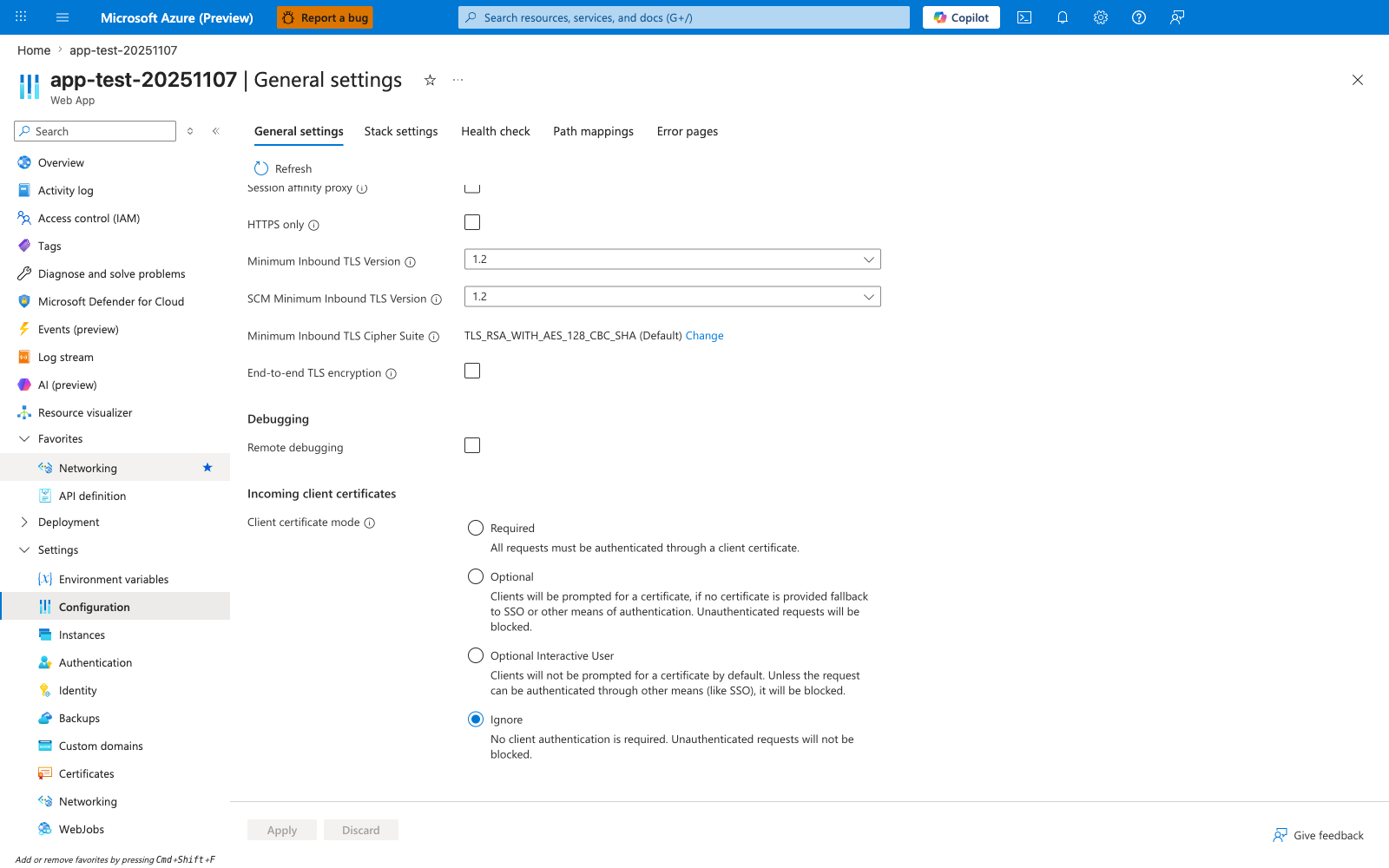
The Incoming client certificates section is the single Portal surface where the platform-side half of mTLS is configured. The visible Ignore default is the App Service factory state and the most dangerous starting point for any app that intends to use client certificate authentication — the platform will simply not request a certificate, so application code that checks X-ARR-ClientCert will never see one. The four Client certificate mode options map directly to the trust models discussed throughout this guide: Required for true mTLS endpoints where every caller must present a certificate, Optional to prompt but fall back to other auth, Optional Interactive User for browser scenarios where prompting would hurt UX, and Ignore only for routes that have no mTLS expectation. Note also that HTTPS only is unchecked in this capture — mTLS without HTTPS only is meaningless, because the platform contract that makes X-ARR-ClientCert trustworthy depends on traffic terminating at the App Service front end over TLS.
Validate the forwarded certificate in app code
Microsoft Learn is explicit: App Service forwards the client certificate but does not validate it.
Validate at least:
- thumbprint or public key pinning policy where appropriate
- issuer or issuing CA
- subject or SAN
- validity window
- chain trust and revocation policy if required by your security model
Keep excluded routes narrow and intentional
Use clientCertExclusionPaths only for routes that truly cannot participate in mTLS, such as:
/health- platform or synthetic probe endpoints
- third-party webhook receivers with no client-certificate support
Document every exclusion with the business reason and compensating control.
Exclusions can introduce protocol-level side effects
Microsoft Learn documents that clientCertExclusionPaths and OptionalInteractiveUser depend on TLS renegotiation. Because TLS 1.3 and HTTP/2 do not support renegotiation, and large request bodies can fail in renegotiated paths, use exclusions only when you understand those transport limits.
Separate inbound and outbound mTLS ownership
Treat these as separate controls:
- Inbound mTLS: caller authentication and route policy
- Outbound mTLS: application credential material, store access, TLS client configuration, and certificate rotation
This separation makes incident response clearer and avoids mixing partner-caller trust issues with downstream service-auth failures.
Store outbound certificate material outside source code
Use App Service certificate-loading patterns and configuration indirection instead of embedding certificate files in the repository.
Recommended direction:
- keep certificate material in managed certificate storage or Key Vault-backed workflows
- use App Service configuration to expose only what the runtime needs
- rotate by reference and thumbprint-driven rollout, not by editing application code
Note
Key Vault references are a strong pattern for configuration indirection in App Service, but confirm your exact certificate-loading workflow for private certificates and outbound mTLS before standardizing rotation steps.
Common Mistakes / Anti-Patterns
Assuming clientCertMode=Required validates the chain
It does not. Required means the front end expects a client certificate. Your application still owns trust validation.
Trusting X-ARR-ClientCert from untrusted paths
Only trust the header when traffic is known to have passed through App Service front ends and HTTPS-only is enforced.
Using Optional mode and assuming authentication happened
Optional allows requests without a client certificate. If your app needs certificate-based auth, enforce presence in code or use Required for that route surface.
Forgetting outbound certificate loading configuration
Uploading a certificate is not enough. The application must be configured to load it and attach it to outbound TLS clients.
Treating /health as a reason to weaken the whole app
Use targeted exclusions instead of downgrading the entire site to Optional just to satisfy health probes.
Validation Checklist
httpsOnlyis enabled for the web app.clientCertEnabledis explicitly configured.clientCertModematches the intended trust model.clientCertExclusionPathscontains only justified routes.- Application code parses
X-ARR-ClientCertand validates the certificate. - Outbound certificate loading is documented separately from inbound auth.
- Rotation and expiration checks exist for outbound certificates.
See Also
- Mutual TLS Architecture
- Incoming Client Certificates
- Outbound Client Certificates
- Security Best Practices