Common Anti-Patterns
This document catalogs high-impact App Service anti-patterns that frequently cause outages, security incidents, cost spikes, and difficult troubleshooting cycles. Use it as a review checklist during design, architecture review, and release readiness gates.
How to Use This Guide
Apply this guide in three moments:
- During architecture and platform design reviews
- Before production go-live
- During post-incident corrective action planning
Anti-patterns are preventable
Most recurring App Service incidents are caused by a small set of known anti-patterns that can be eliminated early.
Anti-Pattern Detection Flow
flowchart TD
    A[Design or operational change proposed] --> B{Touches production workload?}
    B -- No --> C[Apply standard quality checks]
    B -- Yes --> D[Run anti-pattern review checklist]
    D --> E{Any anti-pattern found?}
    E -- No --> F[Proceed with controlled rollout]
    E -- Yes --> G[Map risk severity and blast radius]
    G --> H[Apply recommended alternative pattern]
    H --> I[Retest and validate]
    I --> J{Residual risk acceptable?}
    J -- Yes --> F
    J -- No --> K[Escalate architecture review]
Anti-Pattern Catalog
Use the following table as a policy baseline.
| Category | Pattern | Why It's Bad | What To Do Instead |
|---|---|---|---|
| Configuration | Storing secrets in app settings without Key Vault integration | Secrets become harder to rotate, higher accidental exposure risk, and weak auditability | Use Key Vault references with managed identity and secret rotation runbook |
| Configuration | Ignoring slot sticky settings | Swap can move environment-specific config into production and break dependencies | Mark app settings and connection strings as slot settings where required |
| Configuration | Keeping debug mode enabled in production | Increases attack surface, leaks internals, and adds unnecessary overhead | Use production-safe configuration profile with debug disabled |
| Configuration | Relying on mutable local file writes for state | App restarts, scale-out, or rehydration can lose local state | Externalize state to durable services (Storage, database, cache) |
| Deployment | Using FTP deployment for production | Manual and non-repeatable deployments, weak traceability, and increased human error | Use CI/CD with versioned artifacts and deployment slots |
| Deployment | Deploying directly to production slot | No safe validation stage and higher downtime risk during release | Deploy to staging slot, warm-up, validate, then swap |
| Deployment | Enabling server-side builds inconsistently across releases | Non-deterministic outputs and rollback complexity | Build once in CI, publish immutable artifacts, keep deployment deterministic |
| Deployment | No rollback plan or tested runbook | Recovery is slow and error-prone under pressure | Document and test swap-back and previous-artifact restore procedures |
| Networking | Binding app process to 127.0.0.1 instead of 0.0.0.0 | App container/process may be unreachable from App Service front-end | Bind to 0.0.0.0 and expected platform port |
| Networking | Connection-per-request outbound pattern | Causes excessive socket churn and SNAT exhaustion under load | Use connection pooling, keep-alive, and dependency SDK reuse |
| Networking | Assuming DNS/egress always stable without retry policy | Transient failures become user-facing errors | Add timeout, retry with jitter, and circuit breaker behavior |
| Networking | Not planning VNet integration and outbound dependency paths | Leads to late-stage connectivity failures and hard troubleshooting | Design egress paths early and validate dependency reachability pre-go-live |
| Security | Running production on B1 for critical workloads | Limited scale, weaker isolation characteristics, and insufficient resilience margin | Use production-appropriate Standard/Premium SKU based on SLO and load profile |
| Security | Using broad-scoped service principals without least privilege | Compromise impact is amplified and audit posture weakens | Use managed identities and granular RBAC at minimum required scope |
| Security | Not enforcing HTTPS and secure transport defaults | Increases risk of data exposure and mixed-mode security gaps | Enforce HTTPS-only, modern TLS policy, and secure cookie headers |
| Performance | Single instance in production | Any recycle or failure causes downtime and user-visible errors | Run minimum two instances for high availability |
| Performance | Disabling Always On for production web apps | Cold starts and delayed readiness impact latency and reliability | Enable Always On for continuously serving production apps |
| Performance | Overusing ARR affinity for stateful sessions | Uneven load and hot instances reduce effective scaling | Externalize session state and disable affinity for stateless services |
| Monitoring | Not configuring health checks | Platform cannot reliably remove unhealthy instances from rotation | Configure health check path and verify dependency-aware readiness |
| Monitoring | Not enabling diagnostic logging and App Insights | Limited observability increases mean time to detect and repair | Enable logs, traces, and metric alerts with retention policy |
| Monitoring | Alerting only on CPU and ignoring latency/error rate | Misses user-impact incidents where CPU appears normal | Add SLO-aligned alerts for p95 latency, error rate, and dependency failures |
| Monitoring | No deployment annotation in telemetry | Hard to correlate incidents with release events | Emit deployment markers and release metadata into monitoring system |
High-Risk Anti-Patterns to Eliminate First
If you cannot fix everything immediately, prioritize these first:
- Single instance in production
- No health check configuration
- Secrets outside Key Vault references
- Direct-to-production deployments without slot validation
- Connection-per-request outbound calls causing SNAT pressure
Top-five anti-patterns drive disproportionate incidents
Eliminating these five patterns usually produces the biggest reliability and security gains in the shortest time.
Portal view: Diagnose and solve problems
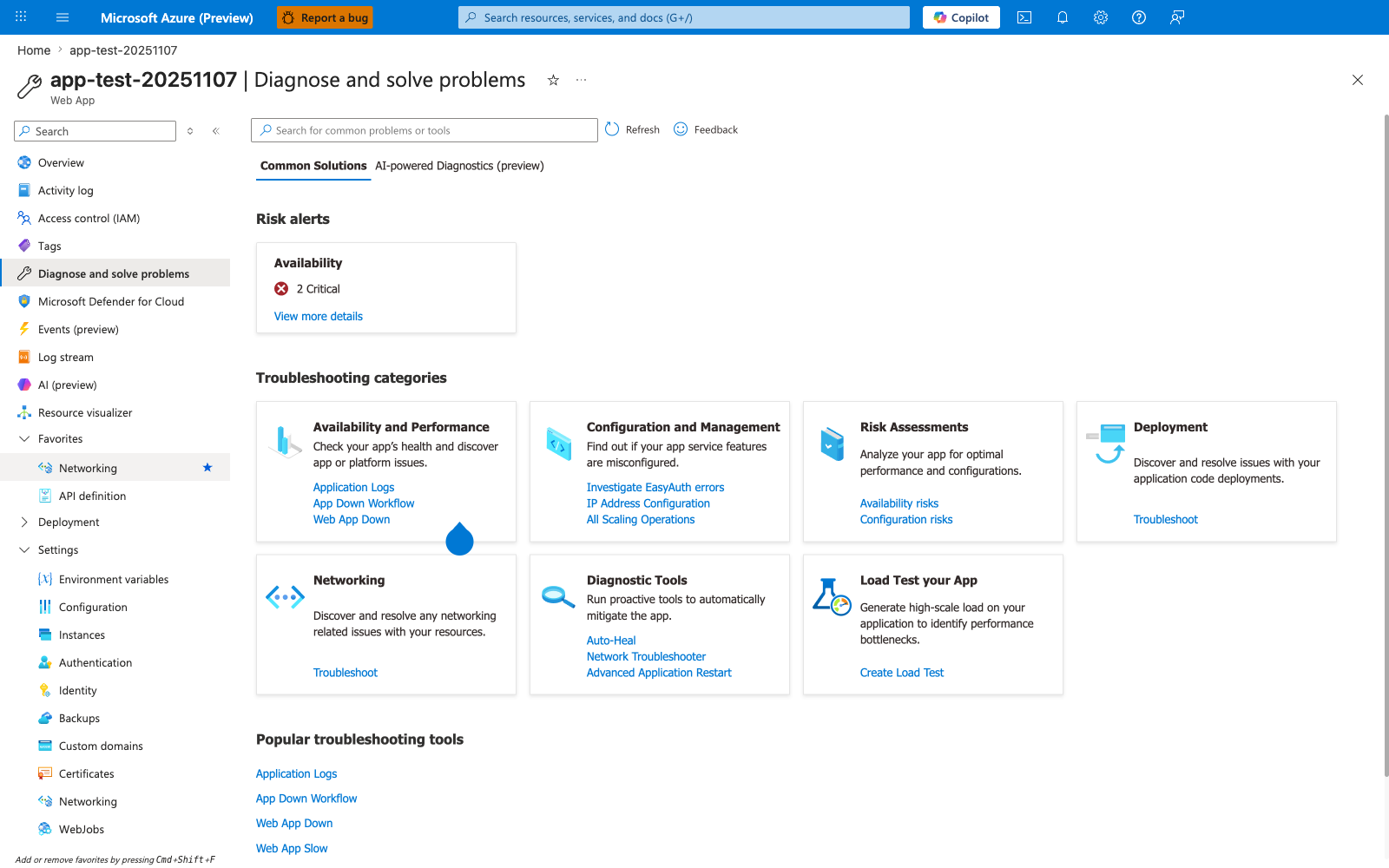
The Diagnose and solve problems blade is the App Service equivalent of an anti-pattern detection gate after the fact — it surfaces the symptoms left behind by the patterns this guide eliminates upfront. The visible Risk alerts: Availability — 2 Critical panel is the platform's own confirmation that this particular app is hitting at least two anti-patterns from the catalog above; clicking through shows which ones (most commonly single-instance HA, missing health check, or SNAT/timeout patterns flagged by the platform). The seven Troubleshooting categories map cleanly onto the anti-pattern table sections — Availability and Performance reveals single-instance and missing-health-check anti-patterns, Configuration and Management surfaces slot-setting and EasyAuth misconfigurations, Networking exposes SNAT and outbound dependency anti-patterns, and Risk Assessments is the closest platform equivalent to a pre-go-live anti-pattern review. Treat any non-zero Risk alerts count as a release blocker, not as ambient noise.
Category Deep Dive
Configuration Anti-Patterns
Common symptoms:
- Unexpected behavior after slot swap
- Environment mismatch between staging and production
- Leaked credentials in logs or scripts
Remediation baseline:
- Configuration inventory with ownership
- Slot setting review in each release checklist
- Secret source policy (Key Vault by default)
Deployment Anti-Patterns
Common symptoms:
- Deployments succeed but app fails after startup
- Rollback takes too long due to missing artifact provenance
- Frequent hotfixes with unclear change history
Remediation baseline:
- Immutable artifact promotion model
- Slot-based validation and controlled swap
- Rollback rehearsal before high-risk changes
Networking Anti-Patterns
Common symptoms:
- Intermittent 5xx under moderate load
- Dependency connection timeouts at scale
- Inconsistent behavior across instances
Remediation baseline:
- Reuse outbound connections
- Add explicit timeout and retry budgets
- Validate network design with load tests
Security Anti-Patterns
Common symptoms:
- Secrets copied into multiple systems
- Over-permissioned identities
- Drift between intended and actual TLS/security config
Remediation baseline:
- Managed identity everywhere possible
- Key Vault reference policy
- Security baseline validation in CI/CD
Performance Anti-Patterns
Common symptoms:
- Tail latency spikes during routine operations
- Scale-out fails to improve user experience
- High variability between instances
Remediation baseline:
- Minimum two instances in production
- Autoscale tied to meaningful metrics
- Session/state design aligned to horizontal scaling
Monitoring Anti-Patterns
Common symptoms:
- Incidents discovered by users first
- Unclear root cause due to missing telemetry
- Slow post-incident analysis
Remediation baseline:
- Health, error, and latency dashboards
- Actionable alert thresholds with ownership
- Deployment and incident timeline correlation
Governance Pattern
Use an anti-pattern review gate in architecture and change workflows:
- Design review checklist must include this document
- Production change approval requires anti-pattern attestation
- Exceptions require documented risk acceptance and expiry date
Operational Review Checklist
Before production release, validate:
- No critical anti-pattern remains unresolved
- All high-risk exceptions have mitigation owners
- Deployment, monitoring, and rollback controls are tested
- Runbooks match current architecture
# Example: verify key settings surface for review
az webapp config appsettings list \
    --resource-group $RG \
    --name $APP_NAME
See Also
- Platform - How App Service Works
- Platform - Networking
- Operations - Security
- Operations - Deployment Slots
- Best Practices - Deployment
- Best Practices - Scaling
- Best Practices - Reliability